The Hostinger hPanel is a custom-made control panel designed to help you manage your web hosting, email, VPS and other Hostinger services with ease. You can access it directly at hpanel.hostinger.com. This comprehensive hPanel guide provides an overview of the main sections and tools available within the interface.
Main hPanel sections
Once logged in, you will find the primary management categories in the left sidebar. You can pin any sidebar item to a Favourites section that appears at the top of the hPanel sidebar for faster access.
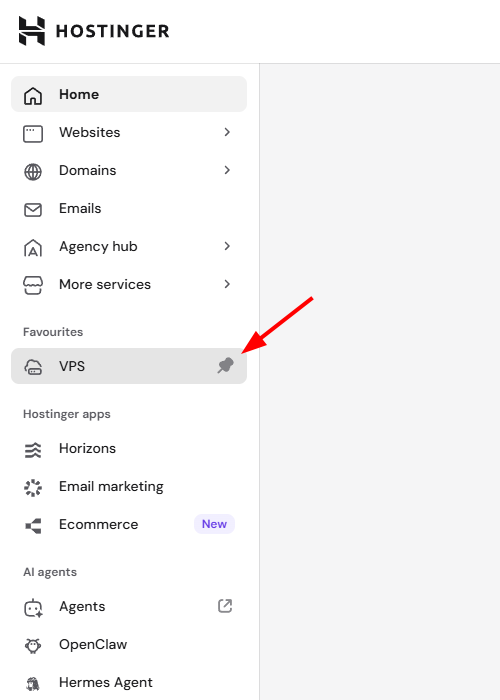
These sections allow you to oversee different aspects of your account:
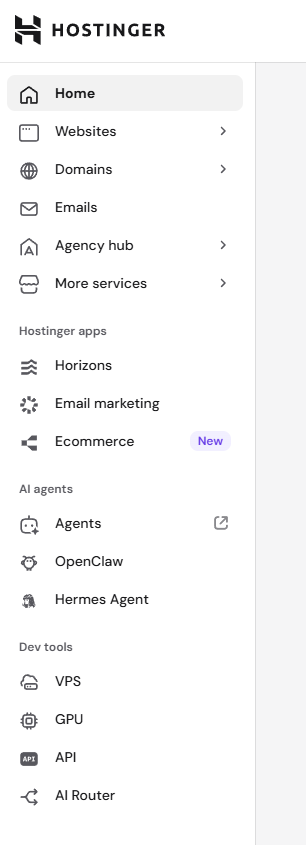
-
Home: This area centralizes your active Hostinger services. It includes the following features:
- Home chat: An AI-powered interface designed to kickstart your journey, acting as a quick-launch entry point. Type an onboarding query or click one of the quick-action pills to get tailored guidance.
- Your to-dos: Relevant actions and reminders for your account.
- Your business: Manage domains associated with your business services. Each domain displays a status indicator indicating if it is active or requires attention (e.g., pointing to Hostinger).
- Websites: Here you can manage all your websites hosted on web, cloud or agency hosting plans; add a new website, or migrate an existing one. Learn more: How to use the websites section in hPanel.
- Domains: Find and manage your domain settings, manage the DNS Zone and purchase new domain names. You can find a detailed guide here: How to use the domains section in hPanel.
- Emails: Access and configure your email services at Hostinger.
- More services (Marketplace): Explore and purchase additional Hostinger services. This section also includes AI and automation tools — click Try now on any AI tool to open the Hostinger AI Agents platform with a relevant skill pre-loaded for the selected task. Previously purchased standalone tool credits have been migrated to Agent credits.
- Hostinger apps
- Horizons: Create and manage web applications using an AI-powered, prompt-based tool.
- Email Marketing: Use Reach to create and manage email marketing campaigns, subscriber lists, and track engagement analytics.
- Ecommerce: Create and manage AI-powered online stores. Manage orders, payments and products in one place.
- AI Agents
- Agents: a standalone AI-powered set of agents to assist you with specialized skills.
- OpenClaw: Access or purchase a Managed OpenClaw hosting instance installed on Managed OpenClaw hosting, manage credits and options.
- Hermes Agent: Access or purchase a Managed Hermes instance installed on Managed Hermes hosting, manage credits and options.
- Dev tools
- VPS: Manage your virtual private servers or purchase additional VPS. More details: How to use the VPS dashboard.
- GPU: Join the waitlist to access dedicated GPU resources on demand.
- Hostinger API: Connect your IDEs to Hostinger MCP.
- AI Router: Gives you access to GPT, Claude, Gemini, Grok, and other AI models through one account. You can view your credit balance and top up credits, manage your API key, and see a usage summary covering total credits used, prompts, total tokens, and total cache for the selected time period, with a further token and cache breakdown available. This is a first step toward greater usage transparency across integrations like OpenClaw, Hermes Agent, and n8n, with more guidance for different integrations, a playground, and a cost table planned for upcoming updates.
hPanel top bar
The top bar and account menu offer additional functionality for account security and navigation:
- Refer & Earn: Join Hostinger referral program and earn rewards for recommending Hostinger to your contacts.
- Ask AI: Get assistance and contact support.
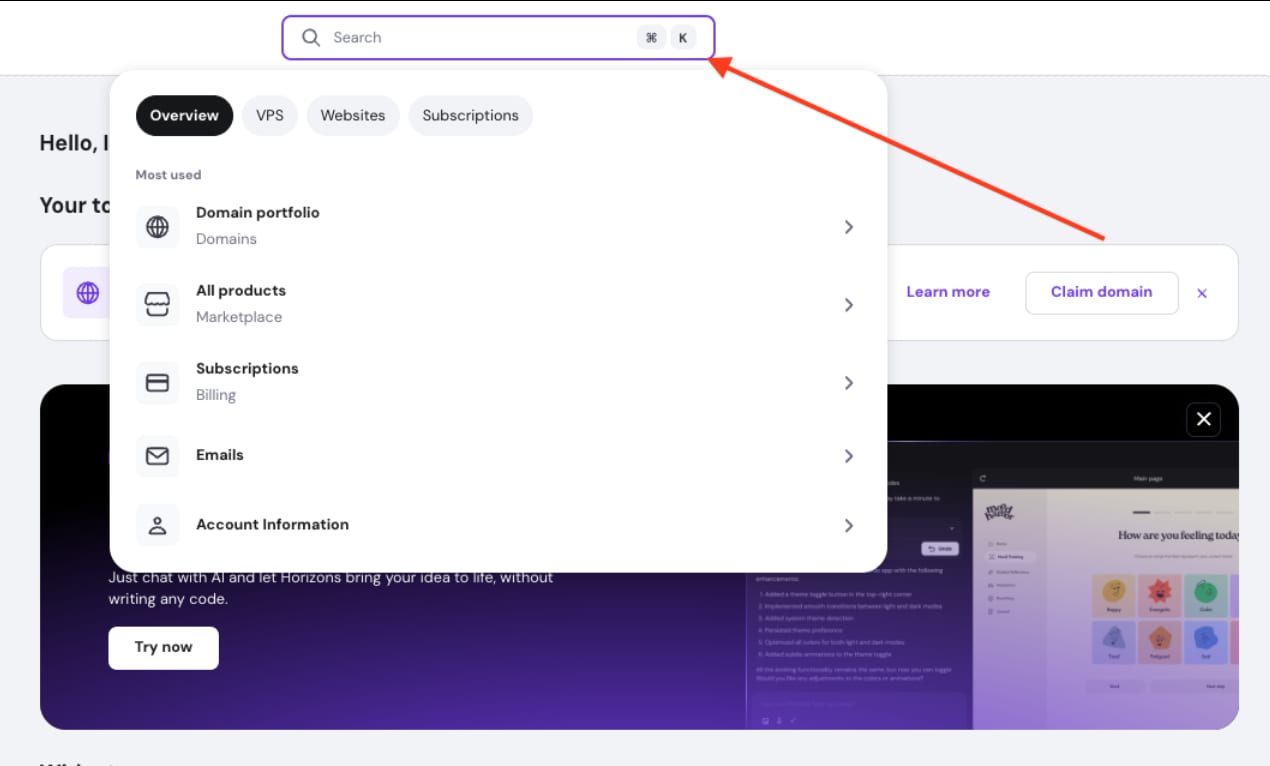
- Quicksearch: Click on the magnifying glass icon in the top bar to open it. This tool finds specific settings or pages within the hPanel instantly.
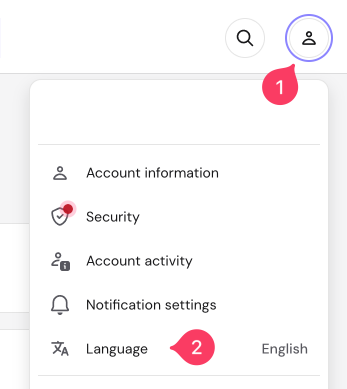
- Account menu: Click on the profile icon to open a menu with the following options:
- Account information: Update your personal information; enable social login, and change your Hostinger account password. You will also find the option to delete your account.
- Account sharing: Share access to your account’s services to collaborators, request shared access, and manage sharing options.
- Billing: Manage your subscriptions, invoices and payment methods. Learn more: How to Use the Billing Section.
- Security: Enable and manage two-factor authentication (2FA) for better protection.
- Account activity: Review the login history to your account.
- Notification settings: Choose how you want to receive updates about your account, payments, and services.
- Learning Lab: Access free how-to guides on topics such as SEO, email marketing, and building an online store. A tooltip introduces this resource on your first visit.
- Language: Change the display language of hPanel.
- Log out of your account.
The Hostinger hPanel serves as a centralized hub for all your Hostinger services. By using the sidebar and search tools, you can navigate between domain management and website configuration efficiently.