Referral programs provide an opportunity to earn money through recommendations. Our referral program is an easy way to earn money by sharing what you love about Hostinger with your friends and network! You will get a commission for each new successful sign-up, and your referral will get a discount off their purchase.
Joining the program
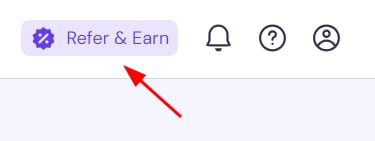
Access the Referral section on hPanel by clicking on the Refer and Earn button:
In the welcome screen, click Join now — you can start referring right away!
If there are no active referrals within 6 months, your referral account will be paused. No worries though – you can rejoin anytime.
In the Referral Program page, you will find two sections:
-
Refer & Earn
-
My earnings
You can switch between them by clicking on the toggle at the top of the page:

Referring to friends
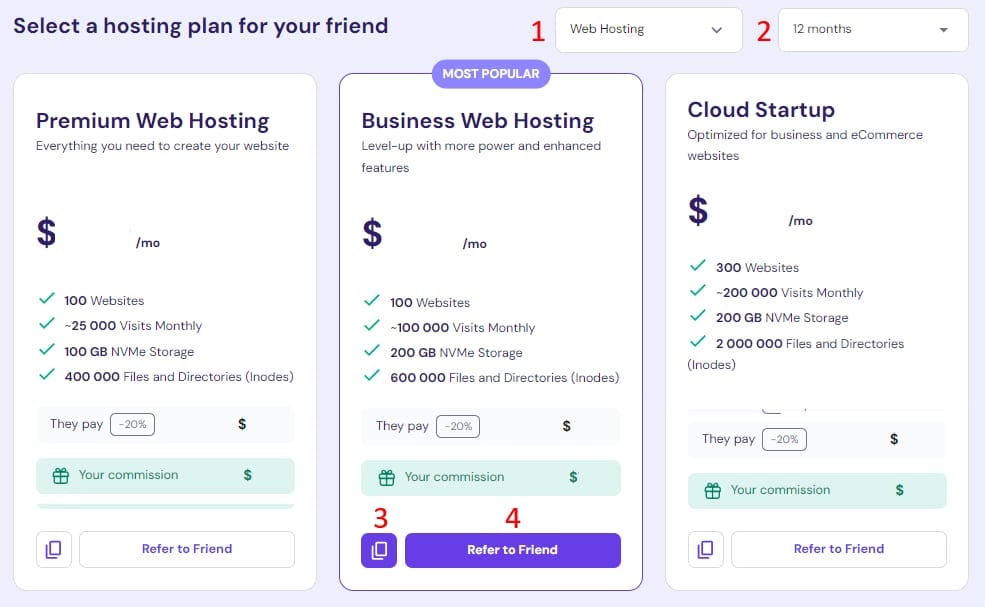
On the Refer & Earn section, you’ll have the option to pre-select a hosting plan to share with your friends:
-
Select the service: web, cloud, Hostinger Website Builder, VPS hosting, or professional email plan.
-
Select the duration — 1, 12, 24 or 48 months.
-
Use the copy referral link button to get your link and easily share it on social media.
-
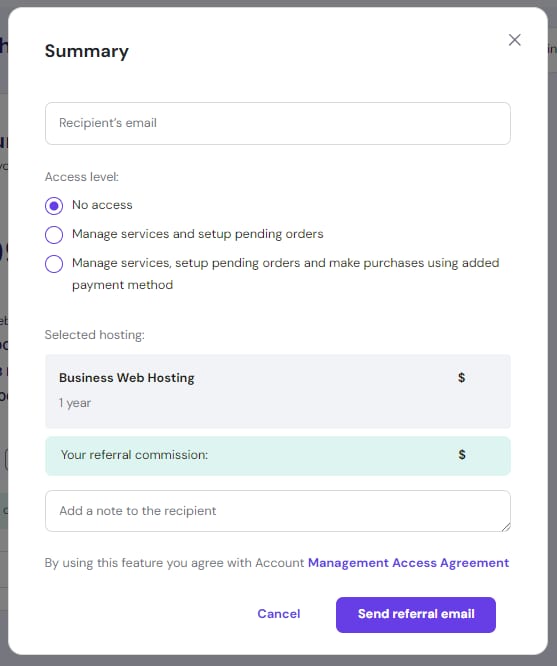
To share by email, click on the Refer to Friend button. When referring via email, you will have the following options:
-
Enter your friend’s email.
-
Select the access level you want them to grant to you – no access, manage services, manage services and make purchases.
-
Add a note to your friend.
When all is good to go, click on Send referral email.
To let your friend choose their own hosting plan, scroll down to the Share your referral link section, where you’ll find your referral link and a handy copy button:
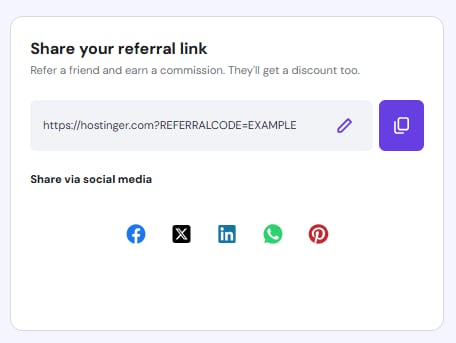
You can also share your link via your personal social media by clicking on the respective icon.
To customize the referral code, click on the pencil icon, enter the new referral code and click on Save changes.
After changing your referral code, the previous one will stop working.
Managing your earnings
Go to My earnings to reach the management options.
Adding a payout method
Before receiving your earnings, ensure you’ve added a payout method. The available options are PayPal, Wire Transfer and Hostinger Balance. To set up your payout method, go to the Commission Payout section, select your preferred option, and enter the required payment details:
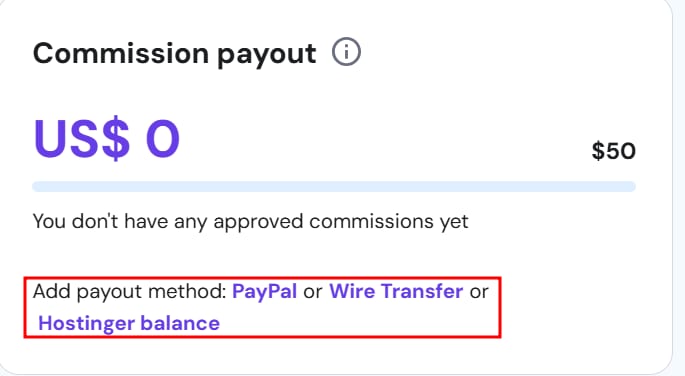
When choosing a payout method, consider the following:
-
PayPal is the recommended option. The minimum payout is $50 USD (or the equivalent in your local currency), and it’s a fast, flexible choice.
-
If you ever need to change the PayPal account linked to your earnings, refer to this guide: How to update your PayPal for the Referral Program.
-
-
If PayPal is unavailable to you, opt for a wire transfer. Keep in mind that the minimum payout is $200 USD, and additional fees or exchange rate differences may apply depending on your bank’s policies, which can reduce the final amount you receive.
-
Hostinger Balance is another payout method that allows you to receive your referral rewards directly as account credit. It has a lower minimum payout threshold of $30, and once the threshold is reached, the payout is processed instantly. You can then use the credited balance to purchase Hostinger services.
Eligible commissions from the Referral Program are automatically sent to the selected payout method.
Referral data
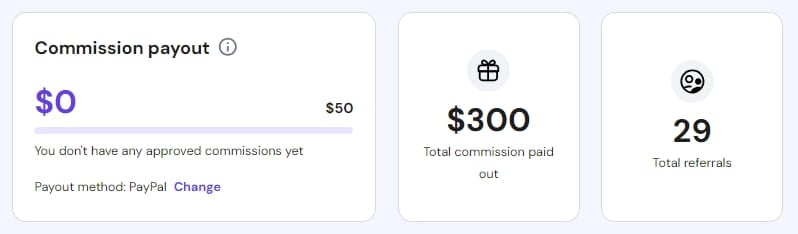
On this page, you will find information about:
-
Commission payout — The accumulated amount that will be paid once the eligibility conditions are met.
-
Total commission paid out — The total earnings you’ve received through the Referral Program.
-
Total referrals — The total number of referrals you’ve sent.
Referrals and payouts
Below the referral data section, you’ll find the Referrals and Payout lists.
The Referrals list shows the email to which an invite was sent, the status of the referral, the date of purchase, and the amount of commission awarded:
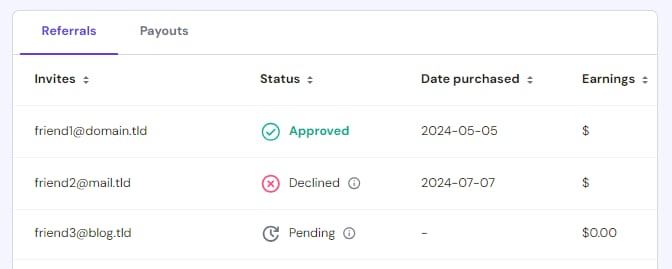
The possible statuses are:
-
Pending — The referral has been sent, but no purchase has been made yet.
-
Qualified — The purchase was made and is pending to be awarded.
-
Declined — The purchase did not meet the elegibility criteria for a commission.
-
Approved — The commission has been credited.
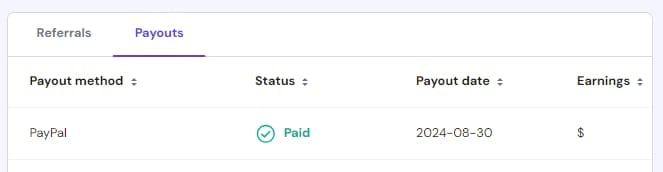
Click on the Payouts tab to display a list of paid commissions, including the following details:
-
Payout method — Method to which the commission was sent.
-
Status — Awarded commissions will appear as Paid.
-
Payout date — The date when the commission was granted.
-
Earnings — The amount of the commission.
Due to transaction processing times, it may take a few additional days for eligible earnings to be applied to your payout method after the 45-day period has passed.
Eligibility criteria
When your contacts use your referral link and meet the eligibility criteria, you will accumulate earnings. An eligible purchase must meet the following conditions:
-
First-time customer — The person you refer must create an account with the company using your referral link. Already registered users, even if they have not made prior purchases, do not count as new customers.
-
New service — Purchases made through your referral link must be for a new service:
- Eligible for 1-month or longer subscriptions: Cloud Hosting, Agency Hosting, VPS Hosting, Business Email, Email Marketing (Reach), Hostinger Horizons, AI Agents
- Eligible only for 12-month or longer subscriptions: Shared Hosting, Website Builder Plans.
A reward is earned when a referred person purchases their first product in a specific category, regardless of other products they may have purchased.
-
Active customer — The referred customer must remain active for 45 days and not request a refund.
Restrictions
-
Referrals are intended for personal use only, meaning you can refer people in your network: friends, family, colleagues, or clients.
-
You should only share referral links on your personal social media or via email with your known contacts. You should not publish them on commercial websites, blogs, or YouTube channels, or use them in email marketing or paid advertising.
It’s important to note that failing to comply with these restrictions could result in the permanent deactivation of your referral account.
For more information about terms and conditions, consult the Referral Program Agreement.
What is the difference between the Referral and Affiliate programs?
Our Affiliate Program is a great way to earn commissions if you already have an audience — for example, if you have a sizeable amount of followers on Instagram, TikTok, YouTube, or any other social media.
On the other hand, if you want to invite some of your friends to use Hostinger services, this Referral Program is perfect for you. You can earn some cash, and your friends can get a complimentary discount at the checkout!
If you are a web developer or have a company that provides online services, you can manage Hostinger products for your clients.