How to Point a Domain Name to Hostinger Using Hostinger Nameservers or A Record
Feb 10, 2025
/
Domantas G. & Ignas R.
/
6 min Read

This guide will present you with two methods to point your domain to Hostinger. The first option involves using Hostinger nameservers, while the second method utilizes A records. By following these steps, you can seamlessly integrate your domain with Hostinger’s hosting services, ensuring a smooth online experience for your website visitors.
Important! Before we start, take into account that DNS changes can take up to 24 hours to fully propagate worldwide.

What Does Domain Pointing Mean?
When you point to a domain, you connect your domain name to the correct server that stores your website’s data. This way, you can connect with different service providers and have the optimal setup for your website.
How to Point Your Domain to Hostinger – Video Tutorial
In this Hostinger Academy video, you will learn how to point a domain name to a new host from any domain registrar.


How to Point a Domain Name to Hostinger Nameservers
You can easily find Hostinger’s nameservers on hPanel. They are as follows:
ns1.dns-parking.com
ns2.dns-parking.com
Pro Tip
For DNS to resolve correctly, make sure that the domain is added to a hosting plan first before pointing it anywhere else. This will ensure that the domain will have an active DNS zone.
You should use these nameservers to point your domain to Hostinger. There are two ways to do so:
- Changing the nameservers to your domain name registrar. This method is recommended since your DNS zone will be automatically configured to match the hosting’s IP address. Plus, it allows you to transfer the control of your domain settings to Hostinger’s hPanel, making management convenient.
- Pointing the domain name via an A record. This method requires you to change the IP address connected to the DNS records. That way, your domain control stays in the registrar. This procedure is only recommended if you’re sure the IP address will be static. Remember that with this method, you must create and check a new A record each time you make a subdomain.
Important! This guide shows how to point to a domain name if it’s NOT registered with Hostinger. For a general tutorial on pointing a domain name to another provider, check out our tutorial on How to Change Domain Nameservers.
Changing Domain Nameservers (Recommended Method)
The process of changing nameservers on various registrars is quite similar. Here’s what you need to do to point your domain name to Hostinger:
- Find Hostinger’s nameservers by accessing the hPanel. You can do this by opening hPanel’s DNS Zone Editor and entering “ns” into the search bar. We use two nameservers to ensure stability and maximum connectivity. So, if one nameserver fails, the other will resolve the requests.
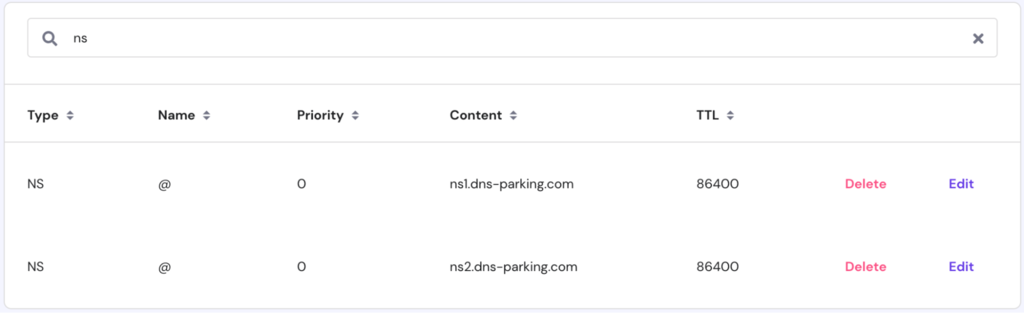
- All nameservers correspond to an IP address, which you can locate by opening the Details section on hPanel. While in most cases you only need the names, some registrars may require the IP as well:
ns1.dns-parking.com (162.159.24.201)
ns2.dns-parking.com (162.159.25.42)
- Log in to your domain registrar’s control panel. If you need to remember the name of the registrar’s company, use WHOIS lookup.
- Search for your domain registrar’s own DNS Zone Editor. However, depending on the registrar, it can be named differently. Common names include “DNS Editor,” “Manage DNS Settings,” “Change Nameservers,” or DNS Details.
- Delete all values (if any) from the nameserver fields and replace them with Hostinger’s nameservers. Save your changes.
- It might take up to 24 hours for DNS to fully propagate worldwide. However, another option is to edit the nameservers via the dedicated nameservers section.
Important! It’s NOT recommended to edit the NS records directly in the DNS zone. We highly suggest making changes in a dedicated NS section instead. However, if the registrar doesn’t have such a section, proceed with the changes.
Pointing a Domain Name via A Record
Alternatively, if you want to keep on managing the DNS zone via the original registrar, you can opt for the A record option.
Step 1: Changing A Records
A Record maps a domain name to its appropriate IP address. Therefore, you can modify these records by replacing the old IP address with Hostinger’s nameservers to point your domain name correctly.
In most cases, you must create two A records for your domain name – one with the www subdomain and one without.
For instance, if you have a domain named domain.tld and want to point it to 185.185.185.185 as its IP address, you need to create A Record entries that look similar to the image below.
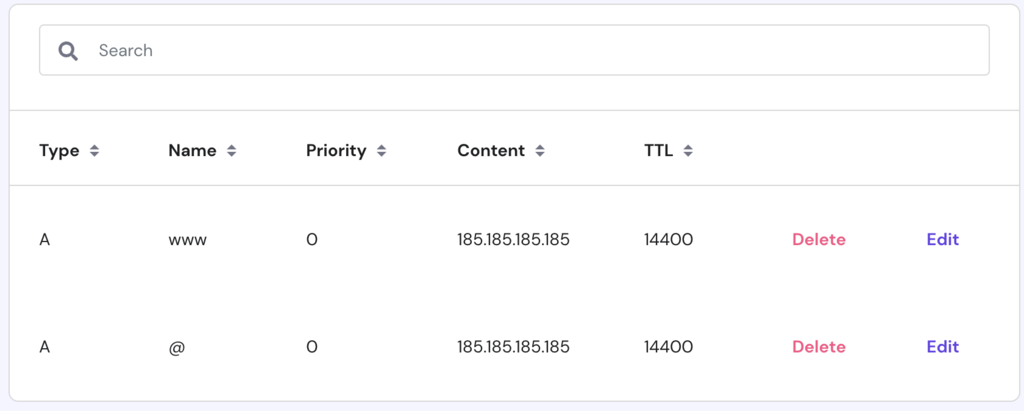
Important! It’s also possible that your www subdomain is pointed to the CNAME (an alias) record. In that case, you only have to change the A record for your root domain name.
Don’t worry if you see a slightly different view at your registrar. Just fill in the values that look similar to the ones shown above. Here’s what each field refers to:
- Name/Host – the domain or the subdomain you want to point to. Some registrars use the “@” symbol instead of a name to represent the root domain.
- TTL – is short for time-to-live. It determines how long the server caches DNS-related information before refreshing it. The default value is usually 14,400 seconds.
- Type – the record type.
- Record/Address – the target IPv4 address.
Step 2: Changing MX Record for Email (Optional)
Important!Changing MX records is OPTIONAL. This step is only required if you also want to use Hostinger’s email services.
To use a different email service, update the MX records on your DNS zone at Hostinger with your email provider’s information. Make sure to do this after the nameserver change has fully propagated.
The MX record specifies mail servers that handle incoming emails. To use Hostinger servers to receive emails sent to your domain, you need to change your domain’s MX records.
At Hostinger, the MX records can also be found in the DNS Zone Editor.
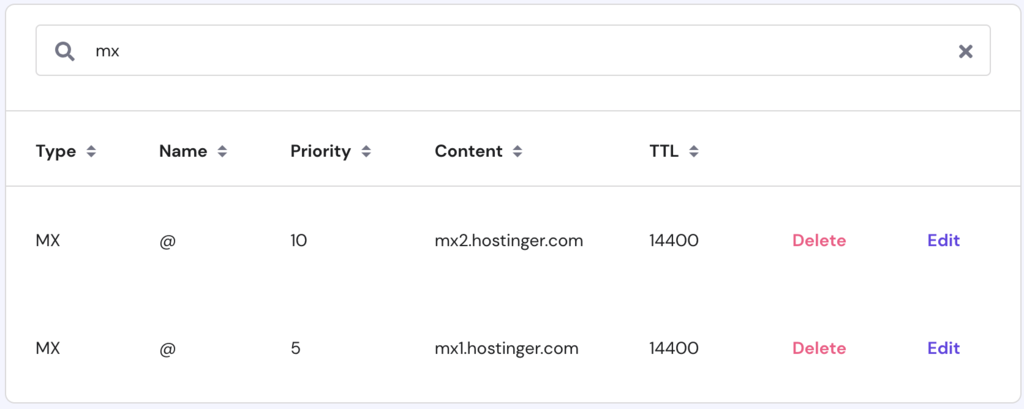
Take note of the mail server’s address. Then, open your domain’s MX record and replace the old mail server:
- Name – “@” symbol should be used as your domain name.
- Priority – if you have more than one server, this field determines the priority of each server. The lowest number represents the highest priority. We recommend sticking with “5” or “10” priority.
- Type – you should select MX as your record type here.
- Address/Points to – destination/address of the server responsible for receiving emails. Hostinger’s default MX records are:
mx1.hostinger.com
mx2.hostinger.com
Pro Tip
Hostinger offers free email and a 30-day money-back guarantee for all hosting plans. Take advantage of the latter to find the best hosting type that best fits your needs.
Step 3: Changing AAAA Record (Optional)
Unlike an A record, which maps the IPv4 of your hosting server to a domain, an AAAA record maps the IPv6 address.
If you are an advanced user and want to point your domain via AAAA and A records, proceed with the instructions below. However, remember that your hosting will work without any issues, even with an A record only.
At Hostinger, AAAA records can be found in the DNS Zone Editor.
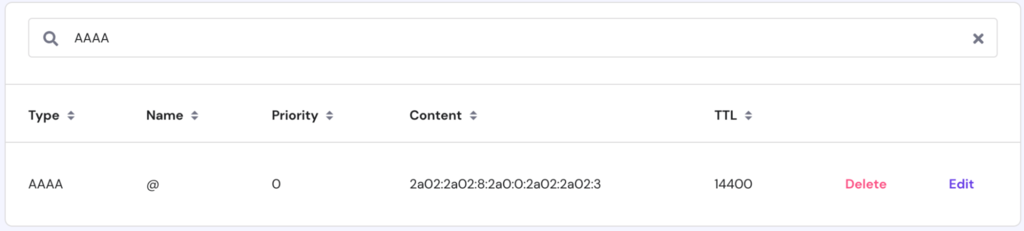
Fill in the values that look similar to the ones shown above. Each field stands for:
- Name/Host – the domain or the subdomain you want to point to. Depending on the registrar, you can use the “@” symbol or the root domain name.
- TTL – is short for time-to-live, and it determines how long the server caches DNS-related information before refreshing it. The default value is usually 14,400 seconds.
- Type – record type, choose AAAA.
- Record/Address – target IPv6 address.

Conclusion
Connecting and pointing your domain to the correct nameservers is the key aspect of getting your website up and running. We discussed the procedures for pointing your domain to Hostinger using both nameservers and A records.
We highly recommend the nameservers method, as it streamlines the process by eliminating the need to set up emails, subdomains, and confirmation records individually. However, the A records method can give you more control over the nameservers settings for a more advanced configuration.
We hope that you found this tutorial helpful. In case you have any questions, leave them in the comments section below.
How to Point a Domain – FAQ
Here are a few of the most frequently asked questions on how to point a domain.
Why Is My Domain Not Pointing to Hostinger?
The activation process may take a few hours to complete, especially if you have just bought your domain. If you recently pointed your domain to Hostinger, the changes may take up to 24 hours to propagate. You can monitor the propagation status by location right there in your hPanel.
There may also be a problem with the domain verification process in general. Propagation can be checked live via tools like the DNS Checker.
How Do I Point My GoDaddy Site to Hostinger?
To point your GoDaddy Site to Hostinger, log in to your GoDaddy account and access the DNS management page of your domain. Take note of the NS records and update these records in your domain’s DNS zone. You might also consider transferring your GoDaddy domain to Hostinger completely.
How Do I Check My DNS Pointing?
Simply log in to your hosting account, select the domain, and view the current NS and A records. You can also check the propagation using the DNS Checker tool.
All of the tutorial content on this website is subject to Hostinger's rigorous editorial standards and values.

Domantas leads the content and SEO teams forward with fresh ideas and out of the box approaches. Armed with extensive SEO and marketing knowledge, he aims to spread the word of Hostinger to every corner of the world. During his free time, Domantas likes to hone his web development skills and travel to exotic places.

Ignas takes great satisfaction in helping people tackle even the most complex technical issues. His current goal is to write easy-to-follow articles so that these issues will not happen at all. During his free time, Ignas likes to play video games and fix up things around his house.

Comments
April 30 2019
Hi, your explanation is very detailed, relevant and easy to understand. I made the right decision to host my website with Hostinger. Thank you. Have a great day, every day.
January 29 2020
We are happy you host your website with Hostinger too :) Have a great day.
July 11 2019
This post was super helpful! Thanks!
November 11 2019
Thanks for the post. Just got clarified after facing some issues with setting up domain on Name cheap to work here. Its all find now.
February 23 2020
hello,I need urgent advice. I have the domain name and hosting with Godaddy. That will get expire very soon. I want to transfer to here in hostinger.how to do it.
March 12 2020
Hi Shilpa, Follow this to help you :)
April 30 2020
which is the nameserver that i am supposed to put after I delete the previous ones. please help I am not getting any reply from your help centers and my website is closed for more than week.
May 04 2020
Hey, in order to point a domain to Hostinger you need to add these nameservers: ns1.dns-parking.com ns2.dns-parking.com Let me know if it worked!
May 02 2020
i have a hostinger domain but i want to transfer my domain on infinity web hosting ffor web hosting so, how i can do that
May 04 2020
Hey, in order to point your domain to another host follow this tutorial
May 05 2020
my website is pendig
May 05 2020
Hey, DNS changes can take up to 24 hours to fully propagate worldwide.
July 05 2020
When I took up hosting, I got a free domain. but this time I was not able to setup this domain.
July 07 2020
Hey, Faiz! You can message our support team for this. I am sure they can help you out with it :)
July 06 2020
Is there the next step tutorial after we change the DNS in another site? Right now i am done changing the nameserver, what happened after? How do we point this so we can start installing the WordPress in the hostinger with the new pointed domain?
July 07 2020
Hey there minimosoul! :) After you point the domain to our nameservers, give it up to 24 hours for the DNS propagation to be complete. Then you can follow this guide here to install WordPress and start building.
July 11 2020
I changed the settings as it indicates on the tutorial( with the name servers) , am I supposed to see my domain anywhere in the hpanel?
July 14 2020
Hey Paola! :) If you haven't added your domain to the plan you will need to first add the domain to your plan. Once you do that - you will be able to see it in the panel itself, and within 24 hours of the nameservers being changed like in the tutorial, you will be able to see the content you've uploaded under that domain name in the panel! :)
July 14 2020
Hey there Ahmad! :) You can just go to the parking menu again, and you will see a list of parked domains. You can just click "Delete" :)
July 22 2020
Thanks for the explanation! I bought the domain from another service provider. On GD domain, I've got these Nameservers: ns71.domaincontrol.com ns72.domaincontrol.com On Hostinger, I've these two: ns2.dns-parking.com ns2.dns-parking.com Which set am I supposed to change to which to get more compatibility ? Thanks in advance
September 06 2020
Hey there! A bit late, but maybe it will be useful for the rest of our customers too! :) When you own a domain - the nameservers can only be set where the domain is owned. The DNS zone will be controlled where the nameservers are pointing. So for example in your case, the DNS zone is controlled in GD as the domain was pointing there at the time. The moment you point it to us, to our nameservers - the DNS zone will be controlled by us, via your plan :)
July 30 2020
I bought a second domain from your site. But I want to add 2nd domain in one hosting account...how to add it? I tried to change the nameservers but it says nameservers can't be same...
September 06 2020
Hey there Nitin! :) You can add the domain to your plan following this short guide!
August 01 2020
Hi, how to point domain name to nameserver as i am getting pop out regarding this and even i updated name servers in domain then also it shows the red poup so please help me out.
November 06 2020
Hey there Kalpesh! I can't see what the red pop-up says for you, but you are referring to a pop-up that appears on domains owned at Hostinger. This guide is about pointing domains owned elsewhere to Hostinger. The domains owned in Hostinger are automatically pointing to us, so trying to change the nameservers to the ones listed here may result in a red pop-up telling you you are already using those nameservers.
August 09 2020
hi I have purchased the domain name and hosting with hostinger but it is showing that not pointing to our name server please help
November 06 2020
Hey there! :) If your hosting and domain name are new, the hosting may not yet be reading the nameservers from the domain. Give it up to 24 hours and all should work fine. All you have to do is setup both products, and add the domain to your hosting plan. Hope this helps!
August 12 2020
Hello, I have had my domain hosted by Hostinger for the past year using the old nameservers (ns1.hostinger.com, ns2.hostinger.com, ns3.hostinger.com and ns4.hostinger.com). Everything was working until I changed to the new nameservers (ns1.dns-parking.com and ns2.dns-parking.com). Should I change the DNS settings back to the old nameservers?
November 06 2020
Hey there! Thanks for messaging us. Once you set the new nameservers, make sure to give it up to 24 hours before your domain properly connects to our services. Keep in mind that you also need to delete the old ones and only keep the new ones :)
August 14 2020
Hi there, just bought a domain and was wondering if you do have a feature to point a certain subdomain to a certain port like GoDaddy does? Any guide on that?
November 06 2020
Hey Donatas. Yes we do have a guide for that feature. You can check it out here!
August 15 2020
Created a new Website with the same Hosting plan. How to point the new Domain name to the server of Hostinger
August 23 2020
how to point the domain provided by the hostinger to the hostinger's hosting
November 06 2020
Hey there! :) You don't need to point a domain purchased and hosted in Hostinger. Just add it to your plan and within few hours it will work :)
September 01 2020
I need help on my vps, How do I get whm on hostinger seems.
November 11 2020
Hey there Bonny. You can select one of the following OS/Control Panel combination that you can find here. One of the option is cPanel with WHM, which you can select in your dashboard under the "SERVER" tab. Just chose the correct OS from the drop down menu and click Save. Keep in mind if you already have another OS, changing OS will delete the files on your VPS.
September 04 2020
please am new here, how can i host a link from my website?
November 11 2020
Hey Debright! Welcome to Hostinger. If you've already pointed your domain name you can go to our AutoInstaller and chose a website building platform of your choice! The most popular one is WordPress. You can see how to do that here.
September 05 2020
Hello, I have my domains in Godaddy and hosting with Hostinger. So to use this hosting I need my nameservers to be pointed to hostinger. But now I have to use free Cloudflare SSL which also requires my nameservers to be pointed towards them. I am stuck as I can only do either of them. How to use Hostinger hosting and Cloudflare at the same time then?
November 06 2020
Hey there Sagar! :) You can point your nameservers to CloudFlare and then within the CloudFlare's DNS zone, just set your A Record to be the same as the IP of your hosting server here! :)
September 06 2020
I'm newly member,how can i start to build website step by step procedure? How can i start?
November 11 2020
Hey Johnny! Welcome to Hostinger. If you’ve already pointed your domain name you can go to our AutoInstaller and chose a website building platform of your choice! The most popular one is WordPress. You can see how to do that here.
October 10 2020
Hi, I have requested a transfer on my domain from Wix to Hostinger, but I haven't pointed my domain (while it was at Wix) to Hostinger Name Servers. The Domains Panel at Hostinger says "Transferring", it has been 3 days. Will it be a problem after the process is completed?
November 18 2020
Hey there Adityaa. After a transfer is done, the nameservers are automatically set to Hostinger's nameservers, so you won't have any issue.
October 10 2020
Hi. i think am a bit dump, i just put up a domain and hosting with you{Hostinger}, Do i need any DNS change or something?
February 02 2021
Hi! There are no dumb questions - it's great that you're learning! Generally, if you have both - domain name and hosting plan on the same account, they should be connected automatically. However, it's always best to double-check that your nameservers are set to ns1.dns-parking.com; ns2.dns-parking.com and the A record from your DNS zone matches the IP of your hosting plan.
October 19 2020
I used the changed the nameserver on godaddy to the hostinger name servers. Now I want to add some additional A records for a subdomain. How can I achieve this?
February 02 2021
Hi, Vishnu! If your nameservers are already pointed well to us, you can proceed to edit your DNS zone from our side ;) Here's an article showing how to do that!
October 27 2020
How to point a domain from Wix to Hostinger? We cannot change (Nameservers) on Wix
February 02 2021
Hi there! In that case, I'd suggest second method - Pointing a Domain Name via A Record ;)
October 31 2020
Can you provide the specifics to set up when Cloudflare in being used both as the registra and CDN please.
February 02 2021
Hi there! If you're using Cloudflare as registrar, that means your domain name is originally registered with them and managed from their side. In that case, to point to Hostinger, you'll need to either point via nameservers or A record, as per article above. If you're using it as CDN, you'd be redirecting your nameservers there to improve your website's speed online and hide your IP. For more information on how to set it up, check out here!
November 29 2020
Hey, I edited the A record on Wix (Wix doesn't allow changing NS), and the changes are reflected on whatsmydns.net. But on Hostinger it still says that the Domain servers are not pointing here. It has been over 24 hours. Thanks, Ashay
February 09 2021
Hi, Ashay! If your propagation is stuck after 24 hours, I'd suggest to try flushing the domain's DNS here. If this won't help, don't hesitate to contact our Customer Success team ;)
November 30 2020
Good
April 08 2021
Thank you for this article! It's immensely helpful. I've decided to give option 1 a try and modified my settings from Porkbun already. May I just clarify, once the settings get updated (I understand it can take up to 24 hours), I should be able to see the domains I purchased from Porkbun in my domains list in Hostinger, right? If it doesn't automatically do that, may I ask how I could make that work? Thanks!
May 13 2021
Hi Rebekah, Yes! That should work! If it doesn't you can contact Customer Success and they can help, if any issues come up :)
June 21 2021
I bought the custom domain, It's been 7 hours after purchase I fail to access it now while registering over 365 to get an error as an invalid entry for DNS shared by hostinger.
September 14 2021
Hi Thoufeeque, if you've encountered any issues with your domain registration, please make sure to contact our Customer Success team - they'll be happy to assist you!
July 04 2021
How do i point multiple domains to a single shared files using DNS
September 16 2021
Hi there :) It seems that you're looking to park a domain name (that way it will show the content of your other domain name), here's how to do that.
August 24 2021
when i go to 'Add Website' in my hostinger hosting and enter my domain name and password, it is showing 'Domain is already hosted'. How to solve this issue. Please reply
September 20 2021
Hello, this means that the domain name you're trying to add is likely already added to another plan on Hostinger. Please check with our Customer Success team to look into your case and guide you with further steps :)
August 27 2021
This does not work ! the name servers look spammy, ns1.dns-parking.com , i am not parking my domain for your ads. I have purchased your hosting and it just does not connect. Where to get my server IP in hostinger I can add an A record.
September 20 2021
Hello, ns1.dns-parking.com and ns2.dns-parking.com are Hostinger default nameservers, they are not used for ads, but to connect your domain name with a hosting plan on Hostinger. You can point via A record (you'll find your server IP following this guide). That said, if you're having any trouble connecting your domain to your hosting plan, don't hesitate to contact our Customer Success team for further help!
September 23 2021
All this pointing and changing 'name savers' is WAY too complicated for someone like me. If Go Daddy has a control panel for this, I do not know where it is on their website
September 24 2021
Hi Tim, we actually have a guide on how to point specifically from GoDaddy - check it out here :)
October 01 2021
Hello, Great Explanation! Can this also work for Single Hosting Plan?
October 05 2021
Hi Darshan, yes - this method will work well for Single Shared hosting plan :)
December 20 2021
Hey Domantas G, Aadarsh this side. It is my first time commenting on your bog page and am glad to say that you have shared an excellent content providing great tips to point domain to hostinger. I really like and appreciate the way you have explained and elaborated things in such a step-by-step process guide making a concept very clear and easy to understand. Your each listed steps are crucial and must be considered. After reading this complete guide i gain ideas and am sure that this post will surely help lots of people & readers. Lastly i would like to say that you are definitely providing good understanding to your readers. Very useful and keep sharing more similar post. Thanks, -Aadarsh
December 22 2021
Hi Aardash, thank you for your kind words - I'll be sure to pass them to Domantas :)
January 06 2022
Hello i already get a domain from your company . i already build my website . How can i rectify my domain name !!?
January 11 2022
Hi there! If you're having trouble with your domain on Hostinger, feel free to check in with our Customer Success :)
July 06 2022
I have a WordPress website with a domain registered on GoDaddy and hosting from NameCheap. I wish to transfer hosting to Hostinger but I have already constructed the website. I am not worried about downtime as of now so which is the best way to transfer my domain to Hostinger without any loss of web data? I am not sure I can avail a data backup as of now.
July 08 2022
Hey there! We're glad that you're considering migrating your website to Hostinger! There's absolutely no need to worry about the migration process, as once you have services with us, you will be able to request a free migration request from your panel! You can check this article to see how the process looks like ?
September 13 2022
how to map multiple ip to a single domain
September 16 2022
You can point one domain to multiple IP addresses by creating separate A records for each IP address. You can check out this article to learn how to manage your A records in the hPanel ?
September 13 2022
I wanted to know that when I changed the nameservers it is not possible for me to add cname to my domain at Godaddy
September 16 2022
Hey! If your domain was registered at GoDaddy, and you have pointed it to Hostinger, then your DNS zone is managed here at Hostinger, as domain's DNS zone is managed where the domain is pointing. You can add the CNAME records in your DNS zone at Hostinger, and you can check out this article to learn how to add them in your DNS zone.
October 10 2022
Hi there, I want to point Godaddy domain on hostinger via changing DNS. But problem is that i can't change it because I'm using google workspace for managing my mail and google also say to replacing the DNS with it. So I'm confused how does it point it on hostinger and still want to use google workspace.?? Please help out. Thanks
October 14 2022
Hi there, If you wish to have your domain point to Hostinger's nameservers, and still use your Google Workspace services, you can point the domain to our nameservers, and then in your DNS zone at Hostinger, point the MX records to Google Workspace to keep using your email services ?
November 05 2022
what is the default DNS nameserver for my hostinger VPS server?
November 18 2022
Hey, for VPS you would need to setup the nameservers yourself, you can check this article to learn how to point your domain to your VPS.
January 23 2023
I bought domain from godaddy and hosting from hostinger. I changed godaddy nameservers with hostingers. When i open wordpress dashboard and click edit website to get access of wordpress admin panel , im getting this error “ xyz.com close the connection.” And while loading website theres godaddy sample website visible. I want access to wordpress admin panel.
January 26 2023
Hey there! We'd like to note that once you point your domain to Hostinger's nameservers there's a propagation period for when the domain is updating the DNS records, during this time services may not work as expected. If the domain is fully propagated and issues still persist, please reach out to our Customer Success team.
June 04 2023
My domain is pointing to hostinger from the beginning and it was working and i can show it online but suddenly when i won't to edit it and show it online.. it said i'm not pointing my domain to hostinger , i checked the dns of my domain and it was correct .. what's the problem?
June 08 2023
Hello there. That usually happens when your domain gets suspended by registrar or expires. Be sure to contact our team for more information.
November 09 2023
My domain is pointing to hostinger from the beginning and it was working and i can show it online but suddenly when i won't to edit it and show it online.. it said i'm not pointing my domain to hostinger , i checked the dns of my domain and it was correct .. what's the problem?Please guide me how to make my domain active again as I want to start editing as soon as possible
November 10 2023
Hello!There are a few reasons why you are seeing the message that your domain is not pointing to Hostinger. For further assistance, please reach out to our Customer Success Team. We will help you ?
June 07 2024
I have the following problem, I bought the domain on hostinger, and I wanted to register it on SYSTEME.IO, but every time I do this ERROR CAA migration, I have already registered new CAAs, and the error still persists. Are you not compatible with the SYSTEME.IO platform or do you have to make a request to allow migration? Help me, I've been trying to solve this problem for a week.
June 13 2024
Hello, Yes, Hostinger is compatible with SYSTEME.IO. You shouldn't need a special request for migration if you're on a shared hosting plan. However, if you're using a VPS, you'll need to handle migration manually. If the issue persists, please reach out to our Customer Success Team for further assistance ?