What is SSL? Understanding Secure Sockets Layer
May 14, 2026
/
Domantas G. & Brian
/
6 min Read
SSL (Secure Sockets Layer) is a security protocol that creates an encrypted connection between a web browser and a server. This encryption helps protect sensitive information, such as passwords, payment details, and personal data, from being intercepted during transfer.
Although SSL has been replaced by TLS (Transport Layer Security), the term “SSL” is still commonly used to describe the certificates that enable HTTPS and show visitors that a website is secure. Websites with an active SSL certificate display HTTPS in the URL and a padlock icon in the browser.
SSL is used to protect data shared between a website and its visitors. It’s especially important for login pages, checkout pages, contact forms, and any website that collects personal or payment information.
SSL/TLS certificates also help verify a website’s authenticity. They are issued by trusted Certificate Authorities (CAs), which helps prevent fake websites from impersonating legitimate ones.
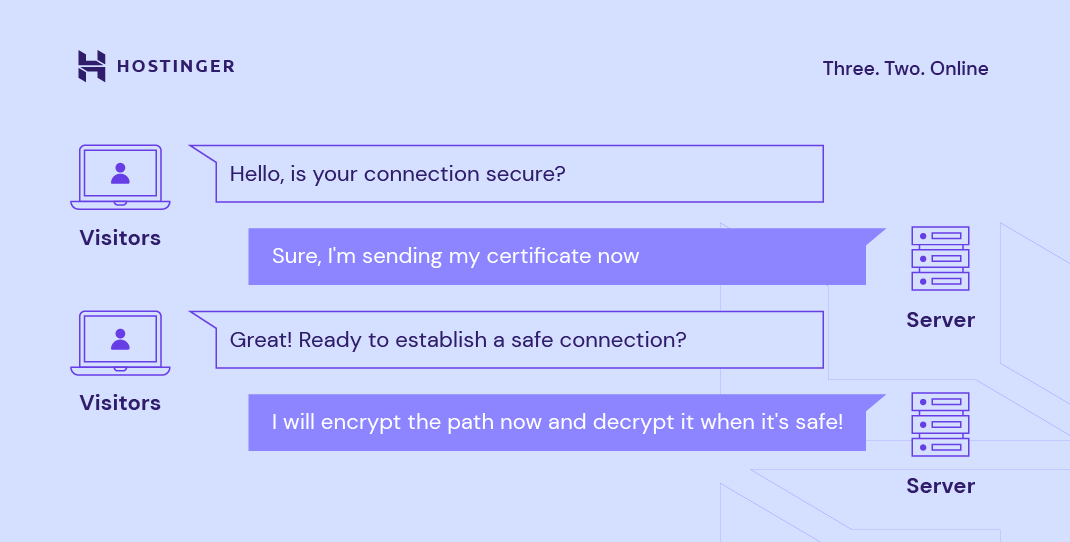
SSL works by initiating a handshake between the browser and the server to agree on encryption methods, exchange cryptographic keys, and generate a secure session key.
Different types of SSL certificates are available based on the number of domains they protect and the level of validation they provide. In terms of validation, SSL certificates include Domain Validated (DV), Organization Validated (OV), and Extended Validation (EV), which offer increasing levels of trust.
Continue reading for a closer look at what SSL is used for, how SSL works, its different types, and the steps to install it on your website.
Download glossary for web beginners
What is SSL used for
SSL is used to create a secure connection between a website and a visitor’s browser. It encrypts the data sent between both sides, making it much harder for others to read or steal the information during transfer.
This is especially important for websites that handle sensitive data, such as:
- Login details. SSL helps protect usernames and passwords when users sign in.
- Payment information. SSL encrypts credit card numbers and billing details during checkout.
- Contact forms. SSL protects personal information users submit through forms, like names, email addresses, and messages.
- Account data. SSL helps secure private information stored or accessed through user dashboards, client areas, or online accounts.
SSL also helps verify that visitors are connecting to the real website, not a fake version created to steal information. When SSL is active, the website uses HTTPS and shows a padlock icon in the browser. Without it, browsers may mark the site as “not secure,” which can make visitors less likely to trust it.
How does an SSL certificate work
SSL certificates protect data transfer using two different encryption techniques: asymmetric and symmetric.
Asymmetric encryption uses two separate keys: a public key and a private key. The public key encrypts the message, which can only be decrypted by the private key, and vice versa.
On the other hand, symmetric encryption uses one shared key, or a pair of keys, to encrypt and decrypt the message.
To give you a better understanding of how those SSL encryption techniques work, here’s an overview of the process:
- First, a website owner purchases an SSL certificate from a Certificate Authority (CA) and installs it on their site.
- When a visitor navigates through the website, the browser and the web server establish an SSL connection using an SSL handshake.
- During the SSL handshake, the browser asks the server for its SSL certificate and public key to prove its validity.
- Once the certificate is verified, the browser and web server exchange private and public keys to create a symmetric session key.
- Both parties then use this symmetric key to encrypt all communications. This key remains valid for a limited time and only for that particular session.
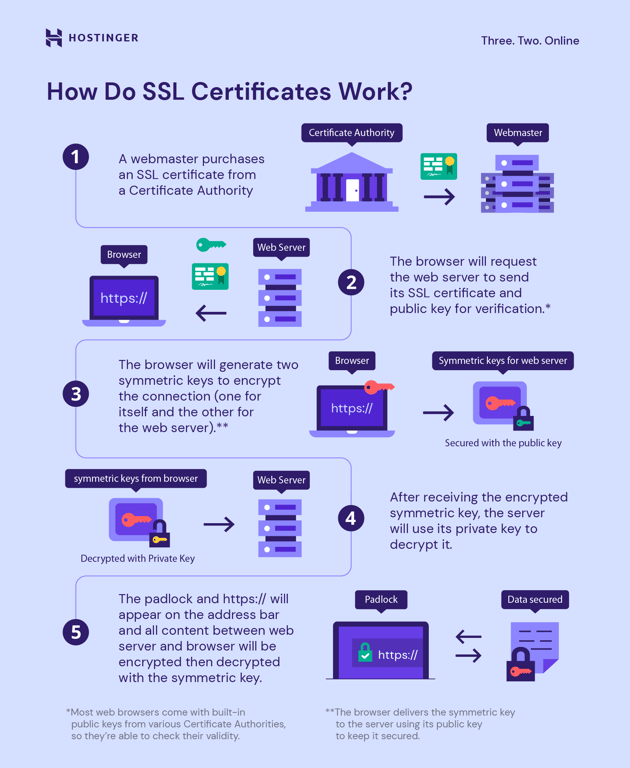
Once the SSL protocol has been enabled, the website is secure and encrypted. Unauthorized third parties can no longer intercept its communication.
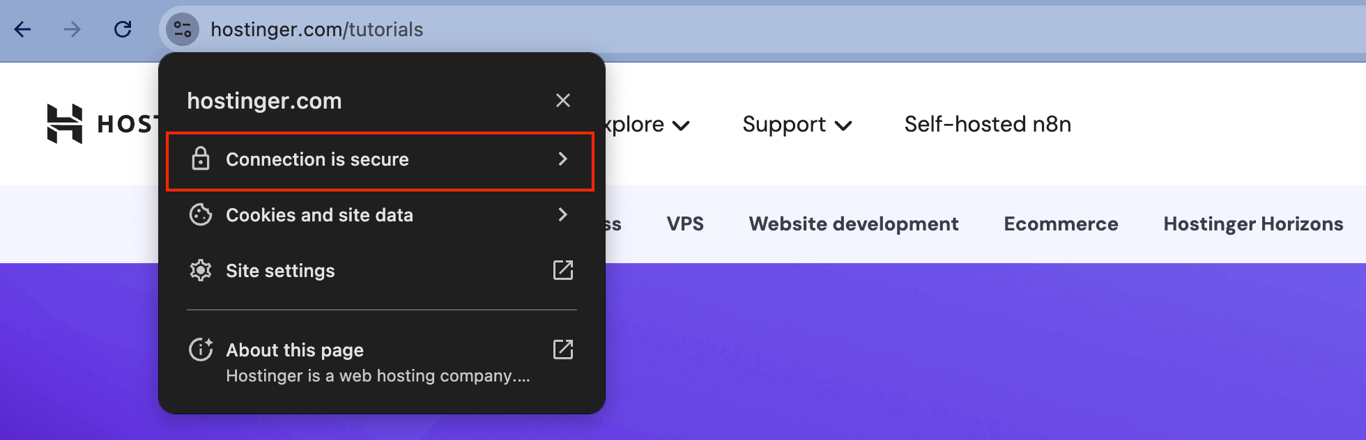
You can check whether a website uses the SSL protocol by clicking the View site information icon in Google Chrome.
The panel will display Connection is secure if the site has an active SSL certificate. You can click on this text for more details about the digital certificate, such as the issuer and validity date.
Conversely, your browser will display a warning for non-HTTPS sites, stating that the connection isn’t secure.
How does SSL relate to HTTPS
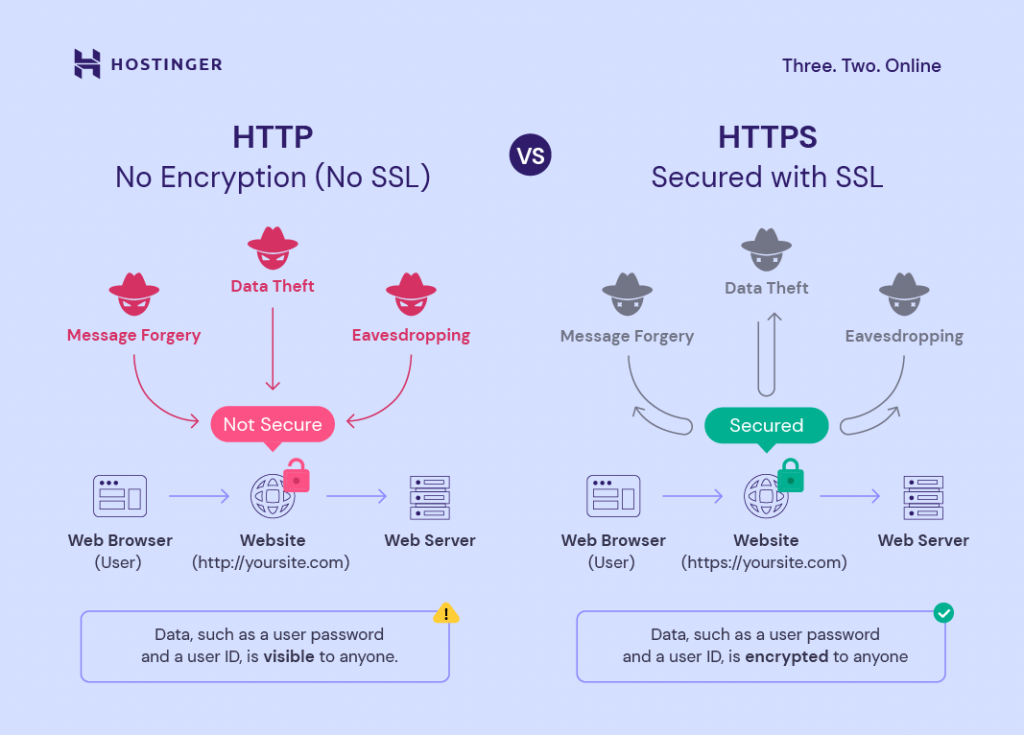
SSL is what makes HTTPS possible. When SSL is installed, it enables Hypertext Transfer Protocol Secure (HTTPS), which encrypts the data exchanged between a browser and a server.
This matters because data transmission on the web relies on communication protocols – most commonly Hypertext Transfer Protocol (HTTP) and its secure counterpart, HTTPS.
Without an SSL certificate, a website can only run on HTTP, transmitting data in plain text. This leaves all information – including sensitive details like passwords or payment information – vulnerable to interception. Cybercriminals can exploit this exposure to carry out data breaches, identity theft, or other malicious attacks.
How an SSL certificate benefits your website
An SSL certificate does more than protect data. It also helps your website look more trustworthy, meet modern browser expectations, and support a better user experience.
- Enables HTTPS and the padlock icon. SSL lets your website use HTTPS and display the padlock icon in the browser, showing visitors that the connection is secure.
- Avoids “not secure” browser warnings. Without SSL, browsers may mark your website as “not secure,” which can make visitors hesitate before browsing, signing in, or making a purchase.
- Builds trust with visitors. SSL helps show that your website is legitimate and safer to use, which is especially important for business websites, online stores, login pages, and contact forms.
- Supports SEO. HTTPS is a lightweight Google ranking signal, meaning it can help when two pages are otherwise similar in quality. However, SSL alone won’t make a website rank higher – content quality, relevance, backlinks, and technical performance still matter more.
- Helps preserve referral data. When traffic moves from one HTTPS site to another HTTPS site, referral information is more likely to stay available in analytics tools. This helps you better understand where visitors come from.
Overall, an SSL certificate helps improve trust, support HTTPS, avoid browser security warnings, and create a safer browsing experience. For a deeper look, read our guide on the benefits of installing an SSL certificate on your site.
What are the types of SSL certificates
SSL certificates vary in the number of domains they protect and the level of validation they provide.
Based on the number of domains they protect, here are the main SSL types:
- Single-domain SSL certificates. This type of certificate protects only one domain and cannot be used for its subdomains. It’s ideal for small websites or personal blogs.
- Wildcard SSL certificates. Encrypt a domain and all its subdomains for sites with multiple subdomains like blog.example.com.
- Multi-domain SSL certificates (MDC). These certificates protect multiple domain names and their subdomains. They’re suitable for businesses managing several websites under one certificate.
- Unified communications certificates (UCC). These are a type of multi-domain certificate originally designed for Microsoft Exchange and Live Communications servers. They’re recommended for enterprise environments with multiple services or domains.
SSL certificates can also be classified by their level of validation, which determines how thoroughly the certificate authority verifies the organization or domain owner:
- Domain Validation (DV SSL). Domain-validated certificates are the most cost-effective. Website owners only need to prove their domain ownership to obtain DV SSL. This type is best for blogs, personal websites, or small informational sites.
- Organization Validation (OV SSL). Organization-validated certificates provide a higher level of validation, as only legitimate businesses and organizations can use them. They’re recommended for business websites handling sensitive user data.
- Extended Validation (EV SSL). Extended Validation certificates offer the highest level of validation and are the most expensive among the three. They’re ideal for ecommerce sites or any organization seeking maximum trust and credibility.
When selecting an SSL certificate type, consider your site’s size, the sensitivity of the data you handle, and the level of trust you want to convey to your visitors.
How to add an SSL certificate to your website
There are several ways to install an SSL certificate, and many web hosting providers make the process straightforward. You can secure your website with just one click, eliminating most technical steps.
With Hostinger, all web hosting and cloud hosting packages include a free lifetime SSL certificate installed by default. So, every new domain, subdomain, and parked domain you add to your account is automatically secured.
Alternatively, you can install any of your preferred SSL certificates that you obtain from a Certificate Authority (CA), such as Let’s Encrypt, DigiCert, or Comodo.
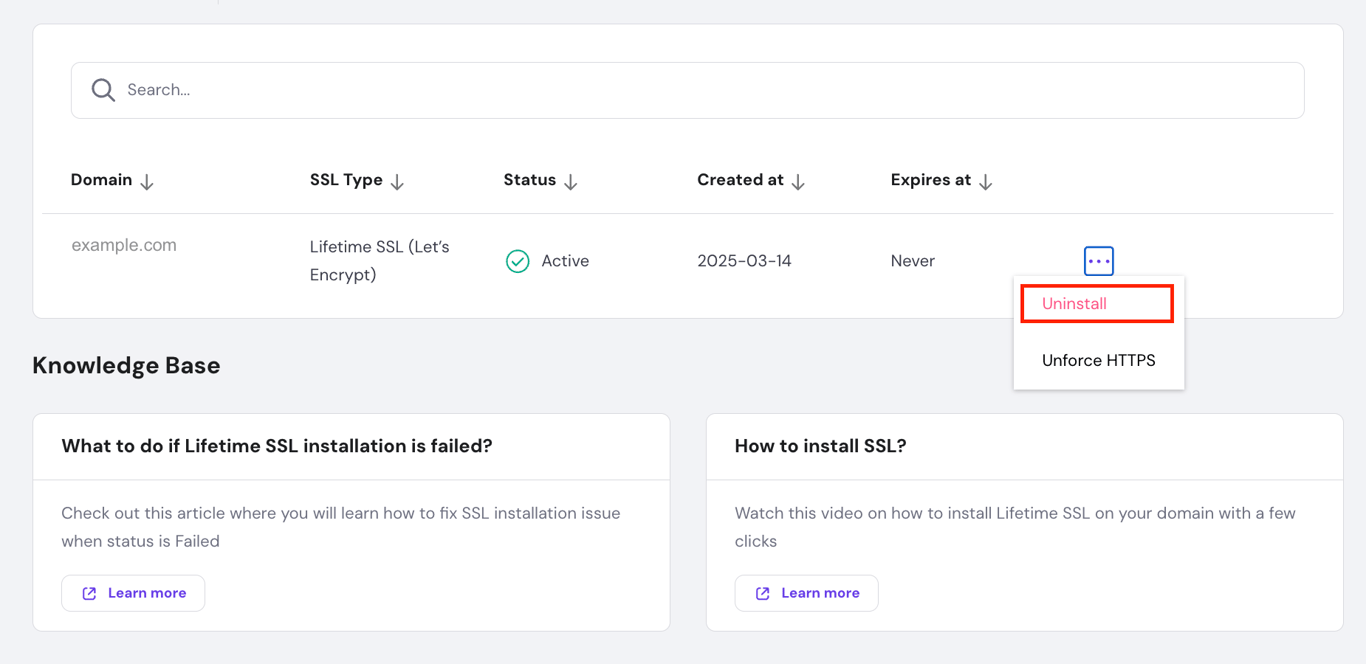
First, uninstall the default SSL by going to Websites → Security → SSL from hPanel. Click the three-dot button on the active domain, and choose Uninstall.
After that, proceed to install the custom SSL of your choice.
The process involves generating a Certificate Signing Request (CSR), submitting it to the CA for verification, and then downloading and installing the signed certificate on your website.
Next, you can force HTTPS to ensure all traffic is encrypted by adding a small snippet to your site’s .htaccess file.
Note that if you choose to install a custom SSL certificate, you’ll be responsible for managing its renewal. Make sure to keep track of the expiry date to avoid any security warnings or downtime on your site.

What is the difference between SSL and TLS
Transport Layer Security (TLS) is the modern, more secure successor to SSL, with the same core purpose of encrypting communication between a browser and a web server.
TLS was created to improve SSL by providing stronger encryption, better performance, and ongoing updates to keep up with current security standards.
Although SSL is now outdated, the term is still widely used in the industry. In most cases, when you see references to “SSL certificates” or “SSL connections,” they actually mean TLS, which powers HTTPS connections today.
For a deeper dive, explore our comprehensive guide on what TLS is and how it works.
All of the tutorial content on this website is subject to Hostinger's rigorous editorial standards and values.

Domantas leads the content and SEO teams forward with fresh ideas and out of the box approaches. Armed with extensive SEO and marketing knowledge, he aims to spread the word of Hostinger to every corner of the world. During his free time, Domantas likes to hone his web development skills and travel to exotic places.

Brian is a Content Writer who loves telling complex stories in a simple way. He has written all types of content, including tutorials, blog posts, landing pages, social media posts, white papers, infographics, and YouTube scripts. Follow him on LinkedIn.