How to create a Eurovision scoreboard with AI within minutes
May 15, 2026
/
Dainius K.
/
6 min Read
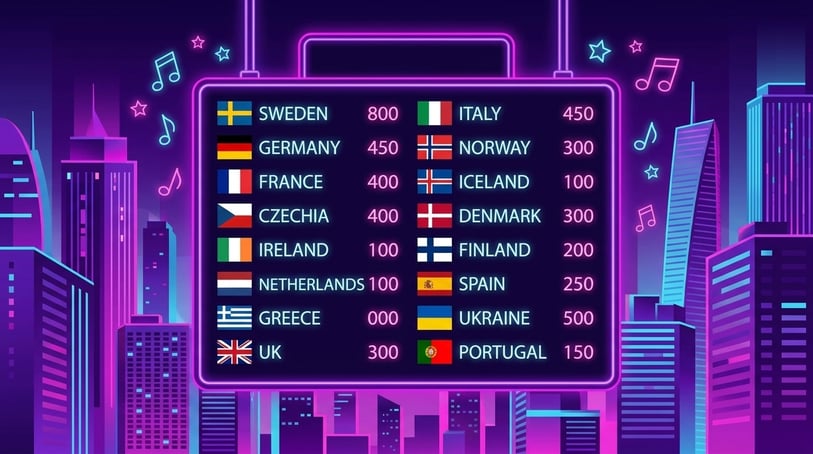
A Eurovision scoreboard turns a simple voting game into a shared live event. It gives everyone something to watch, react to, and debate as the rankings change after each round.
That’s what makes it fun to build: you can recreate the suspense of Eurovision voting for watch parties, fan contests, classroom games, or music nights. Every score reveal becomes part of the show, especially when someone gets the big douze points moment.
With AI and vibe coding, you can describe how the scoreboard should work – contestants, countries, jury rounds, audience votes, point animations, and winner reveals – and quickly turn it into a working web app.
Using Hostinger Horizons, you can build a Eurovision scoreboard without coding. Add live rankings, country flags, big-screen mode, animated scores, and custom voting rules through simple prompts.
TL;DR: How do you create a Eurovision scoreboard fast?
- Define your voting format. Use classic Eurovision-style points like 1–8, 10, and 12 so the scoreboard feels instantly familiar and exciting.
- Generate the scoreboard with AI. Ask Hostinger Horizons to create contestant setup, voting controls, and a live leaderboard.
- Add dramatic reveal features. Animated score updates, current-leader highlights, and winner screens make the scoreboard feel like a live show.
- Publish and host your contest. Share the scoreboard on a TV, a projector, or via a link so guests can follow the rankings in real time.
Step 1: Outline what to include in the first version of your Eurovision scoreboard
Start with the features that make the scoreboard entertaining from the first version.
- Contestant setup screen. Let hosts add countries, performers, song titles, flags, and notes so the scoreboard feels tailored to the event.
- Eurovision-style voting panel. Use point values like 1–8, 10, and 12 to recreate the familiar voting rhythm.
- Live leaderboard. Update rankings automatically after every vote so guests can follow the drama as scores change.
- Winner reveal screen. End the event with a celebratory final screen that highlights the winner.
Step 2: Create a user flow from start to finish
Design the experience like a mini live broadcast.
- Landing → Host opens the scoreboard app and sets the event name, theme, and contestants.
- Input → Host or jury group assigns Eurovision-style points during each voting round.
- Processing → The system adds points, updates totals, and recalculates rankings automatically.
- Result → The scoreboard changes live with animated reveals and current-leader highlights.
- Next step CTA → Host reveals the winner, resets the board, or starts a new round.
Step 3: Generate the first version with Hostinger Horizons
Open Hostinger Horizons and describe the scoreboard experience clearly.
For example: “Create a Eurovision scoreboard where hosts add countries, assign 1–8, 10, and 12 points, reveal scores with animations, and show a final winner screen.”
Horizons will generate a working preview where you can test contestant setup, voting, score totals, and rankings.
You can refine it with prompts like:
- “Add animated douze points reveal.”
- “Make the scoreboard readable on a TV screen.”
- “Add country flags and a current leader spotlight.”
- “Add a jury round selector.”
Step 4: Customize the design and layout
Make the scoreboard feel like a show.
- Use bold colors and large typography. Guests should be able to read scores clearly from across the room.
- Add country flags or icons. Visual cues make contestants easier to recognize and make the scoreboard more immersive.
- Use animated score reveals. Gradual point updates create suspense instead of showing all results instantly.
- Create a big-screen mode. A TV or projector layout makes the scoreboard perfect for watch parties and live events.
Step 5: Add logic, calculations, and scoring
Eurovision-style scoreboards need accurate and exciting scoring logic.
- Classic point system. Support 1–8, 10, and 12 points so the scoreboard feels authentic.
- Automatic totals. Add every vote instantly and update rankings after each round.
- Jury round tracking. Show which jury, guest, team, or group has already voted to avoid duplicates.
- Tie handling. Decide whether tied contestants share a rank or use a rule like most 12-point scores.
Prompt example:
“Add Eurovision-style scoring with 1–8, 10, and 12 points, track jury rounds, and break ties by number of 12-point votes.”
Step 6: Test your scoreboard before publishing
Run a full mock contest before the real event.
Add sample countries, assign points from multiple jury groups, and confirm the scoreboard updates correctly.
Checklist:
- Contestants save correctly. Every country, song, and performer should appear in the scoreboard.
- Points are calculated accurately. Score totals must update correctly after each voting round.
- Leaderboard sorting works. The highest-scoring entry should move to the top automatically.
- Big-screen display is readable. The scoreboard should look clear on TVs, projectors, tablets, and phones.
Step 7: Publish and share your scoreboard with friends
Once the scoreboard works as you want it to, click Publish.
Use it during a Eurovision watch party, a classroom contest, a fan-ranking event, or an online voting night.
Here are a few ideas:
- Eurovision watch parties. Recreate the voting energy with guests and live score reveals.
- Music contest nights. Score singers, songs, or performances in a fun shared format.
- Fan prediction games. Let communities rank favorites before or during the show.
- Classroom performance voting. Turn student presentations or performances into a more interactive activity.
Why should you create a Eurovision scoreboard?
A Eurovision scoreboard turns simple voting into a shared live experience.
It helps users:
- Create suspense with every score reveal. The scoreboard keeps people watching because rankings can change at any moment.
- Track points automatically. Hosts can focus on the event instead of calculating totals manually.
- Make fan events more interactive. Guests feel involved when they can vote, react, and follow live rankings.
- Host contests without spreadsheets. The scoreboard makes parties and competitions feel polished without extra setup.
- Celebrate winners with a final reveal. A dedicated winner screen gives the event a memorable ending.
It’s ideal for Eurovision fans, event hosts, teachers, music communities, and party organizers.
What features should a good Eurovision scoreboard include?
- Contestant setup. Hosts should be able to add countries, songs, performers, and flags easily.
- Eurovision-style points. Classic values like 1–8, 10, and 12 make the scoreboard feel authentic.
- Animated leaderboard. Rankings should update in a way that builds excitement.
- Jury or audience rounds. Voting rounds help organize scores and prevent duplicate entries.
- Winner reveal screen. The final result should feel celebratory, not just mathematical.
What initial prompt should you use to build a Eurovision scoreboard in Horizons?
Use the prompt below in Hostinger Horizons to generate your Eurovision scoreboard maker web app. Simply copy and paste it into the chat to create your first working version instantly. As you build, you can add follow-up prompts to adjust scoring, animations, layout, or voting rules based on your event using vibe coding.
Prompt template:
Create a Eurovision scoreboard web app. Allow users to add contestants with country name, song title, performer name, and optional flag or icon. Use Eurovision-style voting with point values 1, 2, 3, 4, 5, 6, 7, 8, 10, and 12. Allow hosts to assign points during each jury round. Automatically calculate total points for each contestant. Display a live leaderboard sorted by highest score. Add animated score reveals, current-leader highlights, and a final winner reveal screen. Include a big-screen mode for TV or projector display. Make the design bold, colorful, dramatic, and mobile-responsive.
Pre-filled prompt template:
Create a Eurovision-style scoreboard web app for a watch party. Allow the host to add countries, performers, and songs before voting starts. Create a voting panel where each guest or jury group can award 1–8, 10, and 12 points. Update the leaderboard automatically after every vote. Show animated douze-points reveals and highlight the current leader. Add country flags, sound-effect placeholders, and a final winner celebration screen. Include a reset button for starting a new round. Make the interface fun, colorful, and readable on a TV or projector.
How to make your Eurovision scoreboard night more fun
Building the scoreboard is step one; how you use it on the night is what turns it into a proper event. Here’s how to get the most out of what you’ve built.
- Use the animated reveal to control the pace. Don’t rush through scores. Let each animated update land before moving to the next country. The scoreboard does the dramatic work – your job is to give it a moment.
- Put it in big-screen mode from the start. Switch to the TV or projector layout before guests arrive so rankings are visible to the whole room throughout the night, not just during the voting rounds.
- Let the current-leader highlight do the talking. Point out when the lead changes – the scoreboard flags it visually, but calling it out loud keeps the energy up between rounds.
- Use the reset button for a prediction game. Run a quick first round where guests predict their top three, then reset and start the real contest. It adds a layer of competition without any extra setup.
- Save the winner reveal screen for last. Don’t announce the result verbally before triggering the final screen. Let the scoreboard deliver the moment – that’s what it’s built for.
- Run multiple rounds with different jury groups. The round selector and reset function make it easy to split voting between groups – jury, audience, online guests – and treat each as its own mini-event before combining totals.
How can you leverage Hostinger Horizons to build a Eurovision scoreboard?
- Use AI chat to refine scoring rules. Add jury rounds, audience votes, tie-breakers, and custom point systems through prompts.
- Improve the show effect quickly. Ask for animated point reveals, winner screens, country flags, and big-screen layouts.
- Customize for different events. Turn the same scoreboard into a karaoke night, talent show, classroom contest, or fan ranking tool.
- Scale into an event voting platform. Add public voting links, score history, and reusable event templates.
All of the tutorial content on this website is subject to Hostinger's rigorous editorial standards and values.

Dainius Kavoliunas is the Head of Product for Hostinger Horizons, with a passion for building innovative solutions. As an expert in product management, he combines deep expertise in UX, experimentation, and data analysis with a technical background to lead product strategy and build strong teams. He is particularly excited about the practical applications of AI and its potential to transform how we work and live. Follow him on LinkedIn.