The Ubuntu 24.04 with NemoClaw VPS template comes with NVIDIA NemoClaw preinstalled, providing a ready-to-use environment for building, testing, and managing large language model workflows. NemoClaw is designed to help you orchestrate AI agents, pipelines, and tasks directly on your server, making it easier to work with advanced AI capabilities without complex setup.
Accessing Your VPS
After deploying the template, you can access your VPS using the browser terminal available in your VPS dashboard. This allows you to interact with the server directly without requiring an external SSH client. Once connected, you will be able to complete the initial NemoClaw setup and start using the platform.
Completing NemoClaw Onboarding
Before you can start using NemoClaw, you need to complete its onboarding process. In the browser terminal, run the following command:
nemoclaw onboard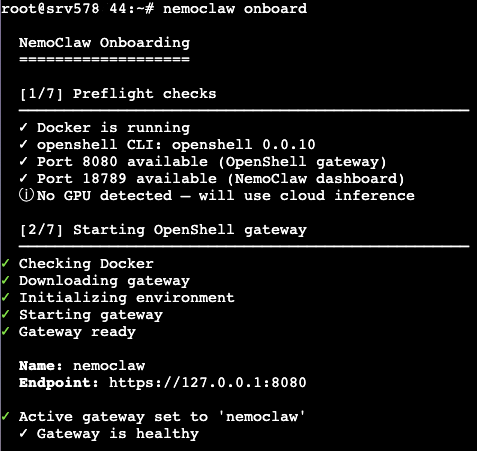
This command will guide you through the initial setup steps required to configure NemoClaw on your server. During the onboarding process, you may be asked to confirm settings or provide basic configuration details needed for running AI workflows.
Using NemoClaw
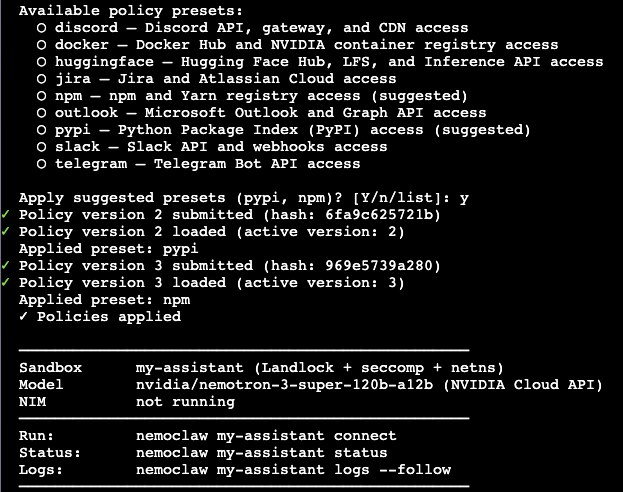
Once onboarding is complete, you can begin working with NemoClaw directly from the terminal. NemoClaw enables you to run AI pipelines, manage agents, and execute tasks related to large language models. It provides a flexible environment for experimenting with AI workflows or integrating them into your projects.
Next Steps
After completing the setup, you can explore NemoClaw’s capabilities by creating and running your own workflows. Depending on your use case, you may want to configure additional resources, integrate external APIs, or build custom pipelines tailored to your needs. Refer to the official NemoClaw documentation for advanced configuration and usage examples.
Conclusion
The Ubuntu 24.04 with NemoClaw VPS template provides a fast and convenient way to get started with AI workflow orchestration. With NemoClaw already installed, you only need to complete the onboarding process to begin building and running language model-powered applications directly on your server.