Runtime Logs for Node.js Websites
Runtime logs help you monitor what happens when your Node.js application is running. They show real-time messages generated by your application and the Node.js runtime, which can help you identify errors, track deployments, and understand how your application behaves in production.
In Hostinger’s Node.js dashboard, runtime logs provide a centralized place to review these messages and quickly troubleshoot issues.
What Are Runtime Logs?
Runtime logs are messages produced by your Node.js application while it is running. These logs typically include:
-
Application errors
-
Warning messages
-
Informational messages
-
Stack traces
-
Deployment-related events
They are especially useful for diagnosing issues that occur after a deployment, when your application is already running on the server.
How Runtime Logs Look in hPanel
Below is an example of the Runtime Logs interface in hPanel:
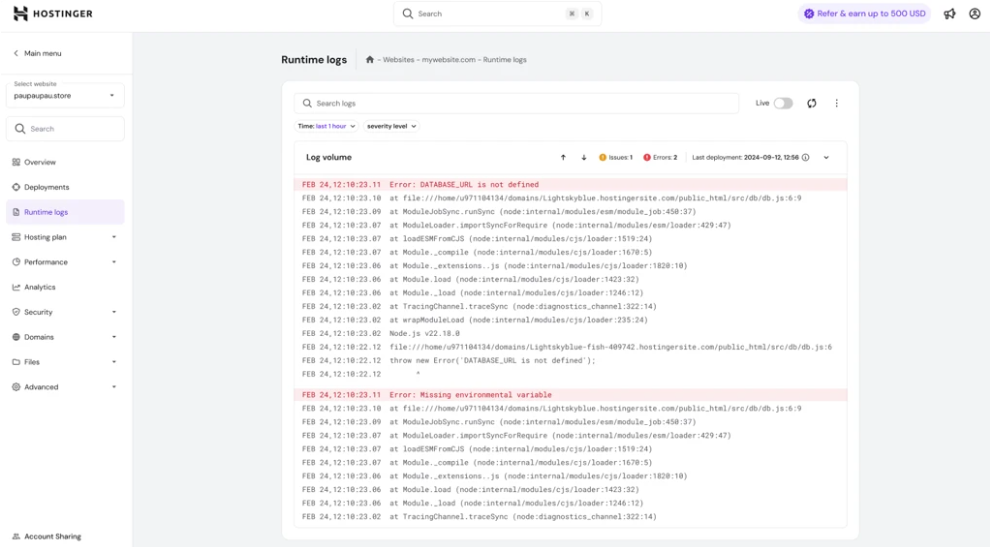
In this view, you can:
-
Filter logs by time range
-
Filter by severity level
-
View error and issue counters
-
See information about the last deployment
Information Available in Runtime Logs
Runtime logs contain several types of information that can help diagnose problems.
1. Error Messages
Errors are the most important entries to check when your application stops working.
Example from the logs:
Error: DATABASE_URL is not defined
This indicates that the application expects an environment variable (DATABASE_URL) but it has not been configured.
These types of errors usually occur when:
-
Environment variables are missing
-
Application configuration is incorrect
-
External services (databases, APIs) cannot be reached
2. Stack Traces
When an error occurs, Node.js often generates a stack trace. A stack trace shows exactly where the error happened in your code.
Example:
at file:///home/.../src/db/db.js:6:9

at ModuleJobSync.runSync
This information helps developers identify:
-
The file where the error occurred
-
The exact line of code causing the issue
-
The execution path that led to the error
3. Log Severity Levels
Logs can be filtered by severity level, helping you focus on the most important messages.
Common severity levels include:
-
Error – Critical problems that stop the application from working correctly.
-
Warning – Issues that may not break the application but could cause problems.
-
Info – General information about application activity.
Using severity filters allows you to quickly isolate critical issues.
When Should You Use Runtime Logs?
Runtime logs are most helpful when troubleshooting issues with a running application.
You should check runtime logs if:
-
Your website shows an error page
-
Your application fails after deployment
-
Your application cannot connect to external services
-
Environment variables are misconfigured
-
Your application behaves unexpectedly
Logs can reveal warnings or informational messages that explain abnormal behavior and assist you on troubleshooting root cause for the error.