You can connect n8n to nexos.ai to access multiple AI models (Claude, GPT, Gemini, Grok, and more) through a single API endpoint. This allows you to switch models without changing providers or managing multiple API keys.
If you deployed n8n and added nexos.ai AI Credits via the Hostinger Docker Catalog, your nexos.ai API key has already been generated and is available in hPanel.
This guide explains how to retrieve your nexos.ai API key and configure it in n8n.
Get your nexos.ai API key
If you purchased nexos.ai AI Credits with your VPS or later in hPanel, your API key is automatically generated. To find it:
- Log in to hPanel
- Go to VPS → select your server
- Open Docker Manager
- In the Projects list, locate the nexos.ai AI credits card at the top
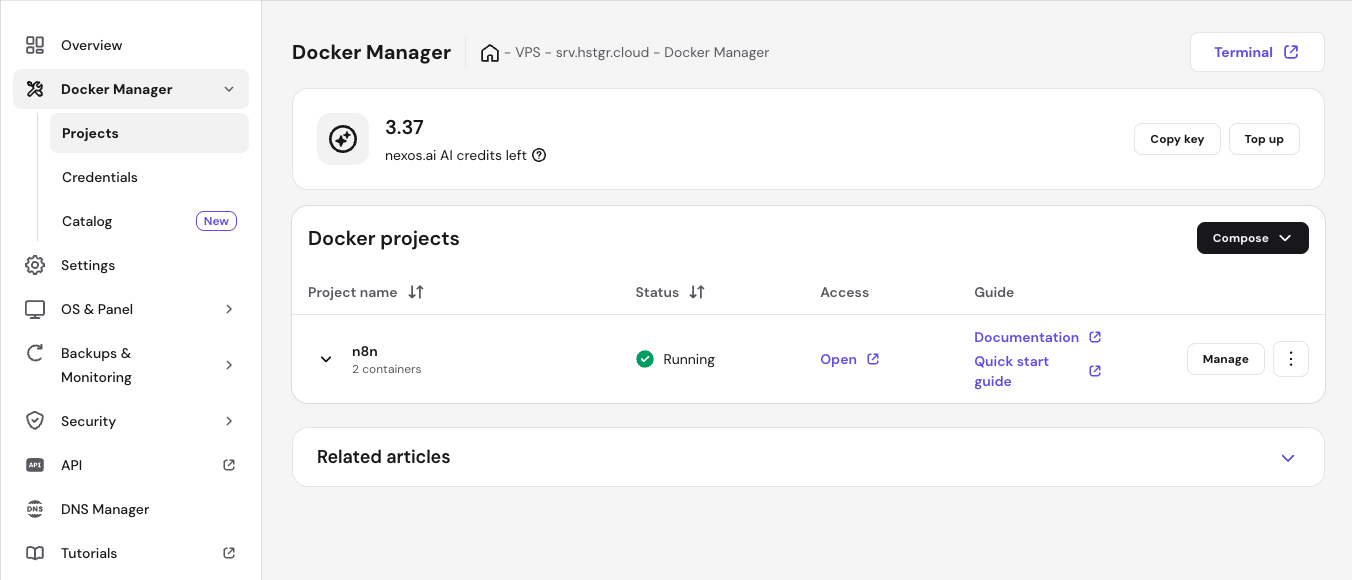
There you will see:
- Your current nexos.ai AI credit balance
- A Copy key button
Click Copy key to copy your Nexos.ai API key. This key will be used inside n8n.
Configure nexos.ai credentials in n8n
After retrieving your API key, open your n8n instance and navigate to the Credentials section. Create a new credential and select the OpenAI credential type. Although you are using nexos.ai, it provides an OpenAI-compatible gateway API, which is why this credential type must be selected. In the credential configuration:
- Enter your copied nexos.ai API key in the API Key field.
- Set the Base URL to
https://api.nexos.ai/v1
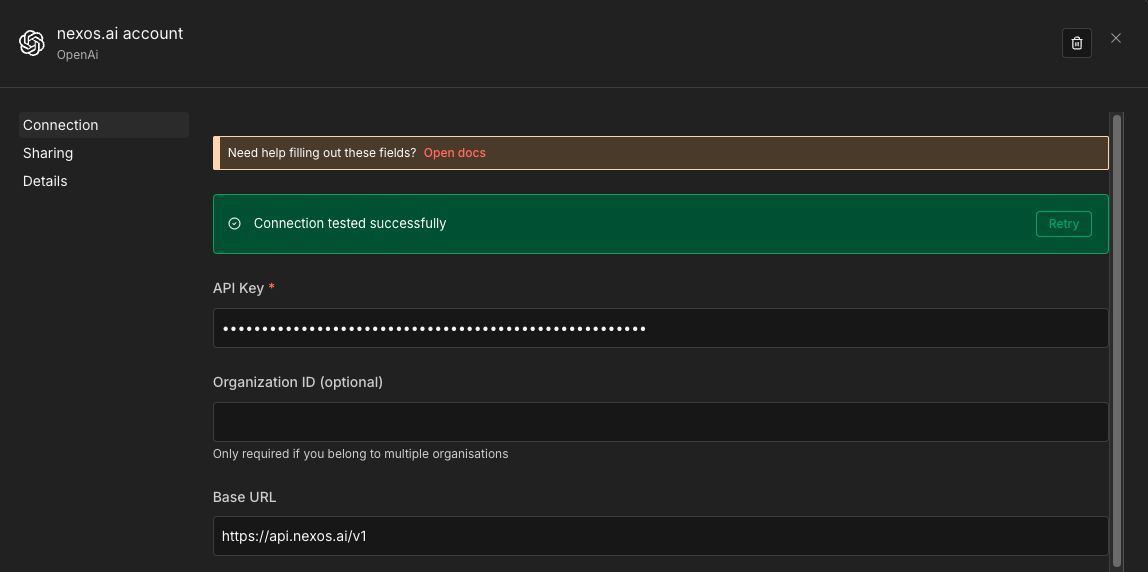
Save the credential. If everything is configured correctly, n8n will confirm that the connection was successful.
Using nexos.ai models in your n8n workflow
Once the credential is created, you can use it in any OpenAI-based node inside n8n. For example, you can add an OpenAI Chat Model node to your workflow and select your nexos.ai credential under the connection settings.
In the Model dropdown, you will be able to choose from the AI models supported by nexos.ai, including Claude Sonnet, Claude Opus, GPT-4.1, Gemini 3 Flash, Grok 4, and other available options.
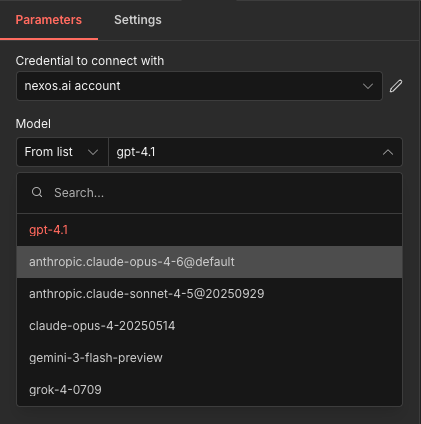
When the workflow runs, n8n sends the request to nexos.ai instead of directly to a single provider. nexos.ai then routes the request to the selected model, and the cost is deducted from your Nexos AI Credits balance.
You can change models at any time without modifying your credential configuration. This makes it easy to optimize for cost, performance, or reasoning capabilities depending on your workflow requirements.
Important: disable the Responses API in n8n
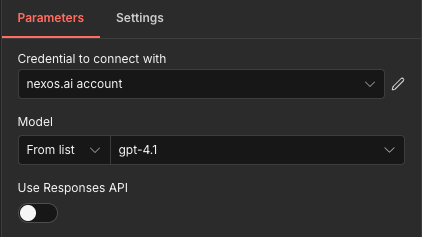
When using the OpenAI Chat Model node in n8n, make sure that the “Use Responses API” option is turned off.
nexos.ai uses the OpenAI-compatible Chat Completions endpoint, not the newer Responses API. If the Responses API toggle is enabled, requests may fail or return errors.
Using nexos.ai with n8n provides a unified AI gateway that simplifies automation workflows. Instead of managing separate OpenAI, Anthropic, Google, or xAI accounts, you connect once to nexos.ai and gain access to multiple providers through a single API endpoint.
This approach improves flexibility, centralizes billing, and allows you to experiment with different AI models without changing infrastructure or redeploying your workflows.