What is Smart Sending?
Smart Sending is a feature that helps you send emails at the best possible time for each recipient.
Instead of delivering your campaign to everyone at the same moment, Smart Sending spreads delivery over a 24-hour period. Each person receives your email when they’re most likely to open it—based on their past behavior.
Why use Smart Sending?
Not all subscribers check their emails at the same time. Some open emails in the morning, others in the evening.
Smart Sending helps you:
- Increase open rates – emails arrive when people are more likely to engage
- Reach your audience at the right moment
- Improve campaign performance automatically
How does Smart Sending work?
Here’s what happens behind the scenes:
1. You schedule your campaign
You choose a date and time to send your email (at least 15 minutes in advance).
2. We analyze recipient behavior
For each contact, we look at their past activity—specifically when they opened your previous emails.
3. We calculate the best time
We combine:
- Their personal open history
- General email engagement trends (like common peak hours)
4. Emails are sent at optimal times
Each recipient gets your email at their individual best time within a 24-hour window starting from your scheduled time.
5. No data? No problem
If a contact has no previous open history, they’ll receive the email at your original scheduled time.
How to enable Smart Sending
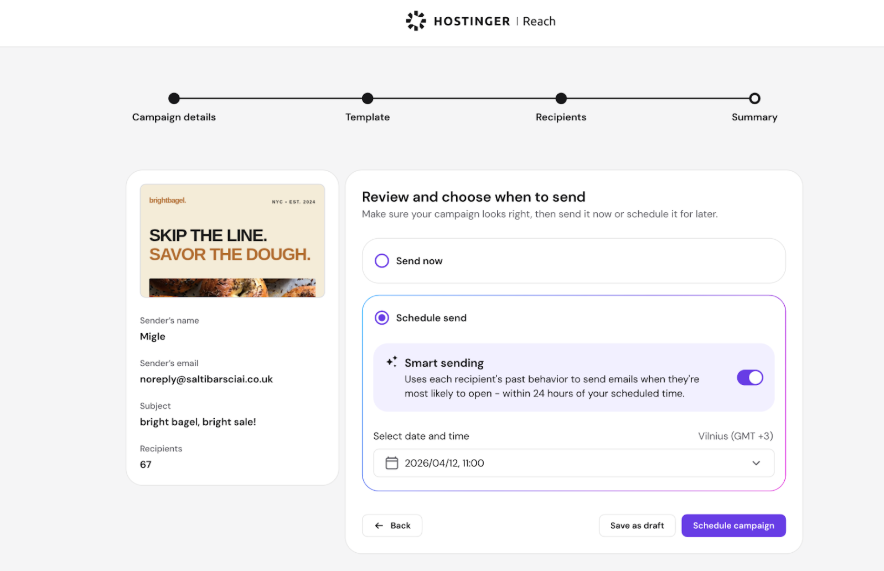
- Go to your campaign setup
- Navigate to Summary step
- Select your desired date and time
- Toggle Smart Sending ON (enabled by default)
What to expect after scheduling
Before sending
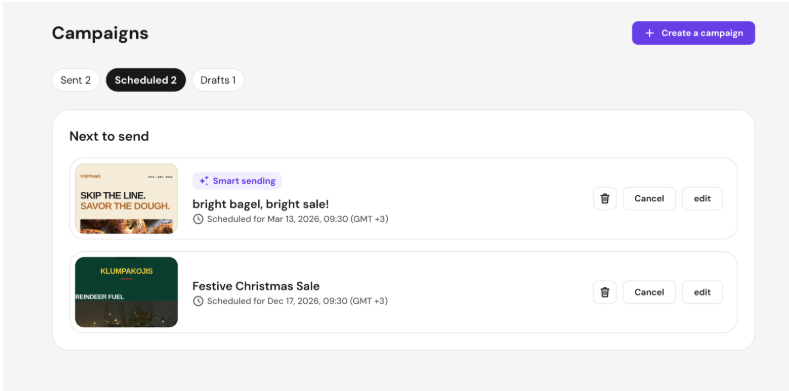
- Your campaign status will show as Scheduled
- Smart sending will automatically be used at the scheduled time
During sending (up to 24 hours)
- Your campaign status will show as Sending
- Emails are delivered gradually—not all at once
- The recipient list updates over time as emails are sent
After completion
- The campaign status changes to Sent
- All emails have been delivered
When should you use Smart Sending?
Smart Sending is ideal when you:
- Have a large or global audience
- Want to maximize engagement
- Don’t know the “perfect” send time
If exact timing matters for a specific event (e.g., a flash sale starting at a fixed hour), you may prefer to turn it OFF.
Summary
Smart Sending takes the guesswork out of email timing. Instead of choosing one send time for everyone, it automatically delivers your campaign when each recipient is most likely to engage—helping you get better results with less effort.