If your web, cloud, or Agency hosting plan has expired due to a missed payment and now shows an Expired status, you can reactivate it directly from the home page of hPanel within 30 days of the expiration date. This process restores your websites so your online projects can go back online.
Renew an expired hosting plan
When you renew an expired hosting plan, your websites will be automatically restored. This includes websites created with Hostinger Website Builder and Hostinger Horizons. Email accounts and their data are not included in this restoration process.
- Go to the Your to-dos section on the Home page of hPanel.
- Click Renew next to the expired hosting plan.
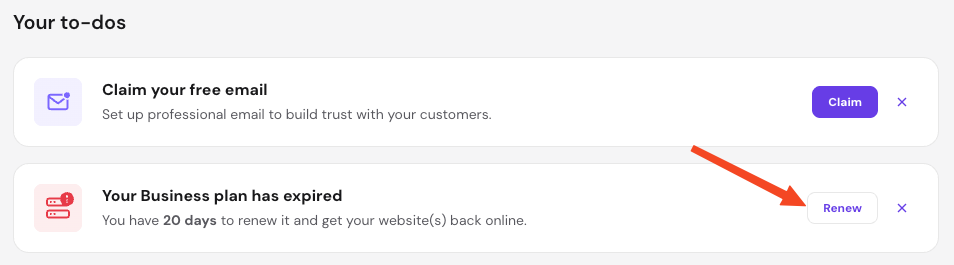
- Choose to renew or upgrade, select your preferred renewal period and complete the payment.
The restoration process typically takes between 30 minutes and a few hours, depending on the total size of your websites.
Download available backups
If you do not wish to reactivate the hosting plan, you may still have the option to download the most recent backup of your files and databases. This option is only available while the hosting plan is in Expired status, which lasts for 30 days following the expiration date.
To download your data:
- Go to the Websites section of your hPanel.
- Click on Generate backup.
- Confirm your file and database selections, then click Generate download link.

- Depending on the file size, the process can take up to a few hours. During this time, the options to create new backups or Renew will be temporarily disabled.
- A Download button appears once the archive is ready.
Once the payment is processed or the backup is downloaded, you have successfully secured your data. If you reactivated your hosting plan, your websites will automatically become visible online again shortly.
NOTES
- After the 30-day expiration period, the hosting plan is considered canceled, and backups are no longer available.
- Hosting plans deactivated for reasons other than payment cannot be reactivated using this method.
- Since emails are stored on a separate infrastructure, they are not included in hosting plan reactivations or file backups. For email recovery options, refer to: Restore a deleted Hostinger email account.
- Websites created with Hostinger Website Builder and Hostinger Horizons do not have backups available for manual download as they are not file-based; these sites are restored only through plan reactivation.