After editing your site, you may find that the live version does not reflect your recent updates. This article helps you identify why changes are missing and how to resolve them.
Update the website
If changes are not saved and published within the editor, they are not available to your visitors.
- Open the Website Builder editor.
- After making any changes, click the Update website button in the top-right corner.

- Wait for the confirmation message indicating the site was updated successfully.
Disable Coming Soon mode
When the Coming Soon mode is active, visitors will get a placeholder page instead of your live content.
- In the Webiste Builder editor, navigate to the Pages section on the left.
- Locate the Coming Soon page.
- Ensure the toggle is turned off to make your website content public.
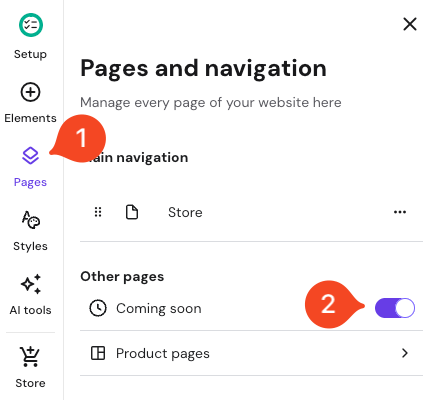
- Update the website to save the changes.
Display changes in products
If you are managing an online store and want to show a product, check the following:
- First, make sure your website has a page with a product section.
- Go to the Online store section from the editor sidebar.
- Select Products.
- Find the product you want to publish and ensure its status is set to Active.
- Scroll down and Save the product changes.
- On the main Editor page, click Update website.
Check for browser or network cache
Your browser or internet service provider (ISP) may be showing an older, cached version of your site.
- Use Incognito mode: Open your website in a private browser window to bypass local cache.
- Clear cache: Clear the cached data in your browser and DNS system.
- Test different networks: Switch between Wi-Fi and mobile data to see if the issue is network-specific.
Avoid editing in multiple tabs
Opening the Hostinger Website Builder in several browser tabs or on different devices at the same time can cause synchronization errors.
- Close all extra tabs or devices running the editor.
- Keep only one session active.
- Re-apply any changes made on a different tab or device and click Update website.
By following these steps, your latest page and product updates will be correctly synchronized and visible to your visitors. Regularly updating your site and reviewing from ensures a consistent experience for everyone browsing your Hostinger website.