There may be several reasons why changes are not visible on your site created with Hostinger Website Builder 👇
You Haven’t Updated the Website
If the changes aren’t saved and updated within the website builder, they won’t be visible online. After making any changes within the editor, click on the Update website button in the top right corner:

Coming Soon Mode is Activated
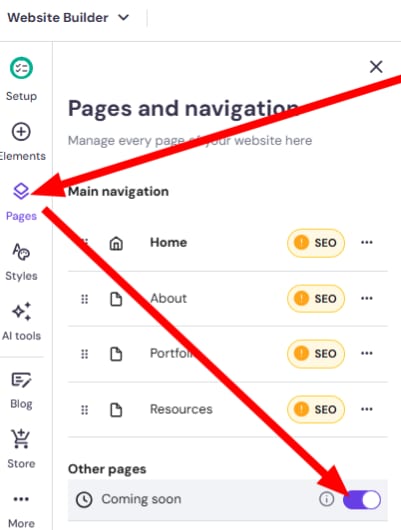
If Coming Soon Mode is active, your website will display a default page to visitors. You can learn more about that in this article. You can toggle and edit the custom “Coming Soon” page by going to your site’s editor, opening Pages, and selecting the Coming Soon section. Click the toggle to disable it:
You’re Having Cache Issues
Clear the cached information in your browser, network, and/or DNS system, and restart your internet router and/or device.
You may also try accessing your website using:
-
Incognito (private) browser window
-
Another network: Wi-Fi vs. mobile data
-
Other devices: laptop, tablet, mobile
You’ve Been Editing the Website Using Multiple Browser Tabs or Devices Simultaneously
If the website builder is open in several browser tabs or devices simultaneously, the changes may not be saved properly. Thus, the content may not be updated properly, either.
Make sure there’s a single editor tab open, update your website again, and check if the changes reflect online.