You can find your VPS IP by navigating to the VPS section of your hPanel. The IP Address of your VPS can be found next to its Status.

The IP address will also be displayed at the bottom of the Overview page after clicking Manage on your chosen server from the previous page:
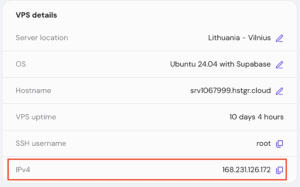
Knowing your VPS IP will allow you to access your control panel if you have installed one, establish SSH connections, and explore diverse functionalities required for managing your server efficiently.
NOTE: Only one dedicated IP address is assigned per Hostinger VPS. There is currently no option to purchase or attach additional IPv4 or IPv6 addresses to a single VPS instance as an add-on. If your project requires multiple dedicated IPs, the best solution is to use separate VPS plans for each unique IP needed.