At Hostinger, you have two options to access your email accounts in cPanel as well as the email account management options:
-
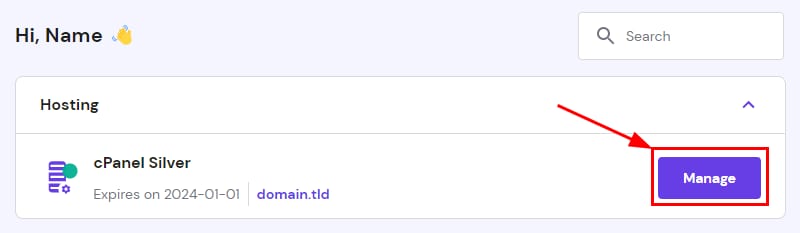
From your hPanel Home page, click on Manage next to your cPanel plan:
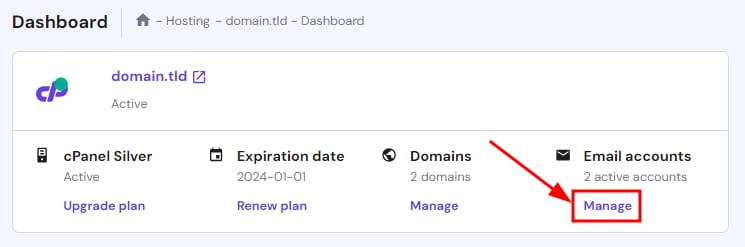
Then, click on Manage below Email accounts on the cPanel dashboard:
-
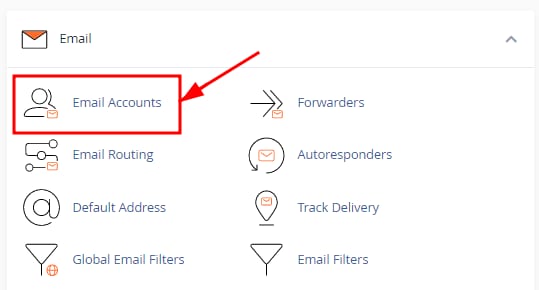
Or, from within cPanel, navigate to the Email → Email accounts section:
With either method, you will reach the Email Accounts section of cPanel, where you will find the list of all your email accounts, as well as the following email management options:
-
Create or delete email accounts
-
Access webmail to check your email
-
Get the email account configuration details to set up email clients or connect devices
-
For more options, click on Manage next to the email account:
-
Change the allocated storage space for the email account
-
Enable or disable email services
-
A tool to free up email storage
-
As well as jumps to other sections such as Email filters and Autoresponder
That’s it! now you know how to access your cPanel emails 📬