Before pointing a domain to Blogger, make sure that you have an active Blogger account and that your blog is already created.
Once that’s done, you can point your domain by adding two CNAME (required) and four A records (optional).
Step 1 – Add Two CNAME Records
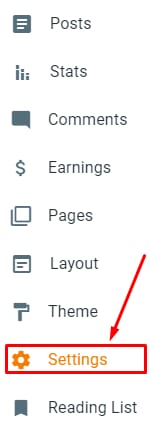
To find the required CNAME records, navigate to the Settings section:
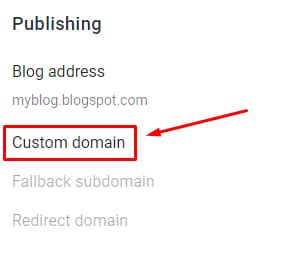
Scroll down to the Publishing section, and click on Custom domain:
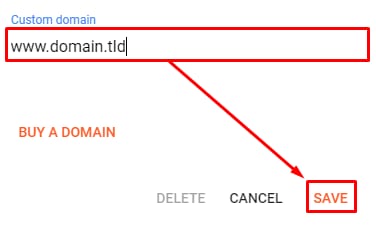
Enter your domain name with www in front of it, and click on Save:
You will get a message informing you about the required CNAME records to be added:
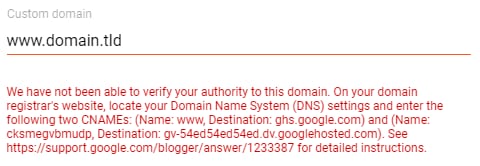
The exact CNAME records are marked in blue:
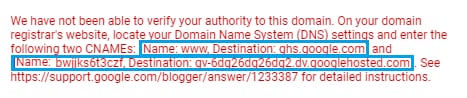
Once you copy the values, add the required CNAME records to your domain’s DNS Zone.
When done, click on Save again, and your domain will be added to Blogger.
Step 2 (Optional) – Add Four A Records or Redirect to www
You may also create four A records in your domain’s DNS zone. This way, your blog will be accessible via both www (www.domain.tld) and non-www (domain.tld) addresses.
The records should have these IP addresses:
-
216.239.32.21
-
216.239.34.21
-
216.239.36.21
-
216.239.38.21
Once you add the records, DNS propagation will start. This process can take up to 24 hours. During this time, it’s expected that your website won’t work, but give it some time, and it will get online soon.
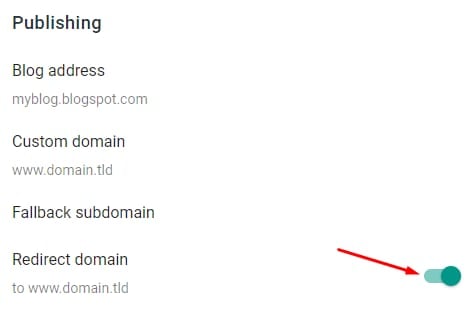
Alternatively, you can redirect visitors from non-www to www version of your blog. To do so, go to Settings → Publishing, and click on Redirect domain:
That’s it! Now you know how to point your domain to Blogger 😊