When you purchase Hostinger services, it is highly recommended to set them up immediately. This is especially time-sensitive for domain names, as they are fully registered only after the setup process is complete. Until then, the domain remains available for registration and can be purchased by others.
If you did not complete the onboarding process immediately after your purchase, you can resume it at any time from hPanel.
Set up a Hostinger hosting plan
To complete the setup for a pending web, cloud or Agency hosting plan, follow these steps.
- Navigate to hPanel → Websites.
- Locate the pending hosting plan order.
- Click the Set up button next to the order.

- Follow the on-screen instructions to complete the onboarding process.
Set up a domain or other Hostinger services
For domains and other services, pending configurations are accessible from the main dashboard.
- Navigate to the Home section of hPanel.
- Locate the service pending activation and click Set up.

If the order is not visible, click Show more.
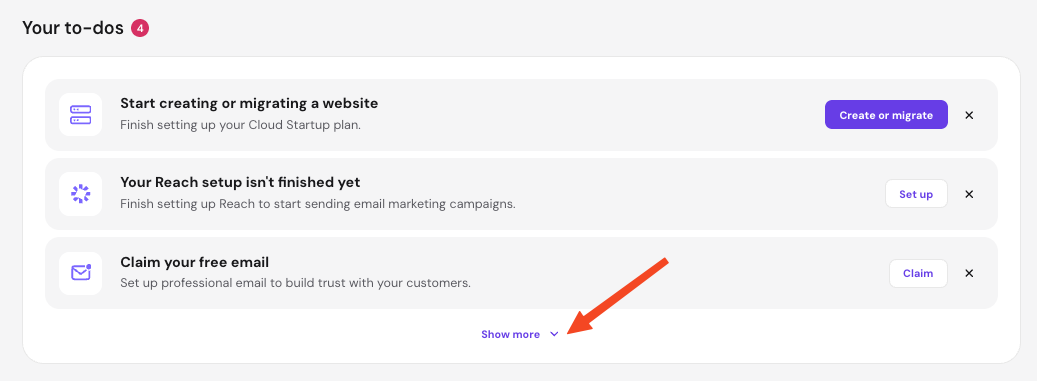
- Alternatively, find your order on the Billing → Subscriptions page and click Set up.
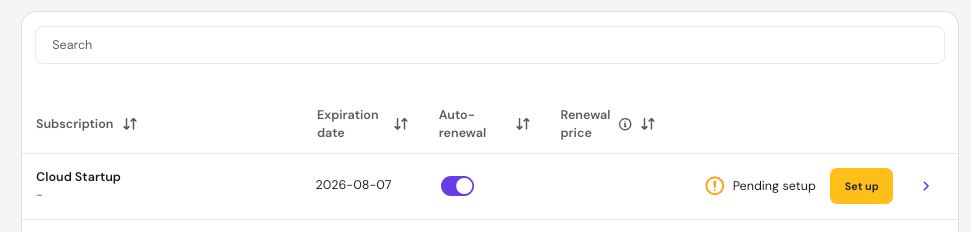
- Alternatively, find your order on the Billing → Subscriptions page and click Set up.
- Follow the onboarding process, entering the required information to complete the registration or configuration.
- Once all required information is submitted, the order becomes active.
Your services are now ready for use, enabling you to manage its configurations.
NOTE
-
The billing cycle starts from the original purchase date, regardless of when the setup process is completed.