You can personalize your experience by changing the display language of the Hostinger hPanel. This adjustment updates the interface labels and navigation menus to your preferred language, making it easier to manage your hosting services and websites.
Make sure to disable any browser translation extensions, as these can interfere with the hPanel and Hostinger Website Builder interface, preventing some options from displaying correctly.
Follow these steps to update your language settings:
- Click on the profile icon located in the top-right corner of the hPanel.
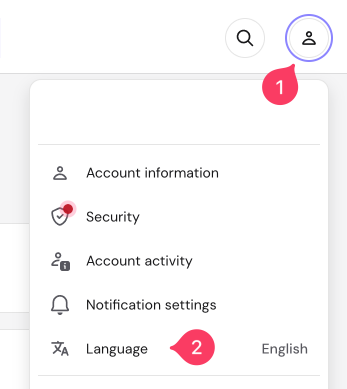
- Select the current language displayed in the dropdown menu to show all available options.
- Choose your preferred language from the list.
The hPanel is currently available in the following languages:
Arabic, Bengali, Chinese, Dutch, English, French, German, Hebrew, Hindi, Italian, Indonesian, Japanese, Korean, Lithuanian, Polish, Portuguese, Romanian, Russian, Spanish, Thai, Turkish, Ukrainian, and Vietnamese.
Once selected, the hPanel interface will instantly refresh to display your chosen language. You can now continue managing your Hostinger services in the language that suits you best.