A parked domain displays the same content as your main hosting domain, allowing you to have multiple domains for the same website. This feature is useful if you want different domain names to lead to the same site.
Parking domains is not supported for websites built with Horizons or Hostinger Website Builder.
To park a domain, follow these steps:
Step 1 – Prepare the domain for parking
Before parking the domain, make sure that:
-
You have full ownership and control of the domain name you want to park.
-
You can access and edit the domain’s DNS settings:
Step 2 – Park the domain
-
Go to hPanel and select Websites → Dashboard
-
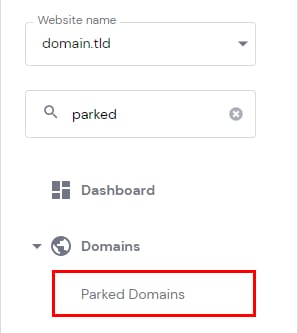
Find Parked Domains on the sidebar, and click on it:

-
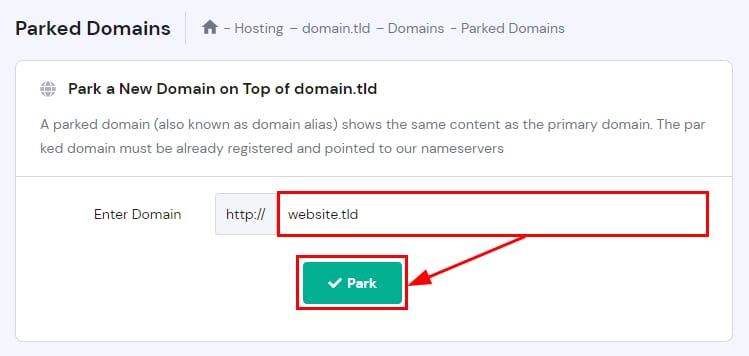
Enter the domain name you want to park and click Park

Step 3 – Point the domain
After parking the domain, update its DNS settings to point to your website. You have two options:
-
Use the website’s assigned nameservers – This will transfer your domain’s DNS zone to Hostinger.
-
A record – This will directly point the domain to your website’s IP address.
After pointing the domain wait a few hours for DNS propagation to complete and the parked domain will start working.
If you receive an error while adding the parked domain to your hPanel, ensure the domain’s A record is properly pointing to your hosting plan’s IP first – then, try again!
Managing parked domains
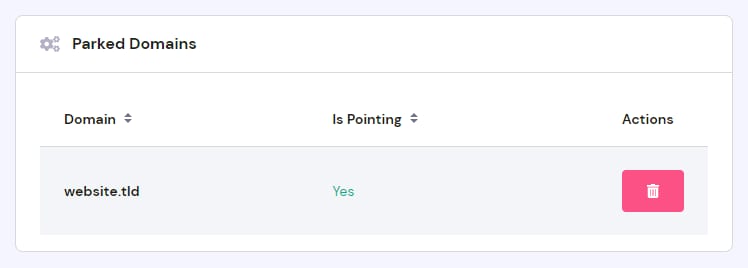
You can view and manage your parked domains by scrolling down to the Parked Domains section. There, you can check if the domain is pointing to Hostinger, as well as remove the domain if needed:
If the parked domain has existing email accounts, they will be permanently deleted when you unpark it. To avoid losing important emails, we strongly recommend backing up your messages before proceeding.