Want to create an online presence without writing a single line of code? You’ve got excellent options with Hostinger — whether you’re building a traditional website or something more interactive, like a web application.
While creating a website may seem like a task that requires technical knowledge and time, with Hostinger Website Builder or Hostinger Horizons, you can easily create your own great-looking, fully functional website in just a few minutes.
Hostinger Website Builder
You can start using the Website Builder, while setting up your new hosting plan, or later, by navigating to the Websites page on hPanel, clicking on Add website of the desired hosting plan, and selecting Hostinger Website Builder.
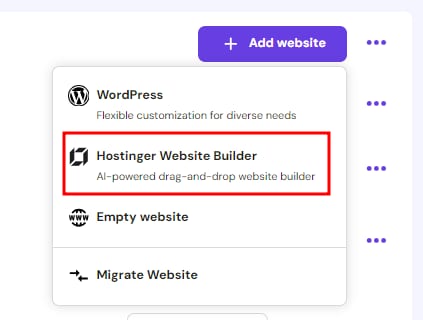
After a moment, you’ll be presented with a screen where you can start creating your website.

Click on Start Creating, and the setup will guide you through several questions about the type of website you’re building. Once enough information is gathered, it will generate a fully functional website with unique content and visuals, ready for you to customize as needed.
If you prefer to get started right away, you can choose to use a pre-made template below the AI option. Select a template from our extensive gallery and begin building your website 🚀
Feel free to check our collection of articles about Hostinger Website Builder.
Hostinger Horizons
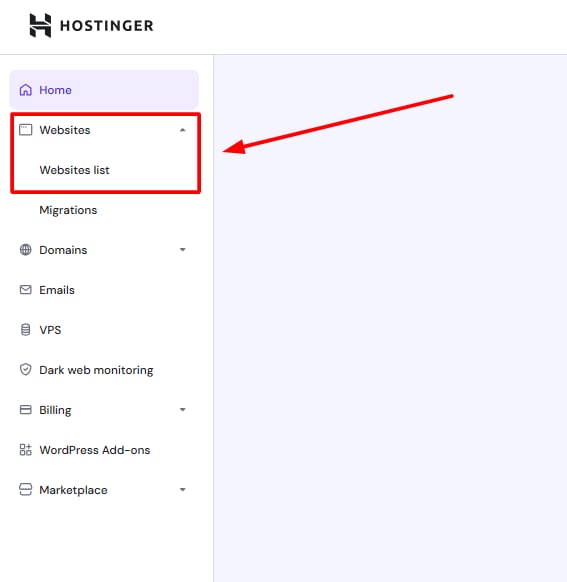
To access the Hostinger Horizons web app generator, go to hPanel Websites → Websites list in the left-hand navigation menu:
Click on Add Website and select Horizons:
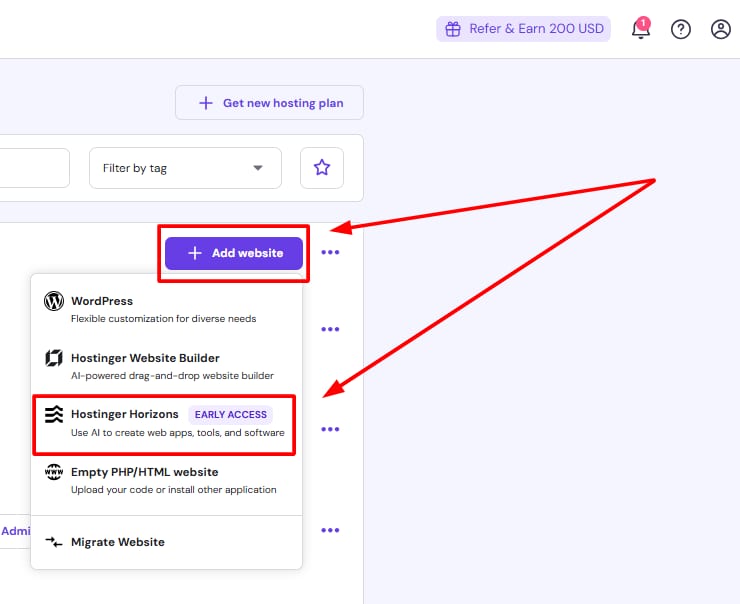
And that’s it! The Horizons solution will open, and you will be able to get started with Horizons.
💡You can start for free using our free trial to test out the tool! Check our guide for more details.