Hostinger Horizons is the first vibe coding tool to offer full online store functionality right out of the box 🚀
Horizons users can create an online shop in minutes, without having to manually prompt databases, payment options, or shipping flows.
See how to connect a store, add products with AI, configure payments and shipping, and launch — all in minutes.
What can I sell?
You can sell physical and digital products, gift cards, and accept donations.
Subscriptions and appointments aren’t supported yet, but you can still offer them using third-party tools:
-
To start selling subscriptions, we recommend using Stripe. Just ask Horizons to help you connect it to your project.
-
For appointments, tools like Calendly work great. You can also ask Horizons how to add it to your site.
Have in mind that currently, Horizons works with traditional product stores’ business models, being unable to generate projects such as course-selling platforms, marketplaces, subscription-based projects, and so on.
What payment methods are supported?
Choose from 100+ payment methods, like cards, PayPal, Google Pay, Apple Pay, and others. Payment methods available for your store depend on where you’re selling, your location, currency, and who you’re selling to.
More details can be found here.
What shipping methods are supported?
Once you connect an online store, you can define your shipping zones with up to 25 delivery options and set custom shipping rules based on order amount or item weight.
How do I connect an online store to my project?
You don’t need to set it up manually. Just ask Horizons in the chat to add an online store to your project — for example: “Add an online store to my project.” Horizons will handle the integration automatically.
Once the store is connected, click My store in the top navigation bar to access the store manager, where you can add products, set up payments, update company information, and configure shipping.
Additionally, when creating a new Horizons project, you can connect it to an existing standalone Ecommerce store. The store and its products remain the single source of truth across all connected storefronts.
How do I edit my online store?
Via My store
You can manage your store anytime by clicking My store in the top navigation bar.
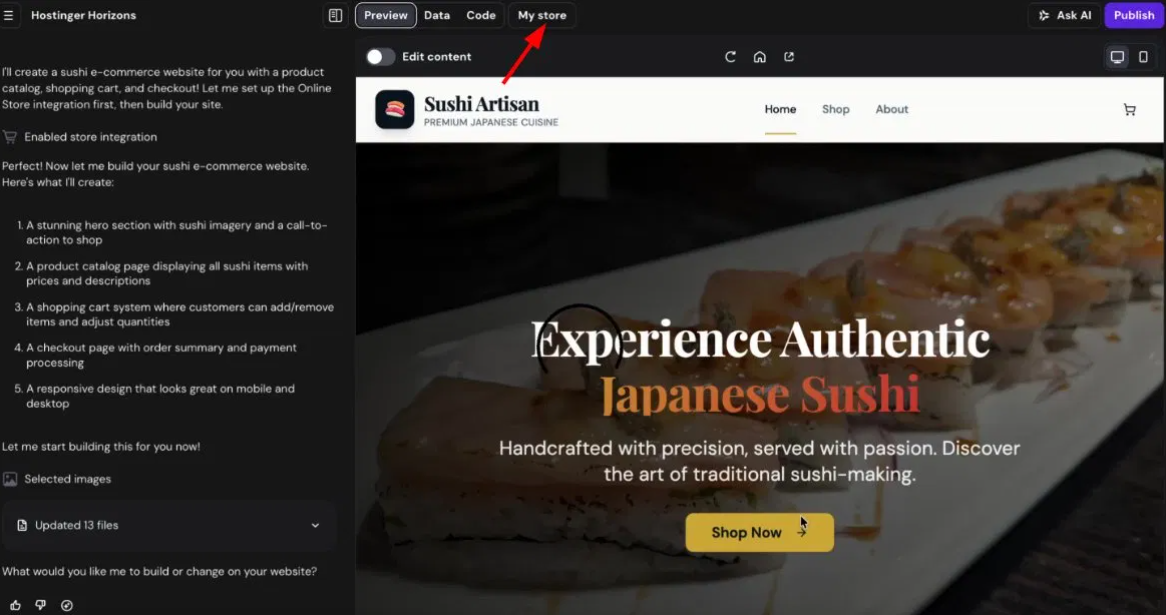
Once it’s connected, you’ll see links that will redirect you to the built-in store manager. From there, you can manage products, payments, and more – without any prompting needed.
Via Horizons chat
You can also create, update, and delete products directly from the Horizons chat — no need to open the store manager. This works for single or multiple products at once. When creating a product via chat, you can:
• Describe what you want and let AI generate the product details and image
• Attach your own image to the chat and use it for the product
If you want to edit the way your online store looks (like the layout of your product list), just ask AI in the chat to make changes.
Supported Features and Limitations
Before setting up your store, review the types of products and payment workflows supported by Hostinger Horizons:
- What you can sell: Physical products, digital products, gift cards, and donations.
- Unsupported models: Built-in subscriptions, appointments, marketplaces, and course-selling platforms are not natively supported.
- Product limits: Horizon plan supports a maximum of 1,000-1,400 products. If you reach this milestone, the interface will display the message: You cannot add more products as the limit is reached.