Deepseek is a powerful AI model for natural language processing tasks, and it can be efficiently deployed using Ollama. The “Ubuntu 24.04 with Ollama” template comes preinstalled with Ollama and OpenWebUI, providing a user-friendly interface for managing AI models. This guide walks you through the process of installing and running the Deepseek model through OpenWebUI.
If you don’t have a VPS yet, check the available options here: LLM VPS hosting 🚀
Accessing Ollama
Open your web browser and navigate to:
https://[your-vps-ip]:8080Replacing [your-vps-ip] with the IP address of your VPS.
Installing the Deepseek Model
Once logged into OpenWebUI, navigate to the Admin Panel section from the dashboard.
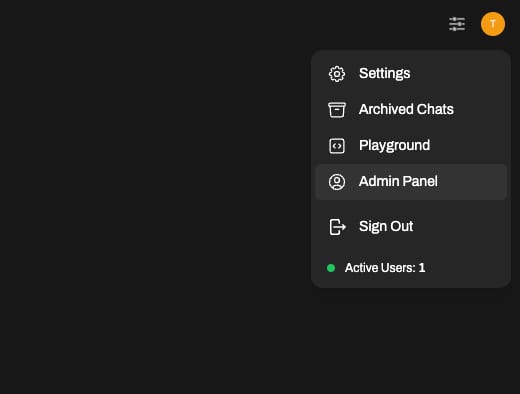
In the Admin Panel, select Settings and Models. Here, you will see all the models currently installed in your instance.
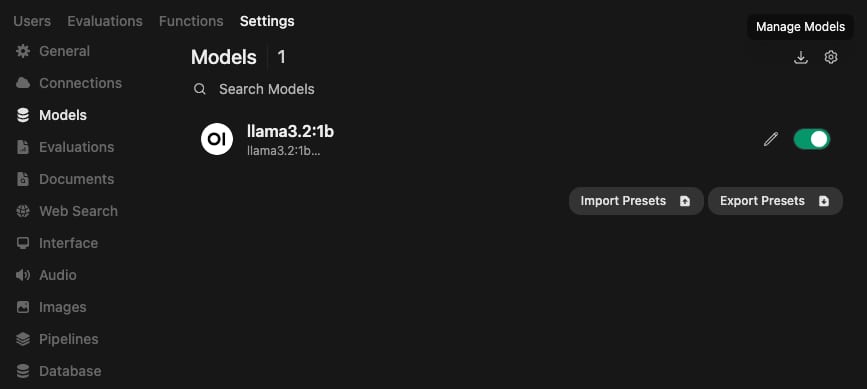
Click on the Manage Models button at the top right corner.
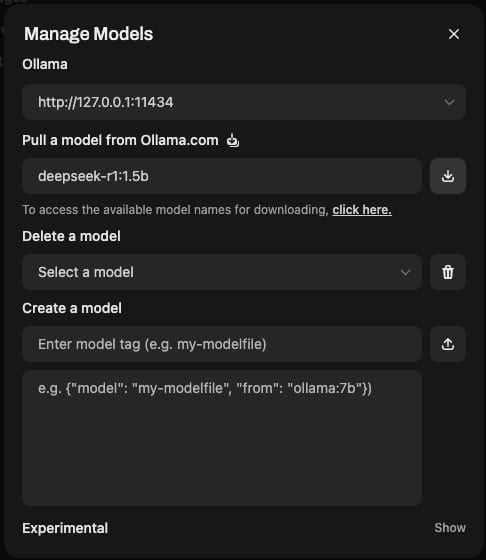
In the opened window, enter the new model tag and press the Download button to Deepseek to begin the installation. OpenWebUI will automatically download and set up the model for use.
Selecting the Deepseek Model
After installation, go to the new chat page. In the list of installed models, select Deepseek and set it as the active model by clicking the Set as Default button. This ensures that Deepseek is the model used for processing requests.
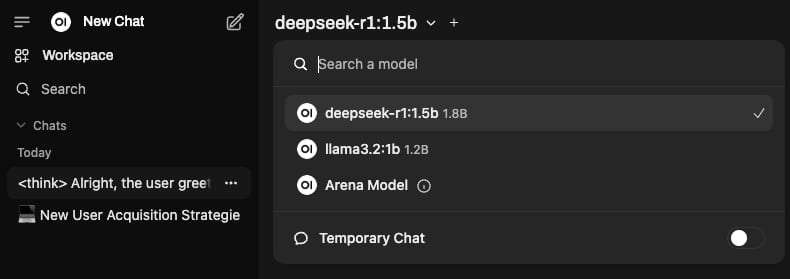
Following these steps, you can easily install and configure the Deepseek model on your VPS using OpenWebUI without direct SSH access. This setup allows for seamless interaction with the model through a user-friendly web interface.