If you have a Google Workspace Email Business Starter plan at Hostinger and you’re looking for more storage and increased features, you can upgrade your email accounts to Business Standard or Business Plus.
Advantages of upgrading
-
Increased participants in video meetings, recording and noise cancellation capabilities: up to 150 particpants with Business Standard and 500 Business Plus.
-
Appointment booking pages.
-
Email layouts and mail merge.
-
More storage: 2 TB with Business Standard and 5 TB with Business Plus per each email account.
-
With Business Plus, you can get additional security and management controls, including Vault as well as advanced endpoint management.
How to upgrade
The upgrade applies to all email accounts within your current Google Workspace Email plan; upgrading individual mailboxes is not supported.
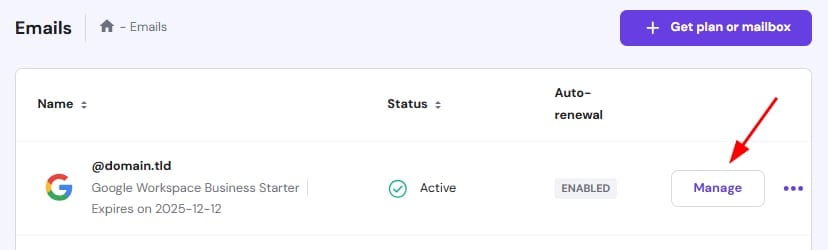
Open the Emails section on hPanel, and click on Manage next to your domain name:
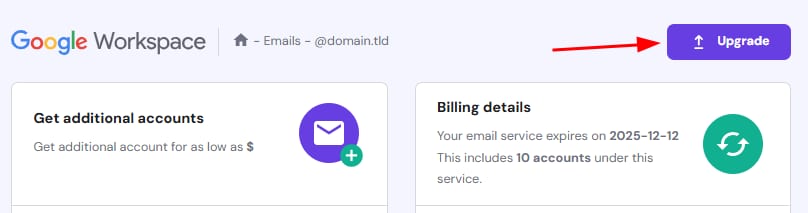
Once there, click on the Upgrade button:
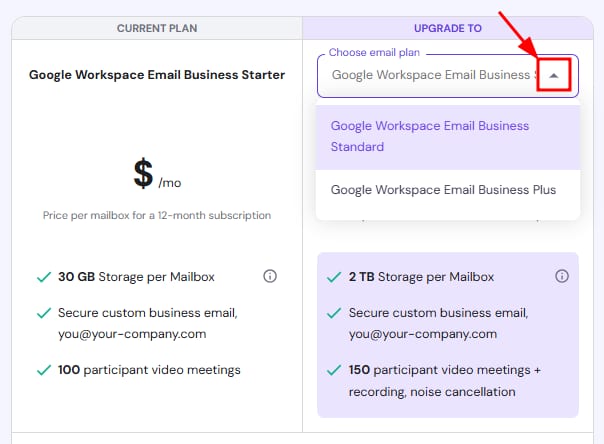
On the upgrade page, select your desired plan from the dropdown list:
On the same page, you’ll have the option to add more mailboxes if needed and select your preferred payment method. When everything is set, click Complete Upgrade Payment to finalize the process.
NOTE
-
Plans come with fixed features and storage limits that cannot be customized.
Additional resources