10 best AI plugins for WordPress: Key features and pricing
Mar 27, 2026
/
Ariffud M.
/
17 min Read

AI plugins for WordPress are extensions that connect machine learning models and natural language processing to your WordPress dashboard.
They are important because the gap between sites that use AI-assisted workflows and those that don’t is growing fast. Faster content production, smarter SEO, 24/7 customer support, and multilingual reach are no longer optional advantages.
Most users install an AI plugin to generate draft blog posts and product descriptions, perform on-page SEO with keyword and meta tag suggestions, deploy chatbots for 24/7 visitor engagement, automate repetitive workflows between plugins and apps, and translate entire sites into multiple languages.
Depending on the plugin, you can get features like one-click article generation, AI image creation, sentiment analysis, voice chat, or even AI agents that manage parts of your WordPress dashboard through natural conversation.
Without these tools, site owners spend far more time on manual content creation, keyword research, accessibility tagging, and customer support. AI can handle many of these tasks in seconds.
Here are the 10 best AI plugins for WordPress, covering content generation, SEO, chatbots, automation, translation, and accessibility:
- Hostinger AI. Free AI content creator that ships with Business + AI and Cloud Startup + AI hosting. It requires no API keys and has no credit limits.
- Rank Math AI. SEO plugin with a built-in Content AI module that scores, writes, and optimizes content inside the editor.
- WPBot. WordPress-native chatbot that runs on OpenAI, Gemini, DialogFlow, OpenRouter, or even just built-in automation without external AI.
- AI Engine. Packs more AI features into a single free plugin than most competitors offer across their entire paid lineup.
- GetGenie. All-in-one content and SEO assistant with NLP keyword research and SERP analysis built into the writing workflow.
- Alt Text AI. Automated alt text generation using computer vision, with ecommerce-aware descriptions for WooCommerce products.
- Tidio. Live chat platform where Lyro, a conversational AI agent, handles customer questions without scripted flows.
- Weglot. AI-driven translation plugin with a custom language model that learns your brand voice the more you edit.
- AI Puffer. Full-spectrum AI toolkit covering chatbots, content, images, forms, video, and automation in one install.
- Uncanny Automator. No-code workflow automation that connects 220+ plugins and apps, with multi-provider AI built in.
1. Hostinger AI
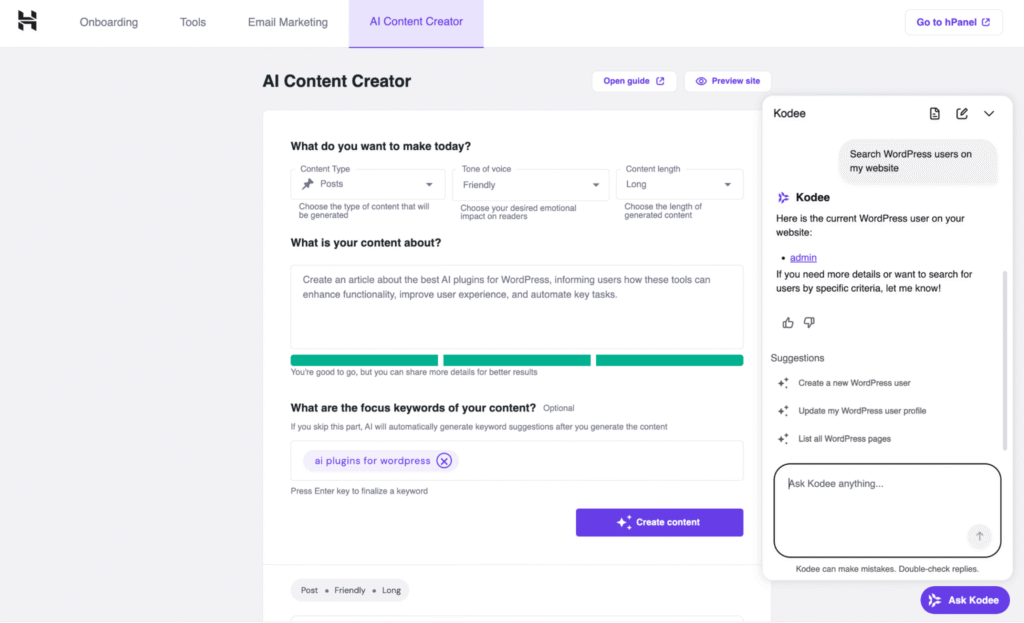
Hostinger AI is an AI content generation plugin built directly into the WordPress admin dashboard. It helps site owners draft blog posts, pages, and WooCommerce product descriptions without leaving the editor.
The plugin pairs with Kodee, an AI chatbot embedded in the WordPress dashboard that answers site management questions and performs over 350 admin-level actions, from changing themes to running backups.
Hostinger AI suits bloggers, small business owners, ecommerce operators, and anyone who wants AI-assisted writing without managing API keys or third-party accounts.
You can use it to generate full article drafts from a short topic description, get meta description and keyword suggestions, and ask Kodee to handle WordPress tasks you’d otherwise need to look up manually.
To use Hostinger AI, you need Hostinger managed hosting for WordPress with the Business + AI or Cloud Startup + AI plan. The plugin installs automatically during WordPress onboarding.
Hostinger AI pros
- No separate subscription or API key required. The plugin comes included with eligible hosting plans. You don’t need to track per-word credits or manage external accounts. Use it as much as you need.
- Built into the WordPress workflow. You generate content directly inside the dashboard. Choose a content type, set the tone of voice, describe your topic, add focus keywords, and click Create content. The draft appears in the post editor with one click.
- Kodee handles admin tasks beyond content. Kodee performs more than 350 admin-level actions, including migrations, backups, server health checks, and even Elementor Pro page edits.
- Multilingual support. Enter prompts in your preferred language, and the AI responds in kind. It works well for most widely spoken languages like English, Spanish, Arabic, Indonesian, Hindi, French, and Portuguese.
Hostinger AI cons
- Only available to Hostinger customers. The plugin is exclusive to selected plans. You won’t find it on WordPress.org, and the AI features stop working if you move your site to another host.
- Drafts still need editing. Like any AI content tool, the output requires review for accuracy, brand voice, and factual correctness before you publish.
- No model flexibility. You can’t choose a different AI provider or switch between models. The plugin runs on Hostinger’s AI infrastructure.
Hostinger AI pricing
Hostinger AI is free. There’s no separate subscription or credit system. It’s included with Business + AI (from RM16.99/month on a 48-month term) and Cloud Startup + AI (from RM49.00/month on a 48-month term) plans.
Both plans also include the AI Website Builder for WordPress, AI Troubleshooter, and unlimited AI tool usage with no per-generation limits.
2. Rank Math AI
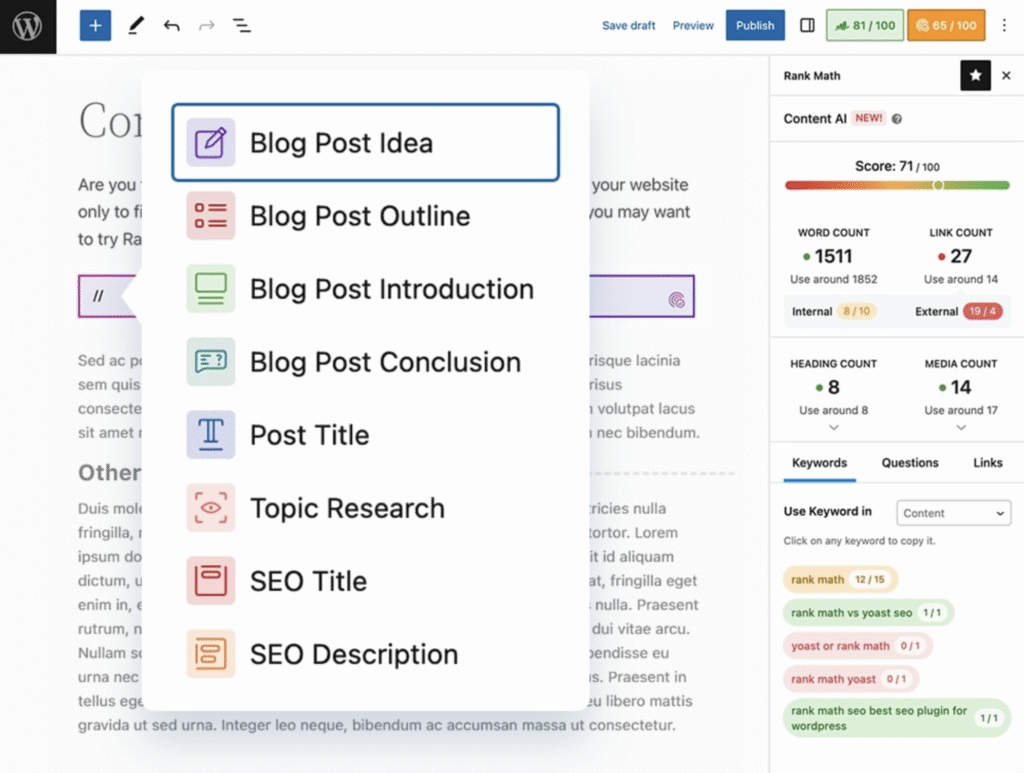
Rank Math is a WordPress SEO plugin that powers over 3 million sites. Its AI layer, called Content AI, adds credit-based content generation and optimization tools directly inside the WordPress editor.
Content AI targets bloggers, content marketers, SEO specialists, and agencies who want to create optimized content without switching between a writing tool, keyword research platform, and SEO scoring tool. One plugin handles all three.
Rank Math AI generates full articles from a keyword brief, provides real-time on-page SEO scores, and writes meta tags with AI assistance.
Notable features include RankBot, a 24/7 in-editor AI assistant for content suggestions and SEO questions, a library of more than 125 prebuilt prompts, support for content creation in 30 languages, and an AI Search Traffic Tracker that monitors referral traffic from tools like ChatGPT and Perplexity.
The plugin also integrates with Google Search Console, Google Analytics 4, the block editor, Classic Editor, and Divi.
Rank Math AI pros
- SEO scoring and AI writing in one plugin. Content AI analyzes top-ranking pages for your target keyword and gives real-time guidance on word count, heading count, keyword usage, and internal and external links while you write. You don’t need to switch between tools.
- Works with major editors and builders. It supports Gutenberg, Classic Editor, and Divi, so the AI tools stay available no matter which editor you use.
- Unlimited user seats on Content AI plans. Unlike many competitors that charge per seat, Rank Math lets you give Content AI access to unlimited users in your WordPress dashboard.
- AI traffic tracking. The AI Search Traffic Tracker filters referral traffic from ChatGPT, Perplexity, and similar tools. These are traffic sources that many analytics setups overlook entirely.
Rank Math AI cons
- Content AI requires a separate subscription. This catches many users off guard. The SEO plugin plans (PRO, Business, Agency) and the Content AI plans (Starter, Creator, Expert) are billed separately. If you want both technical SEO tools and AI writing, you’ll pay for two subscriptions.
- Credit-based system with monthly expiration. Every AI action uses credits. Each generated word costs one credit, alt text generation costs 50 credits, and the Fix with AI feature charges based on the number of words read and written. Unused credits don’t roll over.
- Support quality can vary. Some user reviews mention slow response times and generic replies for complex issues, especially around billing and renewals.
Rank Math AI pricing
Rank Math uses a freemium model with two separate pricing tracks.
The free SEO plugin on WordPress.org includes basic optimization features but no Content AI credits. Paid SEO plugin plans start at $7.99/month when billed annually.
Content AI plans start at $5.99/month with 7,500 monthly credits on annual billing. New paid SEO plugin subscribers get a 15-day free trial of Content AI.
3. WPBot
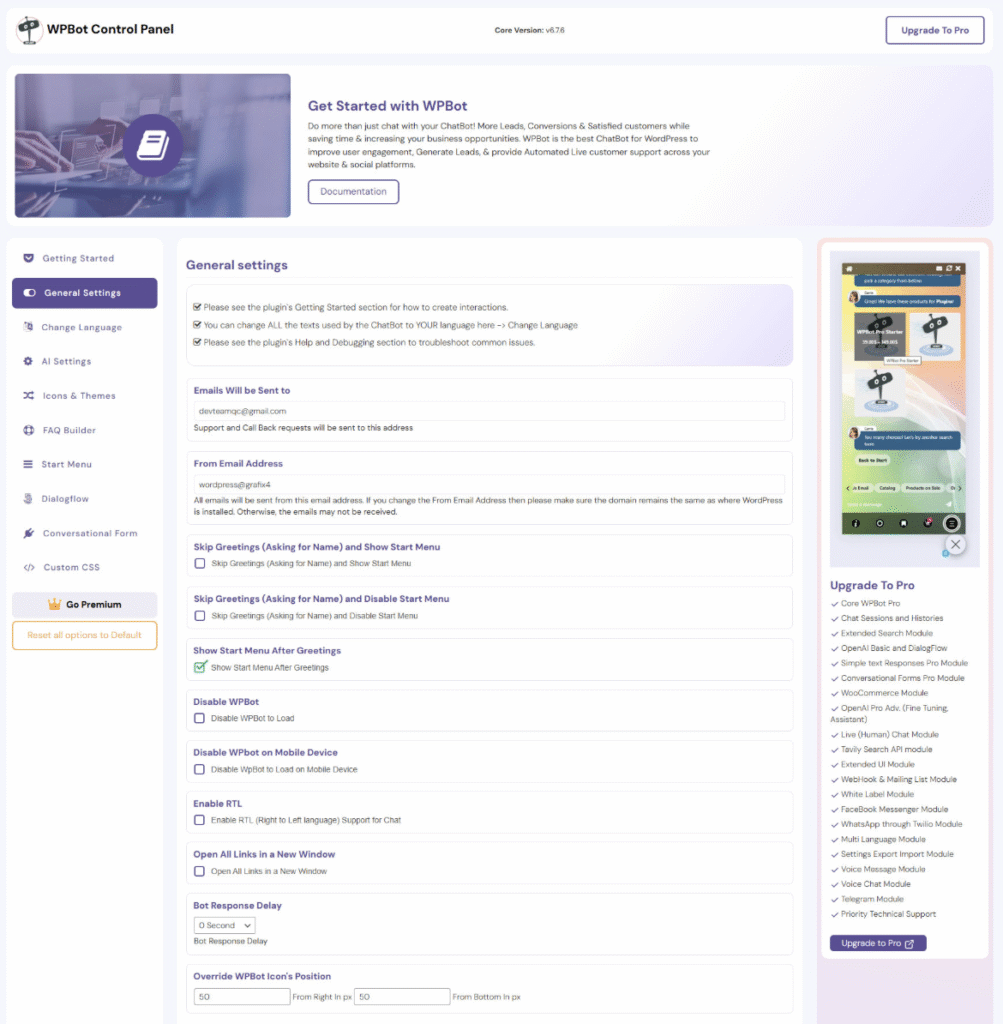
WPBot is a WordPress-native AI chatbot plugin developed by QuantumCloud. It provides 24/7 automated live chat support, lead generation, and user data collection, all managed from inside your WordPress dashboard.
The plugin works well for site owners and ecommerce businesses who want full control over their chatbot without SaaS lock-in, and for agencies deploying chatbots across multiple client sites.
Most users rely on WPBot for customer support automation, lead capture through conversational forms, FAQ handling, and WooCommerce product interactions.
What sets WPBot apart is its backend flexibility. It supports OpenAI (ChatGPT), Google Gemini, Dialogflow, and OpenRouter, which opens access to models like Claude, Grok, DeepSeek, Mistral, and Llama.
You can also skip external AI entirely and run it using built-in automation only.
WPBot also offers Retrieval-Augmented Generation (RAG) knowledge base training, voice chat, an AI-powered support ticket system, and a WooCommerce Bargaining Bot that lets shoppers negotiate prices directly in chat.
WPBot pros
- WordPress-native with no required SaaS dependency. Everything runs inside your WordPress dashboard, and data stays on your server. Privacy-focused site owners and agencies avoiding per-site SaaS fees benefit most from this setup.
- Flexible AI backend options. Choose OpenAI, Gemini, OpenRouter, Dialogflow, or skip external AI entirely. The built-in automation handles structured conversations, button-based flows, and FAQ responses without any API costs.
- Lifetime pricing available. Lifetime plans (Starter at $149, Professional at $279, and Master at $369) remove recurring fees. For agencies, this can significantly lower long-term costs compared to subscription-based tools.
- White-label support on the Master plan. Agencies can rebrand WPBot and deploy it on up to 50 client sites under their own branding, without per-site SaaS fees.
WPBot cons
- Advanced AI features require higher-tier licenses. Fine-tuning and training are limited to the Professional and Master plans, while the AI-powered support ticket system is only available on Master.
- AI API costs are separate. You pay for the WPBot license, then pay your AI provider (OpenAI, Google, etc.) for API usage on top of that. Costs increase with conversation volume, and WPBot doesn’t cap external API spending.
- Refunds only apply to technical issues. The company offers a 14-day money-back guarantee if the plugin doesn’t work as described and support can’t fix it. They don’t issue refunds for change-of-mind purchases or missing features.
WPBot pricing
WPBot offers annual and lifetime plans. Annual pricing starts at $39/year for one WordPress site, while lifetime plans start at $149 for five sites.
The free version on the WordPress plugin repository includes basic Q&A functionality, button navigation, and simple search features.
4. AI Engine
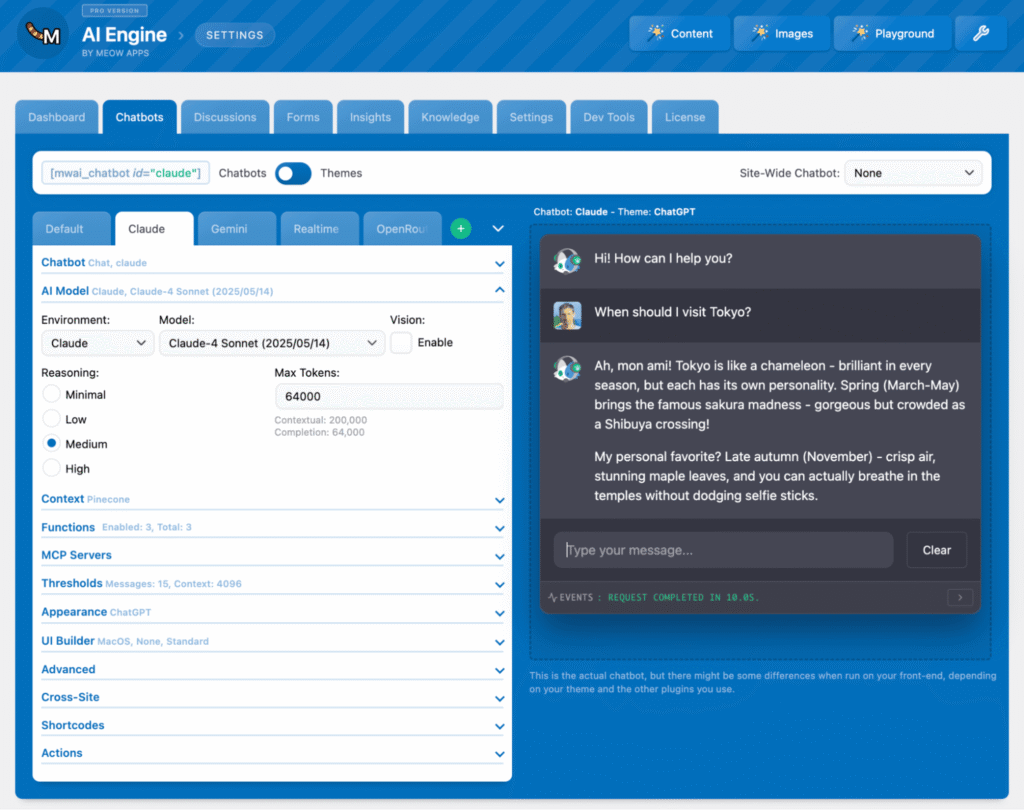
AI Engine arguably packs more AI features into a single free plugin than most competitors offer across their entire paid lineup. It combines chatbots, content generation, AI forms, embeddings, image creation, and a WordPress Model Context Protocol (MCP) server in one install.
The plugin serves a wide range of users: bloggers and solopreneurs who want AI writing help, developers building custom AI tools on WordPress, agencies managing multiple client sites, and ecommerce businesses that need AI-driven product and support workflows.
Its bring-your-own-API-key (BYOAK) model appeals to technically confident users who want full control over usage and costs.
The free version already includes an AI Copilot inside the editor, customizable chatbots with voice and memory, a content generator, image generation, a Playground for translations and text improvements, fine-tuning tools, and a WordPress MCP server.
The Pro version adds embeddings and vector database support, content-aware chatbot responses, AI Forms, real-time audio, cross-site chatbot deployment, and detailed usage statistics.
AI Engine pros
- BYOAK model keeps costs transparent. You pay your AI provider directly for what you use. For many site owners, that means API costs of only a few dollars per month instead of fixed subscriptions with credit limits.
- Multi-provider support with no lock-in. AI Engine works with OpenAI, Anthropic (Claude), Google Gemini, OpenRouter, Mistral, and others. Switch providers at any time or assign different models to different tasks.
- Advanced MCP implementation. AI Engine’s MCP tools let AI agents like ChatGPT and Claude manage parts of your WordPress site through natural language. They can handle posts, pages, plugins, themes, databases, and WooCommerce tasks. This goes far beyond a basic REST API integration.
- Active development cycle. The developer releases frequent updates based on user feedback. As of March 2026, the free version has received eight updates with new features and bug fixes this year alone.
AI Engine cons
- Steep learning curve for advanced features. The sheer number of settings and parameters can overwhelm users new to AI tools. Getting the most out of embeddings, fine-tuning, and MCP takes testing and experimentation.
- Support depends on the license type. Lifetime license holders receive support for the first year only. After that, you need to purchase a new yearly license to continue receiving support.
- No free trial for Pro features. AI Engine doesn’t offer a Pro trial. You can request a refund within two weeks of purchase by contacting its developer Meow Apps.
AI Engine pricing
AI Engine’s annual plans start at $59/year for one WordPress site. Lifetime plans start at $449 for five sites.
A no-support discount is available. Contact Meow Apps and mention “no-support” to request a reduced rate. In addition to the plugin fee, you’ll pay your AI provider’s API costs directly.
5. GetGenie
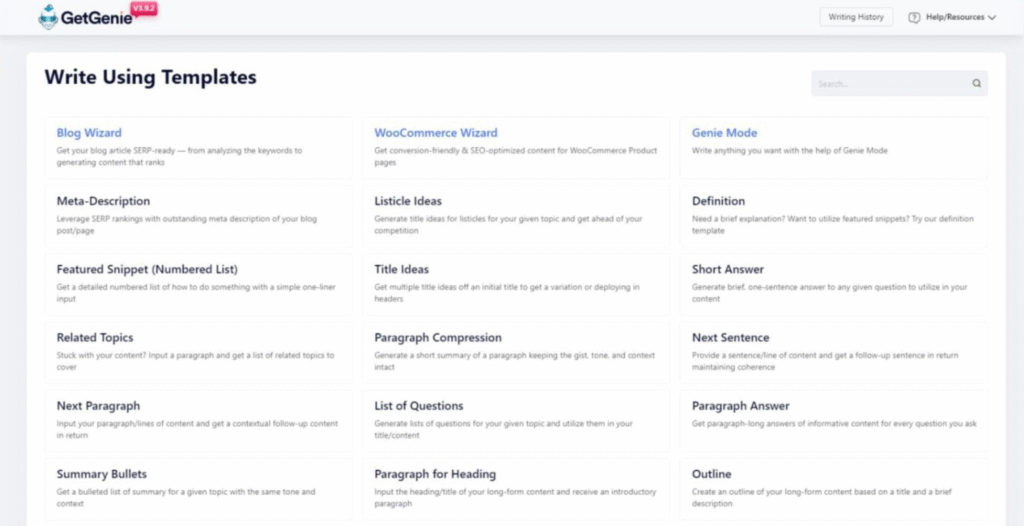
GetGenie is an all-in-one WordPress AI content and SEO assistant. It combines content generation with NLP-powered keyword research, SERP analysis, and competitor insights in a single plugin.
The plugin appeals to content marketers, SEO professionals, WooCommerce store owners, and agencies managing multiple client sites.
With GetGenie, you can create long-form blog posts, run keyword and SERP analysis, audit competitor content, and generate WooCommerce product descriptions.
It runs on OpenAI models and includes more than 30 AI writing templates, GenieChat with over 20 chat personalities, Genie Image for AI image generation, and one-click blog creation.
On the SEO side, it offers NLP keyword suggestions, search volume and competition data, Google Trends integration, head-to-head competitor analysis, content scoring, and a topical map builder.
GetGenie pros
- Unlimited user seats on all plans. Every team member can work under one subscription. This is rare, and it makes GetGenie especially cost-effective for agencies and in-house content teams.
- SEO research is built into the editor. Keyword research, SERP analysis, competitor scoring, and content optimization happen inside the writing workflow. You don’t need to bounce between separate SEO tools and WordPress.
- Templates aligned with AI-driven search. The AI Overview Answer Builder template targets Google’s AI Overviews, focusing on where search is heading rather than just traditional rankings.
- No API key setup required. GetGenie manages the AI connection through its own infrastructure, which removes a technical setup step for non-technical users.
GetGenie cons
- Word limits per plan. Monthly word limits can run out quickly for heavy users. A Fair Usage Policy also caps daily generation at 200,000 words, even on the highest-tier plan. This limit isn’t highlighted clearly on the Pricing page.
- Interface can feel complex at first. Some users report that the dashboard feels overwhelming, especially when switching between templates, SEO tools, and chat personalities.
- Bonus word packs cost extra. If you exceed your monthly limit, you’ll need to buy additional word packs or upgrade to a higher-tier plan. Unused bonus words do roll over and don’t expire.
GetGenie pricing
GetGenie uses a credit-based subscription model. The free plan includes 2,500 word credits. Paid plans start at $5.50/month when billed annually and include 20,000 AI words per month and 12 SERP analyses.
Higher tiers increase word limits, SERP analyses, and keyword tracking allowances. All plans include unlimited websites and unlimited user logins. A 14-day refund policy applies once per account.
6. Alt Text AI
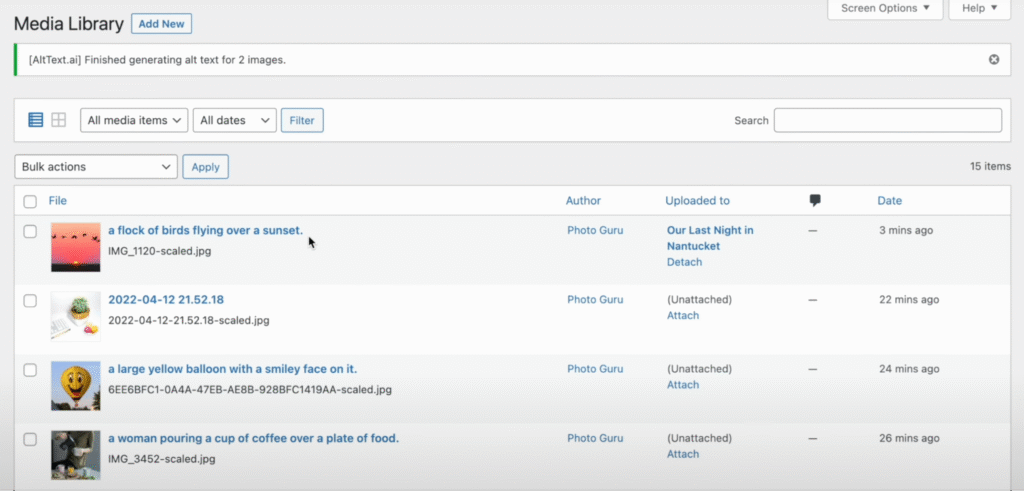
Alt Text AI automatically generates descriptive alt text for images using computer vision. This improves accessibility and helps AI search tools like ChatGPT and Perplexity understand what your images show.
If you manage a large WooCommerce catalog, run accessibility audits, publish in multiple languages, or prioritize Web Content Accessibility Guidelines (WCAG) compliance, this plugin fits naturally into that workflow.
Its Ecommerce Vision feature reads product titles, categories, and descriptions to generate context-aware alt text. Instead of generic image summaries, it produces descriptions that include brand, model, color, and material.
Alt Text AI also integrates focus keyphrases from Yoast SEO, Rank Math, All in One SEO, SEOPress, The SEO Framework, and SmartCrawl for natural keyword optimization.
It supports JPG, PNG, WebP, SVG, and AVIF formats, generates alt text in more than 130 languages, and offers bulk generation, WP-CLI support, and custom ChatGPT prompts for tone control.
Alt Text AI pros
- Unused credits roll over. Unlike many credit-based tools that wipe unused credits each month, Alt Text AI lets you carry them forward indefinitely.
- Ecommerce Vision creates product-aware descriptions. WooCommerce stores get alt text that includes product details like brand, model, color, and material instead of a vague visual description.
- No server strain. Alt Text AI processes images on its own cloud infrastructure. It temporarily processes images and deletes them immediately after generating alt text.
- Wide integration support. The plugin works with WordPress, WooCommerce, Divi, Beaver Builder, and Gutenberg. It also offers browser extensions for Squarespace and Webflow, and integrates with Shopify.
Alt Text AI cons
- Limited to alt text only. The plugin generates alt text but doesn’t fill in image titles, captions, or descriptions. Teams that want full media metadata automation will need additional tools.
- Credit costs increase for certain formats. SVG and AVIF images cost two credits each instead of one. High-volume stores operating in multiple languages may see costs add up quickly.
- No live chat support. Support is available through email and a contact form only. There’s no in-plugin assistant or real-time chat channel.
Alt Text AI pricing
Alt Text AI uses a credit-based system. One credit processes one image for JPG, PNG, GIF, WebP, or BMP formats. AVIF, HEIC, HEIF, JP2, SVG, and TIFF formats cost two credits per image. Each additional translated language costs one extra credit per image.
Plans start at $5/month for 1,200 credits. A free trial includes 25 credits with full feature access, and you don’t need a credit card. You can also buy one-time credit packs, such as 50 credits for $3.
7. Tidio
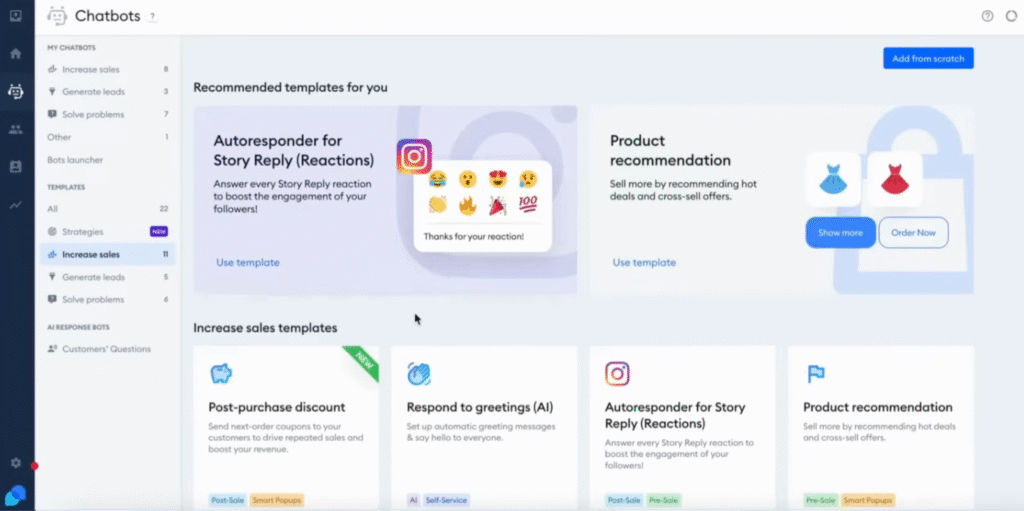
Tidio is a live chat and customer service platform with a WordPress plugin. It combines real-time human chat with Lyro, a proprietary conversational AI agent that understands customer questions and responds in natural language.
The platform works best for ecommerce businesses and support-driven WordPress sites where real-time engagement directly affects conversions and customer retention.
Lyro learns from your help center, website content, PDFs, or CSV files. You don’t need to build complex flows or write training scripts. It also tracks conversational context, so interactions feel continuous instead of fragmented.
Beyond Lyro, Tidio includes Flows, a no-code automation builder for lead generation, abandoned cart recovery, and FAQ deflection.
It also offers an omnichannel inbox that combines live chat, email, Messenger, and Instagram, plus mobile apps for iOS and Android.
Tidio pros
- Lyro reports strong resolution rates. According to Tidio, Lyro automates around 67% of customer inquiries on average. The company also guarantees at least a 50% resolution rate, or your money back.
- Learns from existing content. Point Lyro at your help center and website content, and it starts responding. You don’t need to build a single manual flow.
- Unified inbox. Messages from live chat, email, Messenger, and Instagram appear in one dashboard. Less context switching for support teams.
- Proactive engagement tools. Flows can trigger personalized messages based on visitor behavior, such as pages viewed, time on site, or location. You can recover abandoned carts or offer discounts in real time.
Tidio cons
- Usage limits can be confusing. Tidio applies three separate quotas at once: billable conversations, Lyro AI conversations, and visitors reached through Flows. A single interaction can count toward more than one limit, so usage may run out faster than expected.
- Free Lyro quota is limited. You get 50 Lyro AI conversations for the lifetime of your account, not per month. Ongoing AI-powered support requires a paid plan.
- No bring-your-own-AI-key option. Tidio runs on its own AI infrastructure. You can’t connect your own AI provider or customize the underlying model.
Tidio pricing
Tidio uses a conversation-based pricing model. Customer service plans start at $24.17/month for 100 billable conversations and include 50 Lyro AI conversations as a one-time bonus.
A free plan includes 50 billable conversations per month.
Lyro AI Agent plans start at $32.50/month for 50 AI conversations and scale with volume. Annual billing gives you the equivalent of two months free.
8. Weglot
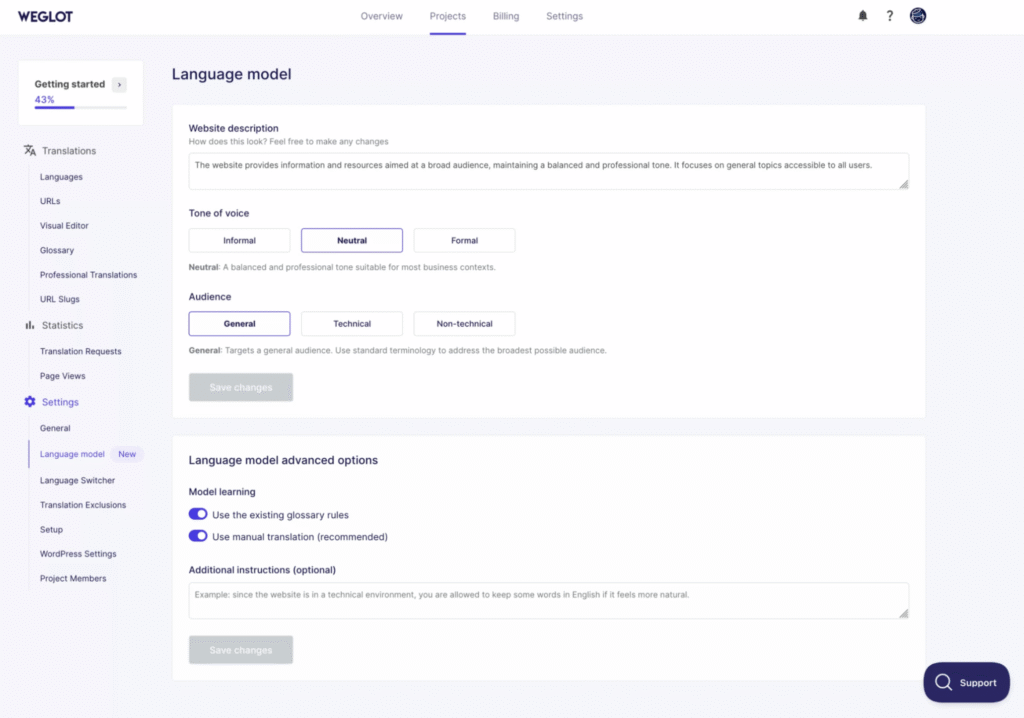
Weglot is a cloud-based WordPress translation plugin that goes beyond static machine translation.
It combines AI-powered translation from DeepL, Google Translate, and Microsoft Translator with a custom AI language model that adapts to your brand voice over time.
This plugin translates pages, posts, and WooCommerce stores without coding. It also handles multilingual SEO automatically, including hreflang tags, translated metadata, and localized URLs.
Weglot is especially useful for non-technical site owners who want professional multilingual SEO without writing code, and for WooCommerce stores that manage hundreds of daily product updates across multiple languages.
The custom AI language model is powered by OpenAI and Gemini. It improves by learning from your edits, glossary rules, and brand guidelines. A visual translation editor lets you refine translations directly on your live site.
Weglot pros
- Custom AI language model improves over time. The system learns from your editorial decisions and glossary entries, producing more consistent translations than static machine translation tools. The more you edit, the better it gets.
- No performance impact. Weglot runs as a cloud proxy, so translation processing happens on its own servers. Your site speed and Core Web Vitals aren’t affected by the translation layer.
- Automatic multilingual SEO. Weglot automatically generates hreflang tags, translated metadata, and localized URLs. You don’t need extra configuration or an additional SEO plugin.
- Automatic browser language detection. Visitors see content in their browser’s language by default, reducing friction for international audiences.
Weglot cons
- Translations are hosted on Weglot’s servers. If you stop using the service, your site no longer displays translated content. You can export translations before canceling, but this setup creates vendor dependency worth considering long-term.
- Word-count pricing increases quickly for large sites. The translated word limit applies across all languages. Content-heavy sites operating in multiple languages can quickly hit higher pricing tiers.
Weglot pricing
Weglot uses a word-count-based pricing model. A free plan includes one additional language and up to 2,000 translated words.
Paid plans start at $17/month for 10,000 words and one translated language, with higher tiers offering larger word limits and more languages. All paid plans include a 14-day free trial, and you don’t need a credit card.
9. AI Puffer
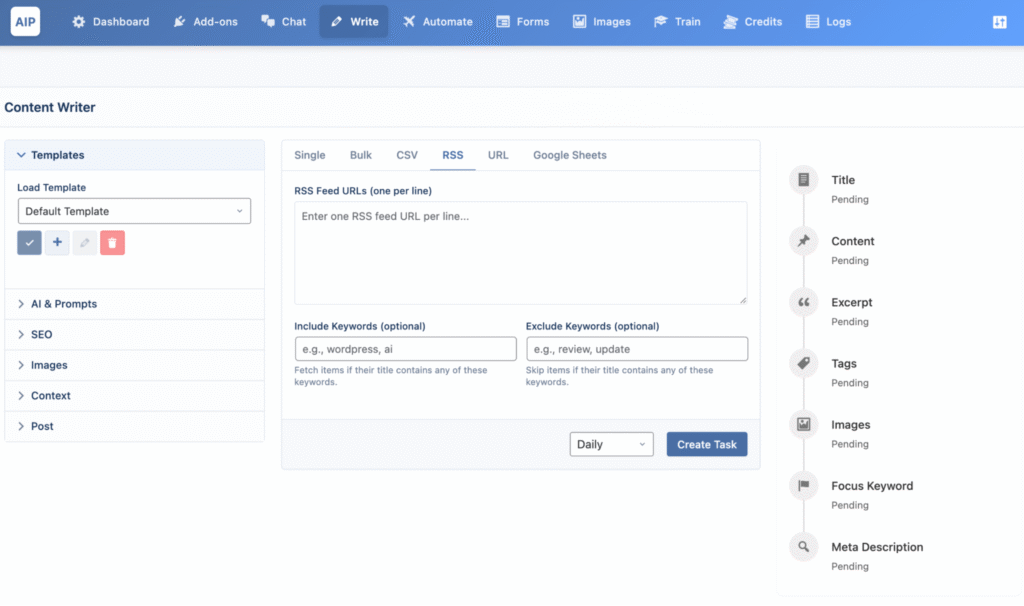
AI Puffer, formerly AI Power, is a full-spectrum AI toolkit for WordPress. It covers chatbots, content generation, image and video creation, AI forms, automation scheduling, and vector database training in a single plugin.
The plugin is suitable for content creators, marketers, agencies, and WooCommerce store owners who want to integrate generative AI deeply into their WordPress workflow without stacking multiple plugins.
AI Puffer follows a BYOAK model. It supports OpenAI (GPT-5, GPT-4o), Google Gemini and Imagen, Microsoft Azure, OpenRouter, DeepSeek, Replicate, and Ollama for local or offline AI use.
Recent updates added Google Veo 3 video generation, Imagen 4 support, Ollama local AI integration, Realtime Voice Agents, structured output as Gutenberg blocks, and an Embed Anywhere feature for deploying chatbots on non-WordPress sites.
AI Puffer pros
- Extensive AI provider support. AI Puffer connects to a wide range of providers, from OpenAI GPT-5 to local AI through Ollama. Choose models based on cost, performance, or privacy needs.
- BYOAK model keeps costs transparent. You use your own API accounts and pay providers directly. There are no bundled credits or hidden usage limits. For light usage, costs can stay under a few dollars per month.
- REST API access in the free version. Developers can programmatically access text, image, embedding, and chatbot functions. This enables custom integrations beyond the plugin’s built-in interface.
AI Puffer cons
- Frequent rebranding may cause confusion. The plugin has changed names multiple times, from GPT-3 Writer to AI Power to AIP and now AI Puffer. The WordPress slug still reads gpt3-ai-content-generator, and the official website remains aipower.org.
- Free version limits advanced features. File uploads, RSS and URL-based automation, and Realtime Voice Agents require a Pro plan. The wide range of tools can also make the interface feel cluttered for new users.
- No full 24/7 support. Support runs 24 hours a day from Monday through Friday only. Teams that need weekend coverage may face delays.
AI Puffer pricing
The free version includes the core chatbot, content writer, image generator, and AI forms. The Pro plan starts at $9.99/month for one site and scales up for multi-site licenses.
10. Uncanny Automator
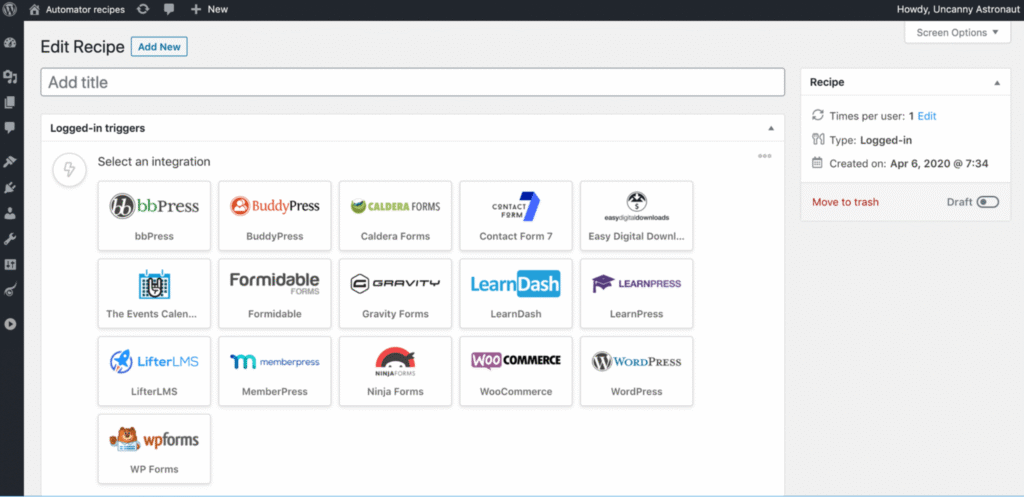
Uncanny Automator isn’t a typical AI plugin. Instead, it’s a no-code automation plugin that connects plugins, sites, and external apps using trigger-and-action recipes.
Think of it as a “Zapier for WordPress,” but with deeper native integrations and lower long-term costs.
What makes it relevant here is its AI integration. It supports multiple AI providers, including OpenAI, Anthropic Claude, Google Gemini, Mistral, Perplexity, and xAI Grok.
These integrations turn it from a workflow automation tool into an AI-powered automation platform.
Uncanny Automator works for almost any WordPress site. Ecommerce, membership, e-learning, and community sites typically see the biggest time savings.
With more than 220 integrations and over 10,000 triggers, actions, and tokens, it can automate nearly any workflow between WordPress plugins and external apps.
AI-focused features include multi-provider text generation inside automation recipes, AI image generation that uploads directly to your media library, sentiment analysis for form entries and reviews, automated proofreading workflows, and real-time AI output displayed on WordPress pages through the Dynamic Content Addon on the Elite plan.
Uncanny Automator pros
- AI outputs respond to real site activity. Instead of generating content from generic prompts, Automator triggers AI actions based on real WordPress events like form submissions, purchases, or course completions.
- Multi-LLM support in a single workflow. You can chain multiple AI models within a single recipe or switch providers as pricing and capabilities change. You’re not locked into one vendor.
- Unlimited recipes and runs on paid plans. All paid tiers allow unlimited automation recipes and executions. You don’t need to track usage caps.
- Free version offers real value. The free plugin on WordPress.org includes unlimited WordPress-to-WordPress automations and 250 free app integration credits.
Uncanny Automator cons
- AI API costs are separate. You need your own API keys and pay providers directly. OpenAI API access isn’t included with a ChatGPT Plus subscription, so you’ll need a separate API account.
- Possible timeouts on restrictive hosting. OpenAI responses can take 5 to 30 seconds. In environments with strict timeout limits, the free version may time out before the AI responds, since follow-up actions wait for the AI’s output.
- Advanced integrations require the Elite plan. The Dynamic Content Addon and integrations like Salesforce and QuickBooks Online are only available on the Elite tier at $399/year.
Uncanny Automator pricing
Pricing starts at $149/year for one WordPress site and scales up to 50 sites on the highest tier. All paid plans include a 14-day, no-questions-asked refund policy.
How to choose the right AI plugin for your WordPress site
Choosing the right AI plugin means matching your workflow needs with a plugin’s core strengths, then confirming compatibility, reviewing long-term costs, and assessing the quality of ongoing support.
Start with these factors:
- Identify your primary use case. A site that needs AI-generated blog posts has different requirements than one that needs a customer support chatbot or automated accessibility tagging. Hostinger AI and GetGenie focus on content generation. WPBot and Tidio specialize in conversational AI. Uncanny Automator centers on workflow automation. Picking a tool aligned with your top priority helps you avoid paying for features you won’t use.
- Check compatibility with your existing stack. Make sure the plugin works with your page builder or editor (such as Gutenberg or Divi), your SEO plugin (such as Yoast), and your ecommerce setup (typically WooCommerce). Plugin conflicts are a common cause of WordPress site issues. Test new tools on a staging environment before deploying to production.
- Evaluate the pricing model carefully. Credit-based systems like Rank Math Content AI, GetGenie, Alt Text AI, and Weglot charge per action and can become expensive at scale. BYOAK models like AI Engine, AI Puffer, WPBot, and Uncanny Automator offer more cost control but require separate API accounts. SaaS-based platforms like Tidio simplify setup but lock you into their infrastructure, and modular pricing can become harder to predict as you scale.
- Match the tool to your technical comfort level. Hostinger AI and GetGenie don’t require an API key, making them accessible to non-technical users. AI Engine and AI Puffer offer deeper customization, but you’ll need a solid understanding of AI concepts to use their advanced features effectively.
Then evaluate these ongoing factors:
- Check update frequency. Actively maintained plugins adapt faster to new AI models and WordPress changes. AI Engine releases frequent updates, and AI Puffer recently added support for GPT-5 and Veo 3. Outdated plugins increase security and compatibility risks.
- Read recent user reviews, not just overall ratings. A high lifetime rating can hide recent problems. Check the latest feedback on the WordPress plugin repository and look for patterns in complaints about support quality, pricing changes, or breaking updates.
- Verify the support structure. Free plugins usually offer community forum support only. Paid plans vary widely. Some offer 24/7 priority support, like Hostinger AI. Others limit support to the first year, as with AI Engine lifetime plans. Some tie support levels to license tiers, as with WPBot.
Future trends in AI for WordPress websites
Future trends in AI for WordPress websites point toward intelligent, adaptive systems that handle personalization, optimization, and site management with minimal manual input.
Capabilities like MCP integration, voice AI, and real-time content personalization are already appearing in today’s plugins.
AI-powered analytics will also play a larger role. These tools help site owners understand visitor behavior without relying on manual reports or complex dashboards.
These changes are reshaping how content teams operate. Instead of focusing only for traditional search rankings, teams are also optimizing for AI-generated answers and conversational discovery.
For businesses adopting AI now, the advantage is clear: WordPress sites that support agentic workflows, voice interaction, and personalized experiences will be better positioned as these features become standard expectations.
All of the tutorial content on this website is subject to Hostinger's rigorous editorial standards and values.

Ariffud is a Technical Content Writer with an educational background in Informatics. He has extensive expertise in Linux and VPS, authoring over 200 articles on server management and web development. Follow him on LinkedIn.