Email hosting vs web hosting: Key differences explained
May 22, 2026
/
Bruno S.
/
9 min Read

Email hosting manages your mail servers and handles all incoming and outgoing messages, while web hosting stores your website files and delivers them to visitors through a browser. Both services run on servers, but they serve entirely different functions.
People compare the two because launching an online business usually requires both a website and a reliable communication system. The confusion starts when hosting providers bundle email accounts into web hosting plans, making it unclear whether you’re getting a full email solution or just a basic add-on.
The core difference comes down to infrastructure: email hosting runs on mail servers built for message delivery, while web hosting runs on web servers designed to serve website content.
The table below breaks down how the two services differ across the most important dimensions:
Dimension | Email hosting | Web hosting |
Purpose | Manages email infrastructure | Delivers website content |
Infrastructure | Mail servers (SMTP, IMAP, POP3) | Web servers (HTTP/HTTPS) |
Storage | Mailboxes, attachments, contacts | HTML files, images, databases |
Security | Spam filtering, SPF/DKIM/DMARC | SSL certificates, firewalls |
Dependency risk | Email downtime doesn’t affect your site | Web server outage can take down bundled email |
Use cases | Business communication, professional branding | Publishing websites and web applications |
Many web hosting plans include basic email accounts. This bundled email runs on the same server as your website, which creates a single point of failure: if the web server goes down, your email stops working too.
Dedicated email hosting runs on a separate infrastructure built exclusively for mail delivery, which means better spam filtering, higher deliverability, and uptime that operates independently of your website.
What is email hosting?
Email hosting is a service that stores your email accounts on a dedicated mail server and manages all the infrastructure required to send, receive, and organize messages.
When you send an email, the mail server uses SMTP (Simple Mail Transfer Protocol) to deliver it to the recipient’s server.
When the recipient checks their inbox, their client retrieves messages using either IMAP (Internet Message Access Protocol) or POP3 (Post Office Protocol 3). IMAP syncs messages across all devices without removing them from the server. POP3 downloads them to a single device and typically deletes them from the server afterward.
Email hosting stores your emails, attachments, drafts, sent items, and contacts – all of which live on the mail server and are accessible through any email client you connect to it.
Three factors directly affect email deliverability:
- Spam filtering – blocks malicious and unwanted messages before they reach your inbox and keeps your outgoing messages out of recipients’ spam folders
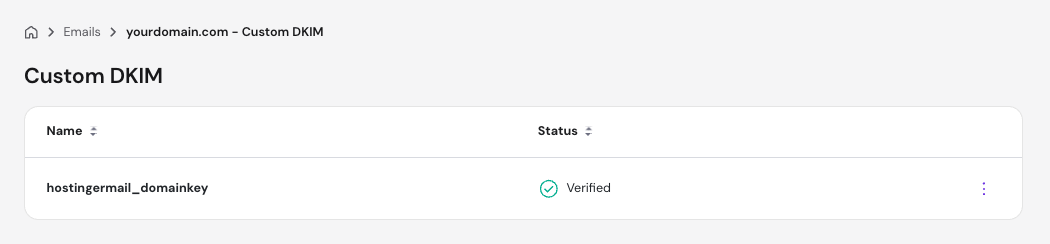
- Email authentication – SPF, DKIM, and DMARC records verify your sender identity, which improves deliverability and prevents spoofing
- Uptime – mail server availability determines whether your messages get through; a server that goes offline means delayed or failed delivery
What is web hosting?
Website hosting is a service that stores your website’s files on a server and makes them accessible to anyone who types your domain name into a browser.
When a visitor enters your URL, their browser sends an HTTP or HTTPS request to your web server, which returns the files needed to display your site. Without web hosting, there is no server to receive browser requests or return your site’s files.
Web hosting stores HTML files, CSS stylesheets, JavaScript, images, videos, and the databases that power your site’s content and functionality.
Four factors determine how well your website performs:
- Speed – server response time and resource allocation affect how fast pages load for your visitors
- Uptime – higher uptime guarantees mean fewer gaps in availability; most reliable web hosting providers target 99.9% uptime or above
- Bandwidth – the amount of data your server transfers per month determines how much traffic your site handles before slowing down or going offline
- Server location – servers physically closer to your visitors reduce latency and improve load times
What are the key differences between email hosting and web hosting?
Email hosting manages mail server infrastructure for message delivery, while web hosting manages web server infrastructure for serving website content. The two services use different protocols, prioritize different performance metrics, and protect against different security threats.
Purpose. Web hosting gives your business a public presence on the internet, while email hosting gives it a dedicated communication channel. Both run on servers, but each is optimized for a completely different function.
Storage type. Web hosting stores structured site data (pages, images, and databases) while email hosting stores message data, including individual emails, attachments, and contact records. These storage systems are built differently, which is why running both on the same server creates performance trade-offs.
Protocols. Web hosting serves content over HTTP or HTTPS, while email hosting uses SMTP for sending and IMAP or POP3 for retrieval. Each protocol has different reliability and security requirements, which dedicated services handle better than bundled solutions.
Security. Web hosting security protects against unauthorized access, injection attacks, and malicious traffic, while email hosting security focuses on blocking spam, verifying sender identity, and preventing spoofing. These are distinct threat models that require purpose-built tools.
Dependency risk. Web hosting failure affects your website and any bundled email running on the same server, while email hosting failure affects only your communication. Separating the two services means neither takes the other down during an outage.
Can web hosting include email hosting?
Yes, many web hosting plans include basic email hosting as part of the package. Most shared hosting providers let you create custom-domain email addresses directly from their control panel, so you can run, say, alex@domain.tld alongside your website without paying for a separate service.
Bundled email works by allocating space on the same server for both your website files and your mailboxes. It’s common in shared hosting because it lowers the cost and complexity for users who only need a basic email setup, since everything is managed from one dashboard with no additional configuration required.
This convenience, however, usually comes with a few limitations:
- Limited mailbox storage – shared hosting plans typically cap storage per mailbox, which creates problems as email volume grows.
- Weaker spam protection – basic spam filtering tools don’t match the accuracy of dedicated email services.
- Shared infrastructure – your mailboxes compete for the same server resources as your website, which can affect the performance of both.
- Dependency on web server uptime – if your web hosting plan goes down, your email stops working at the same time.
While a web server outage that takes your site offline for a few hours is manageable, an outage that simultaneously cuts off your email means missed orders, unanswered support requests, and lost revenue – all from a single point of failure.
Which is better: email hosting or web hosting?
Email hosting and web hosting are not alternatives: they solve different problems. A website without email hosting still works perfectly as a site, and an email hosting plan without web hosting still delivers messages.
The two services operate independently, which means comparing them as if one replaces the other misses the point entirely.
The right question is whether your current setup matches your actual reliability, security, and scalability requirements: a personal blog with low email volume, for example, has different needs than a business handling daily client communication.
The table below breaks down where each option stands.
Factor | Dedicated email hosting | Bundled email (via web hosting) |
Reliability | Dedicated uptime SLAs independent of your website | Tied to web server uptime; one outage affects both |
Security | Advanced spam filtering, full SPF/DKIM/DMARC support | Basic spam filtering with limited authentication options |
Scalability | Scales independently per mailbox and storage needs | Limited by the resources allocated in your hosting plan |
Cost | Additional monthly expense on top of web hosting | Included in most shared hosting plans |
Best use case | Businesses, client-facing teams, high email volume | Personal sites, small projects, low email volume |
Why businesses choose dedicated email hosting
Dedicated email hosting runs on infrastructure built exclusively for mail delivery, which gives it a clear edge over bundled solutions in four areas:
- Uptime reliability. Dedicated mail servers maintain their own uptime independent of your website. Web hosting outages have no effect on your inbox: your team keeps sending and receiving messages regardless of what happens to your site.
- Spam filtering and security. Enterprise-grade spam filtering blocks threats with significantly higher accuracy than the basic tools included in shared hosting plans. Dedicated email hosting also provides full support for SPF, DKIM, and DMARC authentication, which protects your domain from spoofing and keeps your outgoing messages out of recipients’ spam folders.
- Email deliverability. Dedicated mail servers operate on clean IP addresses with established sender reputations. Messages sent from these servers reach inboxes reliably; shared hosting IP addresses, by contrast, are used by many accounts simultaneously, which increases the risk of your emails being flagged as spam.
- Professional branding. A custom domain email address, such as alex@domain.tld instead of alex@gmail.com, signals that your business is established and legitimate. Clients and partners notice the difference, and it directly affects how much trust your communication carries.
Some of the most widely used dedicated email hosting platforms include Google Workspace, Microsoft 365, and Zoho Mail.
Each provides custom domain email on top of separate productivity tools, admin controls, and storage, all running on infrastructure that is independent of your web hosting setup.
When bundled email hosting is enough
Bundled email hosting covers the needs of users who don’t rely on email as a core part of their business operations. Three scenarios where it works well:
- Personal websites. A portfolio site or personal blog rarely generates significant email volume. Bundled email handles occasional contact form replies and low-frequency correspondence without any issues.
- Small projects. A side project or early-stage website doesn’t need enterprise-grade infrastructure. Bundled email keeps costs low and setup simple while the project is still finding its footing.
- Low email volume. If your inbox handles a handful of messages per day and downtime isn’t a business-critical concern, the limitations of bundled email (i.e. limited storage, basic spam filtering, shared infrastructure) are unlikely to cause real problems.
Once email becomes a primary channel for client communication, customer support, or sales, those limitations start to matter. That’s the point where dedicated email hosting becomes the more practical choice.
When should you use web hosting vs email hosting?
The right service depends on what you’re actually trying to accomplish. Web hosting and email hosting solve different problems, and the decision comes down to whether you need an online presence, a communication system, or both.
Situation | What you need |
Building or running a website | Web hosting |
Managing business communication | Dedicated email hosting |
Running a business with both needs | Both, running independently |
In short, use web hosting when you need to publish a website, blog, or web application. Every website needs a server to store its files and respond to browser requests – web hosting is that foundation, regardless of what email setup you pair it with.
On the other hand, use dedicated email hosting when you manage client communication, run a customer-facing inbox, or send emails under a custom domain at any meaningful volume. Bundled email works at first, but a business that depends on email for revenue can’t afford the reliability and deliverability gaps that come with shared infrastructure.
You can also use both separately when your business relies on both an online presence and consistent communication. Running them on the same server creates a single point of failure that puts both at risk.
Here are some real-world scenarios:
- Personal blog – web hosting only. Bundled email handles the occasional reader reply without any issues.
- Small business – web hosting plus dedicated email hosting. Client proposals, invoices, and support requests need reliable delivery and professional branding that bundled email doesn’t consistently provide.
- Growing company – both, running independently. As email volume increases and teams expand, dedicated infrastructure handles the load without competing for resources with the website.
Do you need both email hosting and web hosting?
Most businesses need both email hosting and web hosting, they just don’t need to run them on the same server. Each service handles a completely different function. Web hosting keeps your website accessible to visitors. Email hosting keeps your communication running regardless of what happens to your website infrastructure.
The two services work together without depending on each other. Your website talks to browsers over HTTP/HTTPS. Your mail server talks to other mail servers over SMTP. These systems operate on separate protocols and separate infrastructure, which means neither one needs the other to function.
Separating them produces two concrete improvements.
Reliability improves because a web server outage no longer takes your email offline at the same time – each service maintains its own uptime independently.
Security improves because each service runs on purpose-built infrastructure with its own protection model, rather than sharing a generic server environment that has to cover both threat landscapes at once.
How to choose the right hosting setup for your needs
The right hosting setup depends on your goals, your email volume, and how much downtime you can tolerate. Work through these five steps before committing to a plan:
- Identify your main goal. Decide whether you need a website, a professional email system, or both. If you need a website, choosing a web hosting provider starts with understanding what type of plan matches your traffic and storage requirements. If you need business email, decide whether bundled email covers your requirements or whether dedicated email hosting is worth the additional cost.
- Evaluate your reliability requirements. Ask yourself what happens if your web server goes offline for two hours and your email stops working at the same time. If that scenario is unacceptable, separate your services. If your email volume is low and occasional downtime is manageable, bundled hosting is fine.
- Assess your security needs. Basic spam filtering works for personal email with low stakes. If you handle client data, financial communication, or customer support, you need the advanced filtering and full SPF/DKIM/DMARC authentication that dedicated email hosting provides.
- Consider scalability. Web hosting scales by traffic and storage. Email hosting scales by mailbox count and storage per account. Estimate how both needs grow over the next 12 months and choose plans that accommodate that growth without requiring a full migration.
- Compare bundled vs separate costs. Weigh the full cost of a web hosting plan that includes email against a dedicated web host paired with small business email hosting providers like Google Workspace or Zoho Mail. The price gap is often smaller than expected, and the reliability difference is significant.
How to get started with email hosting
A custom domain email address is one of the simplest ways to establish credibility with clients and partners. An address like name@domain.tld signals that your business is legitimate and invested in professional communication.
That address requires email hosting. Without a mail server connected to your domain, there’s nothing to send or receive messages on your behalf.
Hostinger Business Email hosting gives you a dedicated mail server with up to 50 GB of storage per mailbox, spam and phishing protection, end-to-end encryption, and support for up to 3,000 outgoing emails per day – all on infrastructure that runs independently of your website.
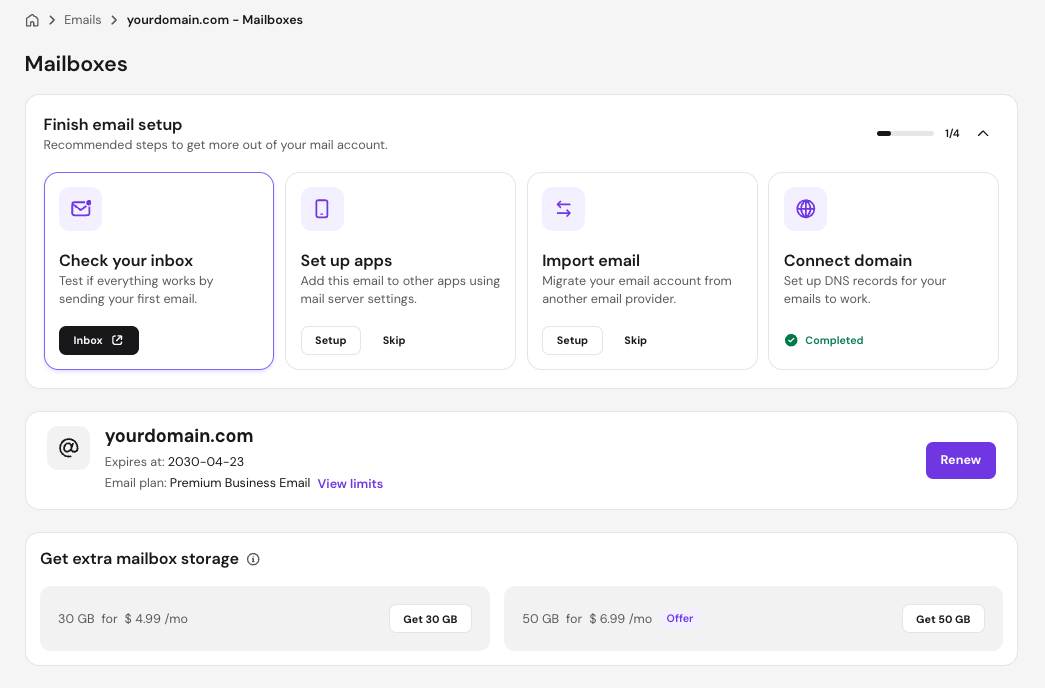
Plans start at $0.39/month per mailbox. Setup takes minutes from hPanel: you choose your plan, connect your domain by updating your DNS records, and create your mailboxes. AI assistant Kodee walks you through each step of creating a professional email address, from DNS configuration to connecting your inbox to an email client.


Bruno is a Content Writer at Hostinger, focused on creating and optimizing helpful, engaging articles about web development and marketing. With a background in journalism, he combines storytelling with practical insights to make complex topics easier to understand. He has also contributed to publications like MacMagazine and Jornal A Tarde. Outside of work, Bruno enjoys exploring art, cooking, and technology.