What is email encryption and how does it secure your messages?
Apr 07, 2026
/
Ksenija
/
14 min Read
Email encryption protects email messages by turning readable content into encoded ciphertext that only an authorized recipient can decrypt.
It helps keep secure email communication private while messages are sent, received, and stored, which matters when emails contain passwords, personal data, financial records, contracts, or internal business information.
Without email encryption, a message can be exposed at multiple points along the way. Attackers may intercept traffic, access stored emails, or use weakly protected communication to support phishing, spoofing, and data breach attempts.
Encryption does not solve every email threat on its own, but it does protect the message content itself from unauthorized access.
That protection works through cryptographic keys. One system encrypts the message, and the right key on the recipient’s side decrypts it back into readable text.
An encrypted email follows a simple path: the sender writes the message, the system encrypts it before or during delivery, it travels as unreadable data, and the recipient uses the correct key to open it.
What is email encryption?
Email encryption is the process of protecting email messages using cryptography so that only the intended recipient can read them. It turns readable content into coded data that cannot be understood without the correct key.
At a basic level, encryption converts your message from plain text to ciphertext, making it look like random characters.
Emails travel across multiple servers before reaching the recipient. Without encryption, every step along that path is a potential point at which someone could intercept and read the message.
Encryption protects three core aspects of email communication:
- Confidentiality – Only the intended recipient can read the message.
- Integrity – The message cannot be altered without detection.
- Authentication – The recipient can verify who actually sent the message.
This directly prevents common attacks such as:
- Network interception (e.g., someone monitoring public Wi-Fi).
- Man-in-the-middle attacks (where an attacker tries to read or alter messages in transit).
- Unauthorized access to email servers or backups.
Encryption also plays a central role in meeting regulatory requirements. Laws like GDPR (data protection in the EU), HIPAA (health data in the US), and financial data regulations all require sensitive information to be protected in transit.
Sending unencrypted emails with personal, medical, or financial data can lead to fines and legal exposure.
How does email encryption work?
Email encryption works by turning a readable message into protected data that only the right recipient can unlock.
The basic flow is simple: you write an email, an encryption system scrambles it using a cryptographic key, and the recipient’s system uses the right key to turn it back into readable text.
The easiest way to understand this is to think of a normal email as a letter in a clear envelope. Anyone who gets hold of it can read it. An encrypted email is the same letter placed inside a locked container.
The message still moves through email servers and networks, but people who intercept it cannot make sense of what they see.
At the center of this process are two things: encryption algorithms and cryptographic keys.
An encryption algorithm is the mathematical method that scrambles the message. A cryptographic key is the secret value that tells the system how to lock or unlock that message.
1. Generate cryptographic keys
Email encryption starts with cryptographic key generation. This is the step where a user or system creates a matched pair of keys: one public key and one private key.
The public key is the one you share. Other people use it to encrypt messages meant for you.
The private key is the one you keep secret. It is used to decrypt those messages when they arrive. Private keys are usually protected with strong passwords, secure storage, hardware security modules, or managed key systems inside business email platforms.
A simple way to picture this is to think of the public key as an open padlock and the private key as the only key that can open it.
You can hand the padlock to anyone who wants to send you something securely. They can lock the box, but they cannot unlock it afterward. Only you can do that because only you have the private key.
This is what makes public key encryption practical for email. You do not need to agree on a shared secret with every person before they contact you. Instead, your system creates the key pair once, publishes the public key, and protects the private key on your side.
Key generation is handled by cryptographic algorithms. These algorithms create keys using carefully designed mathematical processes that make them hard to guess or break.
The strength of encrypted email depends heavily on this step. If the key pair is weak, the protection is weak as well. If the key pair is generated securely and stored properly, the whole system is much harder to attack.
In most real-world setups, users do not generate keys by hand. The email platform, security tool, or IT team does it automatically.
For example, a secure email service might create a key pair when an employee account is set up. The system then stores the private key securely and makes the public key available so others can send encrypted messages to that employee.
2. Encrypt the email message
Encryption happens before the message is sent, so the content is protected before it starts moving across the internet.
In a secure setup, your email client or encryption tool takes the message you wrote and converts it from readable text into encrypted data.
That means the email leaves your device in a protected form rather than as plain text. If someone intercepts it on the way, they do not see the original message. They see scrambled data that is useless without the right key.
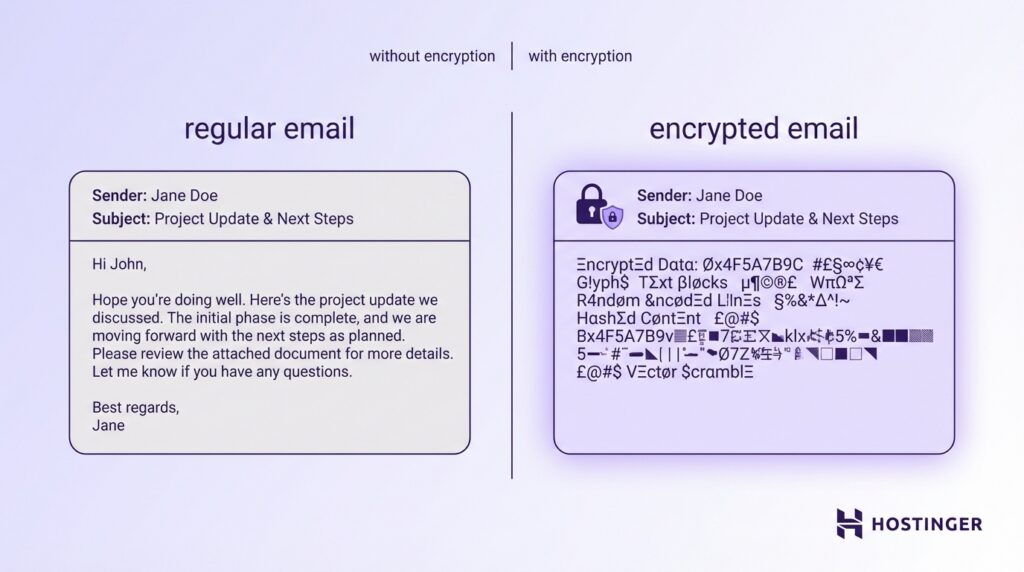
The sender’s system does this by using the recipient’s public key. That public key tells the encryption software how to lock the message in a way that only the recipient’s private key can unlock.
This is the key point: the sender can encrypt the message for the recipient, but the sender does not need the recipient’s private key and never gets access to it.
Imagine you are sending payroll details to your finance manager. Before the email leaves your inbox, the encryption tool uses the finance manager’s public key to protect the message.
The email then travels through mail servers as unreadable ciphertext. When it reaches the finance manager, their private key is used to turn it back into readable text.
This encryption step usually covers the message body, and in many systems it also covers attachments. That matters because attachments often contain the most sensitive data, such as contracts, medical records, invoices, or customer files.
Some platforms also encrypt parts of the metadata, but not all metadata is always protected. Metadata includes things like the sender, recipient, subject line, time sent, and routing information.
In many standard email systems, the message content and attachments can be encrypted, while some metadata still remains visible because mail servers need it to deliver the email.
Behind the scenes, many systems use a mixed approach called hybrid encryption. The email client generates a one-time session key to quickly encrypt the message content, then encrypts that session key with the recipient’s public key.
This makes the process faster and more practical for large messages and attachments while still keeping the exchange secure.
3. Transmit the encrypted message
After the email is encrypted, it is sent through the normal email delivery path. It still moves from the sender’s system to one or more email servers, then on to the recipient’s mail server, and finally to the recipient’s email client.
The difference is that the message is now traveling as protected data rather than readable text.
Emails pass through several systems along the way. In a plain-text setup, anyone who gains access to one of those points can read the message. In an encrypted setup, those same systems can still route the email, but they cannot read the protected contents.
You can think of it like shipping a sealed safe through a chain of warehouses. The warehouses still handle the package and move it to the right place, but they cannot open it and inspect what is inside.
In many email systems, the connections between mail servers are also protected with TLS (Transport Layer Security). TLS encrypts the connection itself. That means the link between servers is protected while the message is being transferred.
This helps stop eavesdropping during transit, especially on untrusted networks.
That said, TLS and message encryption solve different problems.
- TLS protects the connection between systems while the email is moving.
- Message encryption protects the content of the email itself.
- End-to-end encryption keeps the message unreadable even if a server or transfer point is exposed.
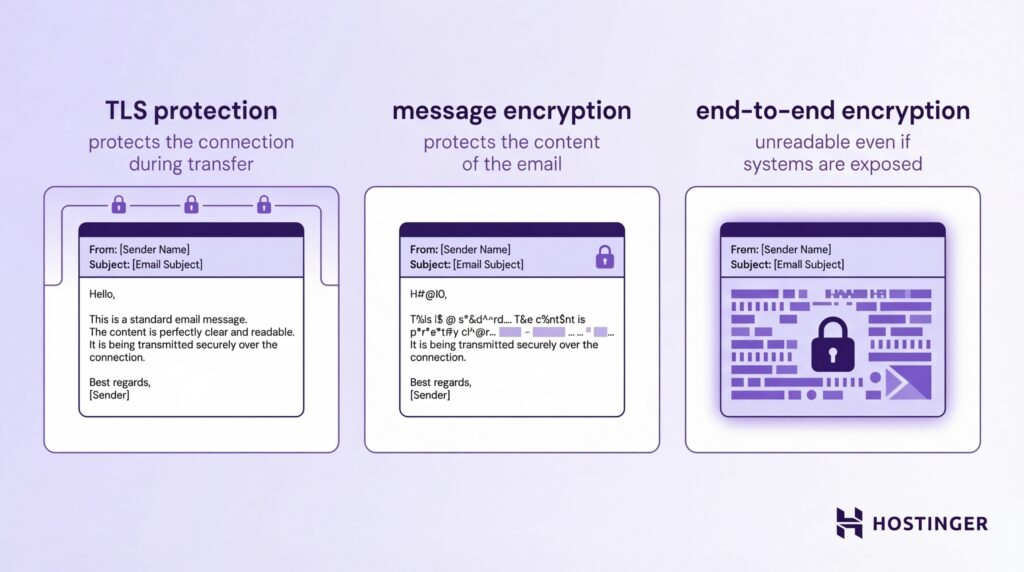
If an email relies only on TLS, the message may be protected while it is traveling between servers, but it can still be readable on a server at one end of that connection.
If the email itself is encrypted, the content stays protected beyond the connection layer. Even if someone intercepts the stored message or captures it during delivery, they still cannot read it without the right decryption key.
Imagine you send a file with employee salary data. TLS protects that file while it moves between your mail server and the recipient’s server. But if an attacker gets access to a mailbox, backup system, or copied message on the way, TLS alone does not help anymore.
Message encryption still does, because the file remains scrambled and unreadable.
This is why interception does not automatically lead to exposure. Attackers might capture the message, copy it, or store it, but what they get is ciphertext, not useful information. Without the private key or another approved way to decrypt the message, the contents stay locked.
4. Decrypt the email message
When the encrypted email reaches the recipient, the recipient uses the private key to unlock it. This is the step that turns the protected data back into a readable message.
Imagine someone sends you an encrypted email with a signed contract attached. During transit, the email looks like unreadable code to anyone else. When it arrives in your inbox, your email system uses your private key to decrypt it, and only then do you see the normal message and file.
In most modern setups, this decryption happens automatically after you authenticate yourself. That usually means you sign in to your email account, unlock your device, enter a password, or complete multi-factor authentication.
Once the system confirms that you are the authorized user, your email client or connected security tool can access the private key and decrypt the message for you.
That is why encrypted email often feels seamless to the end user. You open the message, and the email client handles the technical work in the background.
You do not need to manually decrypt each email line by line. The software checks your credentials, uses the stored private key or secure key service, and displays the content in a readable form.
This workflow usually looks like this:
- The encrypted message arrives in your inbox
- Your email client verifies your identity through login or another security check
- The system accesses your private key in a secure way
- The message is decrypted locally or through a trusted secure service
- You read the original email content and attachments in normal form
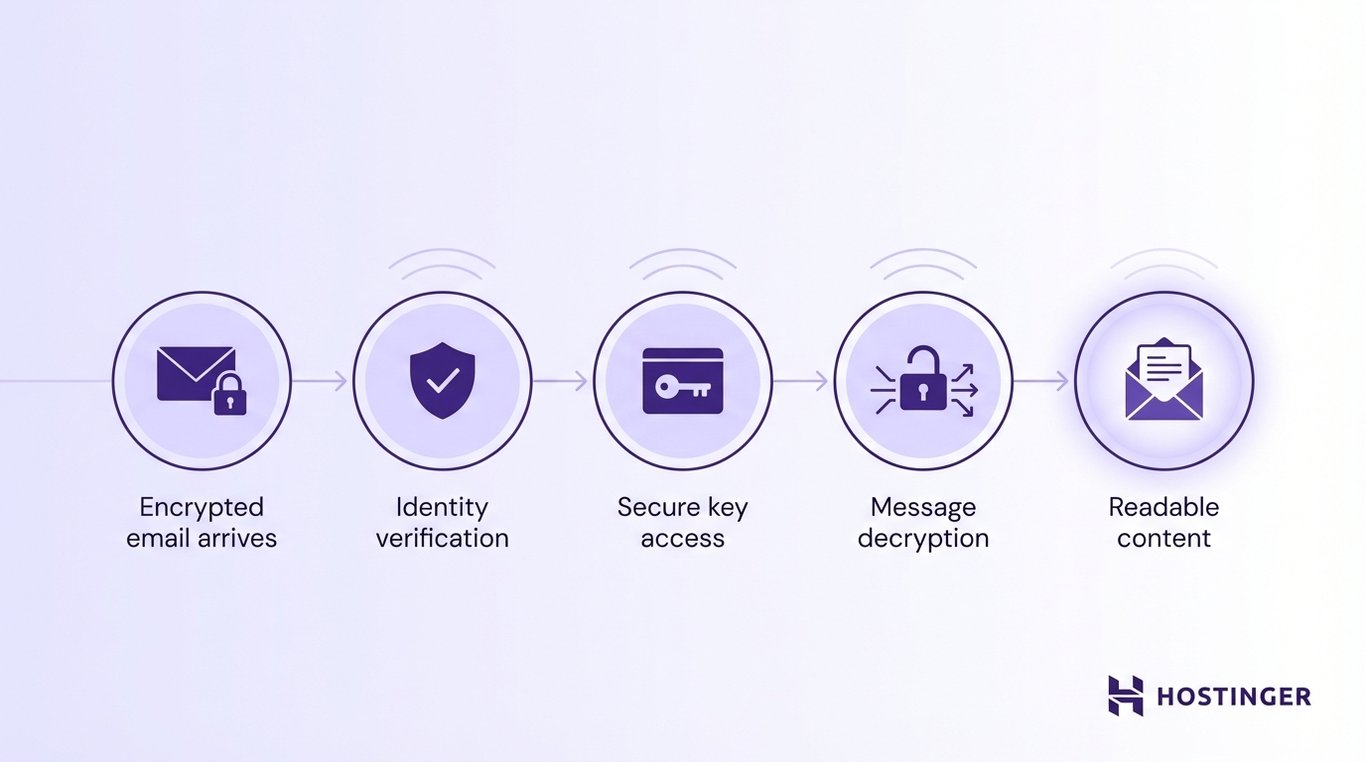
The key point is that the message stays unreadable until that last step. So even if someone copies the message before you open it, they still cannot read it without your private key.
Private key protection matters just as much here as it did during setup. If your private key is stored insecurely, an attacker who steals it could potentially decrypt your messages.
That is why secure email systems protect private keys with passwords, device-level security, encrypted key storage, or dedicated key management tools.
Types of email encryption
The main types of email encryption are Transport Layer Security (TLS), end-to-end encryption (E2EE), S/MIME, and PGP. Each one protects email in a different way, depending on where and how the message is secured.
Transport layer security (TLS) email encryption
TLS email encryption protects the connection between email servers while a message is being delivered.
It creates a secure channel between systems, so the email is harder to intercept while it travels across the network.
A simple way to think about TLS is to picture a protected tunnel between one mail server and another. Your email enters that tunnel on the sending side, moves through it in encrypted form, and exits on the receiving side. Anyone trying to watch the traffic in the middle sees protected data instead of readable text.
Email usually passes through several systems on the way. Without TLS, a message sent across a network could be exposed to anyone monitoring that traffic, especially on insecure or poorly protected connections.
TLS protects:
- The connection between sending and receiving mail servers
- The message, while it is moving across networks
- The data against passive interception during transfer
That is why TLS is described as protection in transit. It secures the path the email takes from one server to another.
TLS is widely used by email providers because it improves security without requiring major changes for users. In most cases, it works automatically in the background.
The sender writes the email as usual, the mail servers negotiate a secure connection, and the message is transmitted through that encrypted channel. There is no extra step for users, which makes TLS easy to deploy at scale.
Still, TLS has a clear limit: it protects the connection, not the message, at every stage. Once the email reaches a mail server, it may be stored there in readable form unless another layer of encryption is also used. So TLS is important, but it is not the same as end-to-end encryption.
S/MIME email encryption
S/MIME (Secure/Multipurpose Internet Mail Extensions) encrypts and signs email messages using digital certificates.
The core of S/MIME is the digital certificate. A digital certificate is an electronic credential that links a person or organization to a cryptographic key. In an email system, that certificate is used to confirm identity and support secure message exchange.
Here is the basic idea:
- The sender uses the recipient’s certificate to encrypt the email
- The recipient uses their private key to decrypt it
- The sender also signs the message with their own private key
- The recipient uses the sender’s certificate to verify the signature
This gives S/MIME two jobs at once. It protects confidentiality through encryption, and it supports authentication and integrity through digital signing.
Certificate authorities (CAs) are trusted organizations that issue digital certificates. Their role is to verify that the person or organization requesting a certificate is who they claim to be. Once that check is complete, the CA issues a certificate that others can trust.
A certificate authority is like a trusted passport office for digital identity. It checks the applicant, issues the credential, and gives other systems a reason to trust that credential.
Without that trust layer, anyone could pretend to be someone else by creating their own certificate and claiming a false identity.
This trust model is what makes S/MIME useful in business environments. When you receive a signed S/MIME email, your email client can check the sender’s certificate, confirm that it was issued by a trusted authority, and verify that the message has not been altered.
That is how S/MIME supports message integrity and authentication:
- Authentication helps confirm who sent the email.
- Integrity shows whether the message was changed after it was signed.
- Confidentiality keeps the message private when encryption is used.
For users, this happens in the background. The email client checks the signature, validates the certificate, and shows whether the message is trusted. If something is wrong, such as an invalid
Pretty Good Privacy email encryption
Pretty Good Privacy (PGP) uses public-key cryptography to provide end-to-end email encryption.
PGP works with two keys: a public key and a private key. The public key is shared with other people so they can encrypt messages for you. The private key stays secret and is used to decrypt those messages when they arrive.
If someone wants to send you an encrypted email with PGP, they use your public key to lock the message. Once the email is sent, only your private key can unlock it.
That is what makes PGP an end-to-end system. The message is protected from the moment it is encrypted until the intended recipient opens it.
PGP also allows users to exchange public keys directly. That exchange is an important part of the system because you need the recipient’s public key to encrypt a message for them.
In practice, people share public keys through key servers, email contacts, company directories, or direct exchange. Since the public key is meant to be shared, giving it to others does not weaken security.
This direct key exchange gives users more control, but it also adds responsibility. You need to make sure the public key you received really belongs to the person you think it does. Otherwise, you could encrypt a message with the wrong key.
That is why many PGP users verify keys through fingerprints, trusted directories, or direct confirmation.
Digital signatures are a key part of PGP as well. The sender can sign the message with their private key, and the recipient can verify that signature with the sender’s public key. This helps prove the message came from the expected sender and was not altered after it was sent.
PGP is widely known for strong privacy protection, especially for users who want direct control over encryption. It is common in technical, security-focused, and privacy-focused environments.
End-to-end email encryption
End-to-end encryption (E2EE) protects an email so only the sender and the intended recipient can read it.
The process starts on the sender’s device. When you write the email and hit send, the email app or encryption tool encrypts the message before it leaves your system.
The message then travels across the internet in encrypted form. It is only decrypted on the recipient’s device after the recipient is authenticated and the correct private key is available.
It flows like this:
- You write the email on your device.
- Your email tool uses the recipient’s public key to encrypt the message.
- The encrypted message is sent through the normal email path.
- The recipient’s device uses the matching private key to decrypt it.
- Only then does the message become readable.
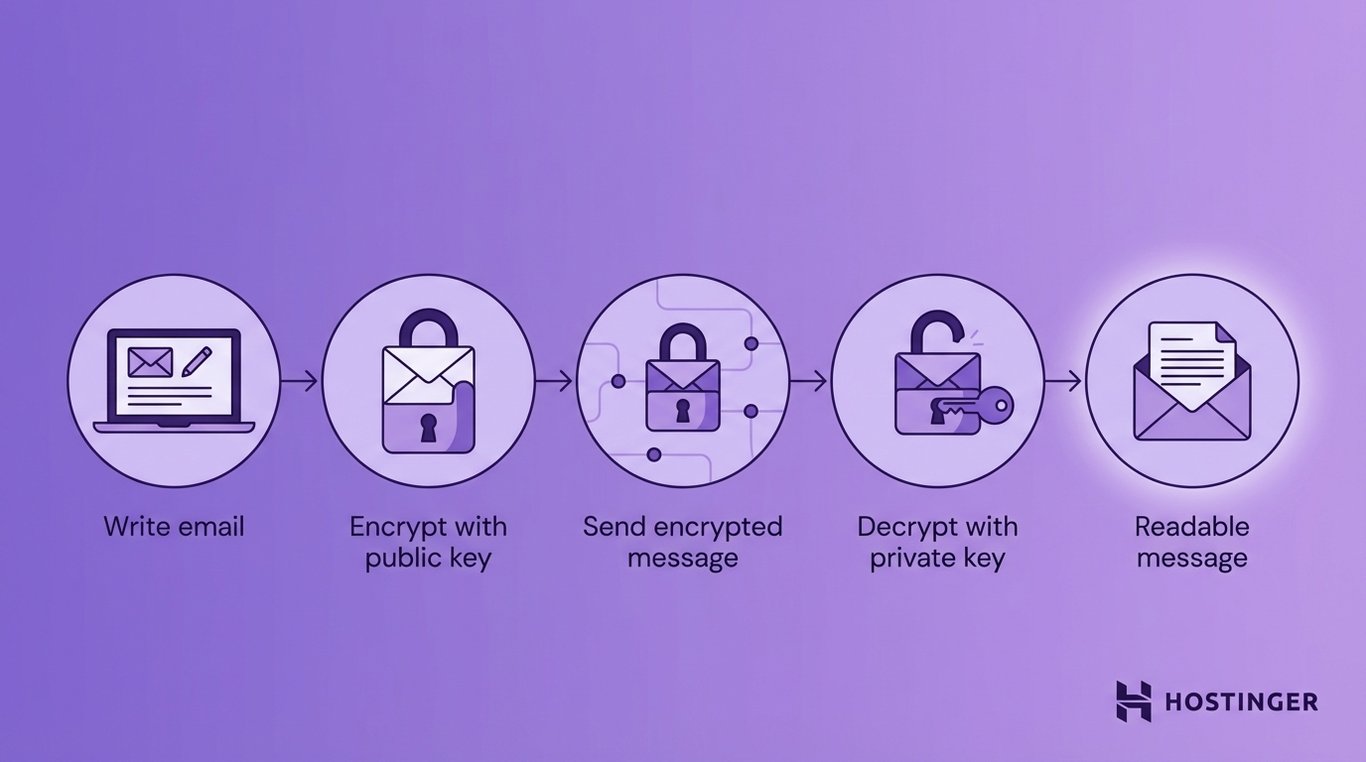
In a proper end-to-end setup, this protection covers both the email body and the attachments.
Metadata is a separate issue. The message content and attachments can be encrypted end-to-end, while some delivery details, such as sender, recipient, and time sent, may still remain visible because the email system needs them to route the message.
Benefits of email encryption
Email encryption protects sensitive information by making your messages unreadable to anyone except the intended recipient.
This translates into the following benefits:
- Keeping sensitive data private – Protects customer records, contracts, financial details, and login information from unauthorized access.
- Reducing the impact of breaches – Even if an attacker gets the email, they cannot read or use the contents.
- Building trust with customers and partners – People are more willing to share confidential information when they know it is protected.
- Supporting everyday business communication – Enables safe sharing of contracts, invoices, HR data, and internal plans over email.
- Helping meet compliance requirements – Protects regulated data under laws like GDPR, HIPAA, and financial data rules.
- Reducing compliance risk in daily workflows – Makes routine actions like sending tax files or employee records safer.
- Strengthening your overall security setup – Adds a layer of protection alongside MFA, access controls, and phishing defenses.
- Protecting data even if other controls fail – Encrypted messages remain unreadable even when accounts or systems are compromised
Real-world use cases of email encryption
Organizations use email encryption when the message contains information that would cause harm if the wrong person read it. That includes personal data, financial records, legal documents, internal business plans, and private conversations between staff and clients.
In healthcare, email encryption is used to protect patient information. A clinic might send lab results, treatment updates, referral notes, or billing details to another provider or to a patient. Without encryption, that message could expose medical history, insurance data, or personal identifiers.
In finance, encryption is often used for account documents, tax files, payment instructions, audit materials, and internal reporting. For example, an accounting firm may email a client’s tax summary, or a bank may send secure account documents.
These messages often contain account numbers, income details, transaction histories, or identity data. If that information is exposed, the damage can be immediate. Encryption reduces that risk by making the email unreadable to anyone without permission.
Government organizations use email encryption to protect citizen data, internal communications, policy documents, and case-related information. A local authority might send records about benefits, licensing, education, or public services.
A national agency may need to protect internal discussions, investigative material, or personal records. In both cases, email moves across large systems with many users involved. Encryption helps limit exposure and keeps sensitive data from being casually read or copied.
Legal services rely on email encryption because legal work is built around confidentiality. Law firms and in-house legal teams send contracts, case strategy notes, evidence files, settlement discussions, and client correspondence.
Much of that information is highly sensitive, time-critical, and legally protected. If an opposing party, attacker, or unauthorized employee reads it, contracts, strategy, or evidence can be exposed. Encryption helps preserve attorney-client confidentiality and keeps legal communication more secure.
Beyond regulated industries, businesses use email encryption every day to protect customer data, contracts, and internal communication.
Customer data is one of the clearest examples. A company may need to send onboarding forms, invoices, support records, or account updates. Even when the message seems routine, it can still include names, addresses, phone numbers, account references, or service history.
Encryption helps protect that information and shows customers that the business takes privacy seriously.
Contracts are another major use case. Businesses regularly email draft agreements, signed documents, amendments, and negotiation comments.
These files often contain pricing, liability terms, intellectual property clauses, and other confidential details. Encrypting those emails helps prevent accidental exposure during negotiation or approval.
Internal communication is just as important. Not every sensitive email goes outside the company. Teams also use encryption for board discussions, incident reports, restructuring plans, disciplinary matters, security issues, and product roadmaps.
How can I secure my email?
You can secure your email by combining encryption, strong authentication, and safe user behavior. One layer is not enough. You need to protect both the message and the account.
Follow these steps:
- Step 1: Secure your account – Use a strong, unique password and turn on multi-factor authentication (MFA). Even if your password is stolen, MFA can block access.
- Step 2: Encrypt sensitive emails – Do not send contracts, financial data, identity documents, or internal plans as plain text. Use encryption whenever exposure would cause harm.
- Step 3: Check links and attachments – Do not open files or click links without verifying the sender. Watch for urgent requests, unknown senders, or unexpected file types.
- Step 4: Control access – Limit who can access sensitive inboxes and data. Use role-based permissions and avoid sharing accounts.
- Step 5: Keep systems updated – Update your email apps, browser, and devices regularly. Many attacks rely on known, unpatched vulnerabilities.
- Step 6: Learn to spot threats – Watch for phishing emails, fake login pages, and unusual requests (like sudden payment changes or password resets).
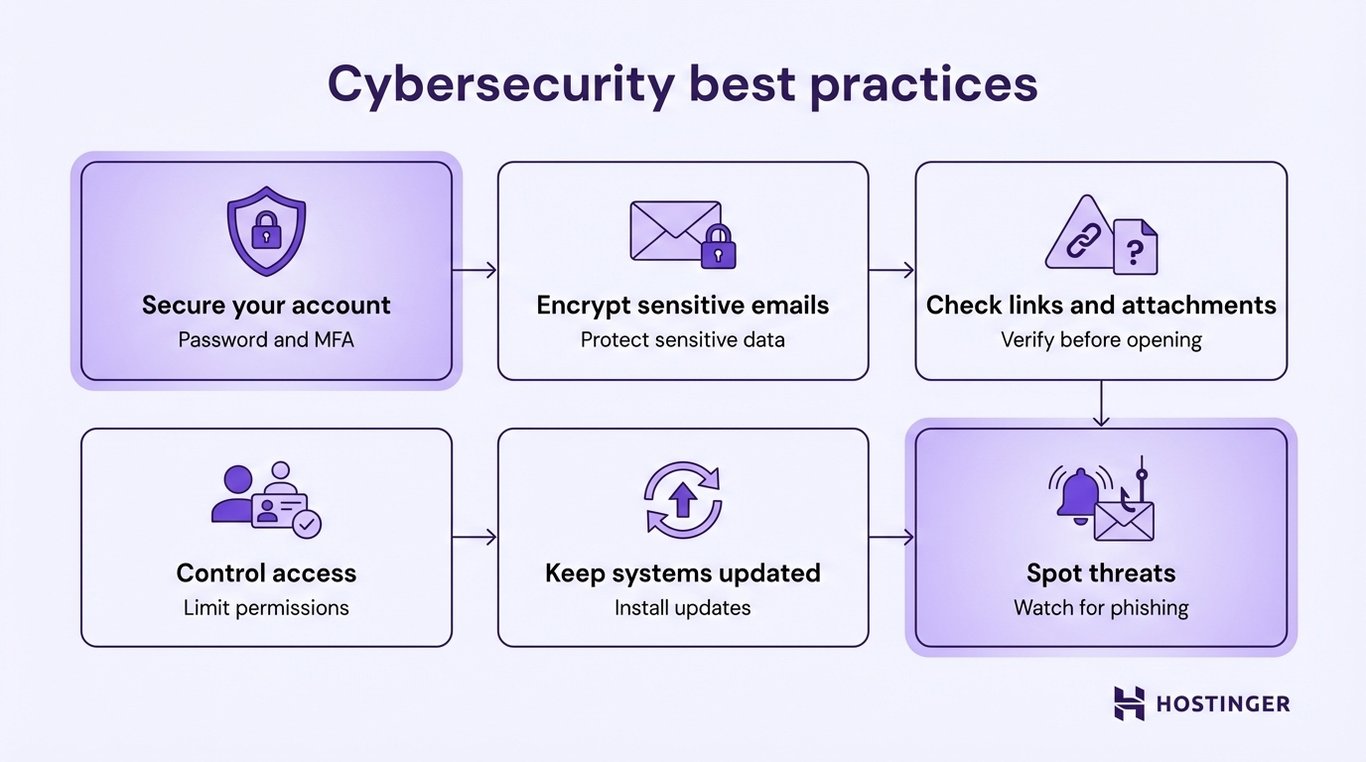
Each step strengthens your email security. Encryption protects the message, authentication protects access, and awareness helps you avoid mistakes.
If you want a simpler setup, use an email service that already includes these protections. For example, business email platforms like Hostinger include built-in encryption, spam and phishing filters, secure access controls, and reliable uptime, so you don’t have to configure everything manually.


Ksenija is a digital marketing enthusiast with extensive expertise in content creation and website optimization. Specializing in WordPress, she enjoys writing about the platform’s nuances, from design to functionality, and sharing her insights with others. When she’s not perfecting her trade, you’ll find her on the local basketball court or at home enjoying a crime story. Follow her on LinkedIn.